
“File formats, standards wars, and the improbable business of deciding what data mean”
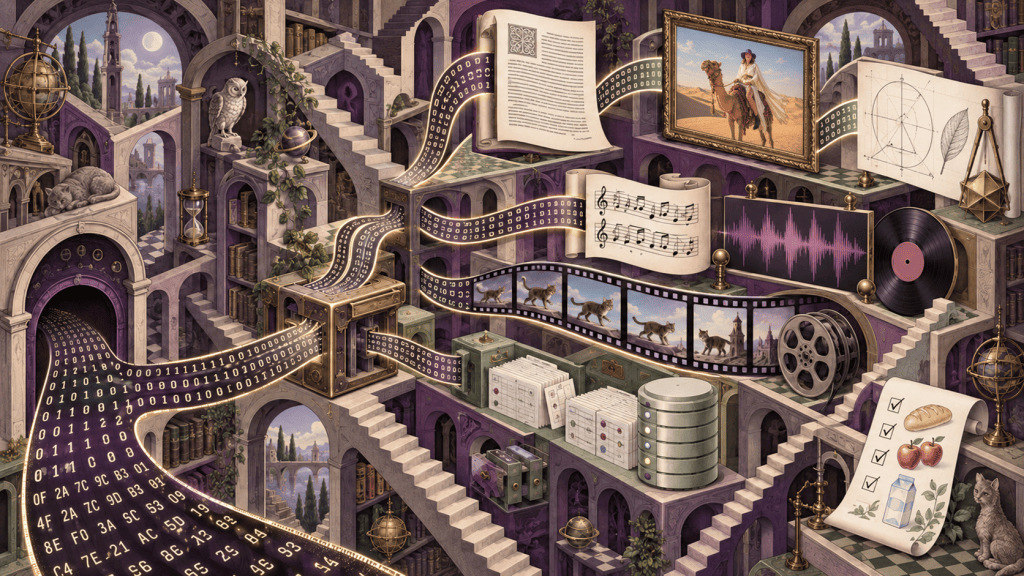
Part of Sophie’s Cabinet of Computing Curiosities. Although file formats have are covered here, audio and video needed their own article.
The Gazetteer found the bytes. Unfortunately, that does not mean anybody knows what they mean. A file format is the grammar that turns a dumb sequence of numbers into a letter, a picture, a program, a database, or, with sufficient committee participation, four mutually incompatible interpretations of the same standard.
Some images in this article
are generated by

EU AI Act Regulation 2024/1689
| Where this Curiosity lives The Storage Encyclopaedia is concerned with media, the Gazetteer with filesystems, and this Grammar with the layer immediately above them: the agreements that tell a reader what the bytes mean. Cables, buses, interfaces, sectors, directories, formats, applications, and human interpretation are separate layers. They frequently wear one another’s hats, which is why the Cabinet requires so many shelves. |
Contents
Scope
Text, documents, images, archives, packages, executables, emulator artefacts, structured data, databases, identification, security, and preservation are all here. Deep audio and video, however, remain reserved for the future: Sophie’s Codex of Codecs, Containers, Copyrights, Confusion, and Compression.
Preface: bytes do not explain themselves
Open a file in a hex editor and it will show you the truth. Unfortunately, it will show you only the truth: numbers, without context, stretching away in rows. The same byte value might be the letter “A”, part of a colour, an instruction to a processor, the length of the next record, the beginning of a compressed stream, or corruption caused by a cat walking over a keyboard in 1987. Bytes are admirably literal and wholly unhelpful witnesses.
A filesystem can locate the byte stream, tell us its length, record dates and permissions, and associate it with a name. It cannot, by itself, tell us whether those bytes represent a WordPerfect pleading, a ZX Spectrum tape, a JPEG photograph, or an SQLite database containing the membership list of an organisation that would prefer we did not open it. That act of interpretation belongs to a file format: a convention governing syntax, structure, and meaning.
The convention may be a crisp public standard, an application’s well-documented native format, a reverse-engineered truce, a sequence of habits established before anyone thought to write them down, or a proprietary blob whose most authoritative specification is the source code of a program that no longer builds. Formats are engineering, but they are also history. They carry the marks of printers, punched tape, magnetic discs, patents, market dominance, government procurement, courtroom habits, network effects, myth conceptions [sic], and the repeated insistence that nobody will ever need more than 32 bits for that field.
That is the central argument of this Curiosity: a file format is a social contract expressed in bytes. Writers promise to lay information down in an agreed form. Readers promise to interpret it in the corresponding way. Standards bodies may notarise the contract. Patents may charge admission. Vendors may extend it, preserve it, or weaponise everybody’s dependence upon it. Archivists arrive later carrying checksums and expressions of professional concern.
We cannot inspect every file format ever created. We would need a larger Cabinet, stronger floorboards, and an extension to the planning permission. Instead, we shall tour the principal classes, stopping at formats whose design, afterlife, politics, or sheer oddness earns them a specimen jar. Audio and video receive only a boundary marker here; their codecs and containers are being reserved for the future Sophie’s Codex of Codecs, Containers, Copyrights, Confusion, and Compression. Even the working title has started buffering.
| FORMAT LESSON • The first rule of format archaeology Preserving the bytes is necessary. Preserving the means to interpret them is what turns storage into memory. |
What is a file format, exactly?
Every file is merely bytes. A file format is the agreement that makes them mean something.
Syntax, semantics, and structure
At its simplest, a format says which byte may occur where. That is syntax. A four-byte field at offset 16 might be an unsigned integer in little-endian order; a line might consist of comma-separated fields; an object might begin with a length, a type, and then that many bytes of payload. If the input violates those rules, a strict parser rejects it. A forgiving parser sighs, invents an interpretation, and accidentally creates tomorrow’s security advisory.
Syntax is not enough. Semantics say what a valid structure means. An integer might be an image width, a timestamp measured from 1 January 1970 00:00 UTC, a colour-table index, a permission mask, or the number of paragraphs written by committee. Two files can be syntactically valid while disagreeing profoundly about meaning because one application interprets a field differently, ignores a constraint, or implements a local extension.
Most useful formats also define structure: records, chunks, pages, objects, streams, tables, relationships, trees, or graphs. A PNG file is a sequence of typed chunks. A PDF is a graph of numbered objects with one or more ways of locating them. An SQLite database is a set of fixed-size pages organised into B-trees, free lists, and journalling structures. A DOCX file is a ZIP package whose parts and relationships are governed by Open Packaging Conventions. “It is all just bytes” is true in exactly the same way that Shakespeare is “all just ink”.
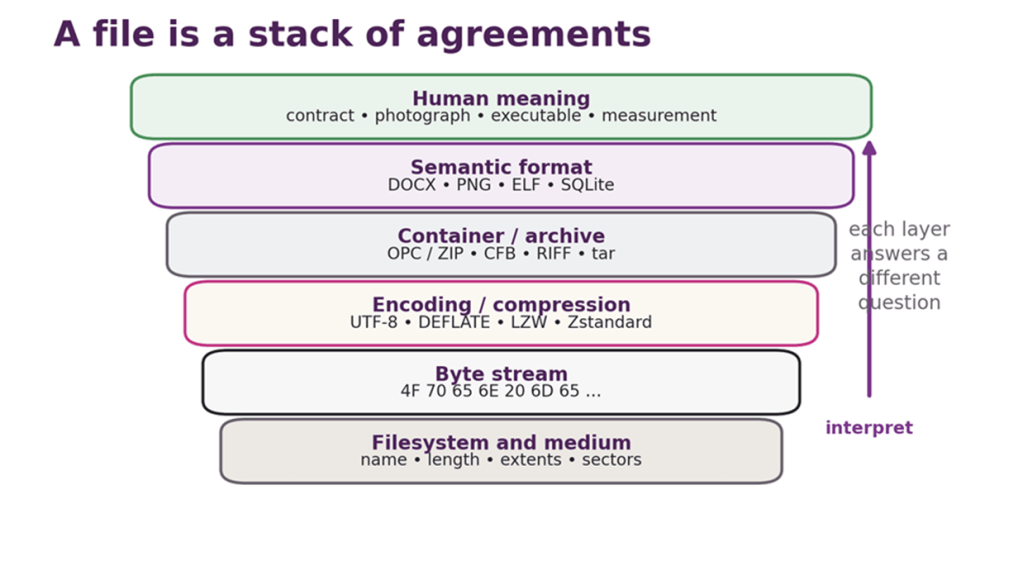
Figure 1: From physical storage to human meaning. Each layer answers a different question, and several may be present inside one apparently simple file.
Encoding ≠ compression ≠ a container
The words are often used as if they were interchangeable. They are not.
- An encoding maps symbols or values to bytes: ASCII maps a small character repertoire to seven-bit numbers; UTF-8 maps Unicode code points to sequences of one to four bytes.
- A serialisation maps structured values to a stream: JSON represents objects, arrays, strings, numbers, booleans, and null in text; Protocol Buffers represent schema-defined fields in a compact binary wire format.
- Compression reduces redundancy: gzip, xz, and Zstandard transform input into a smaller coded stream, from which the original can normally (and ideally) be recovered exactly.
- An archive packages multiple files and metadata: tar joins file contents, names, modes, timestamps, and other properties into one stream. Compression is optional.
- A container packages multiple objects or streams under one outer structure: RIFF, IFF, ZIP, Matroska, PDF, and Compound File Binary all do this in different ways.
- A semantic format defines an application-level object: a document, image, database, executable, font, map, or machine snapshot.
The layers combine. A .tar.gz is a tar archive fed through gzip: two formats in a trench coat. A .docx is ZIP plus Open Packaging Conventions plus XML vocabularies plus any embedded images, fonts, and other passengers. A Debian package is an ar archive containing control and data members which are themselves tar archives, usually compressed. None of this is cheating. Layering lets designers reuse solved problems. However, it also means that a broken reader may be lurking at any layer.
Versioning and extensibility
A format that survives will encounter requirements its designers did not anticipate. Sensible designs provide a version field, tagged records, ignorable chunks, reserved bits, length-delimited fields, or namespaces. Older readers can then skip unfamiliar material without losing their bearings.
This is harder than it sounds. A reserved field will be populated by a writer, assumed zero by an old reader, repurposed by another vendor, and finally described by an archivist as “implementation-dependent”. Optional features become mandatory in practice. Unknown chunks are discarded by software that should preserve them. Version numbers lie because the application wrote its own version rather than the file grammar’s. A flag called “must understand” is interpreted as a motivational suggestion.
Extensibility also creates the possibility of private dialects. TIFF became extraordinarily adaptable because its Image File Directories contain tagged fields, but the resulting ecosystem includes baseline readers, specialist profiles, vendor tags, and combinations nobody’s general-purpose software has ever met. XML namespaces avoid name collisions but do not magically supply the semantics or code required to understand an extension. “Extensible” means the file can hold new ideas; it does not mean every old program becomes telepathic.
| FORMAT LESSON • Specification is not implementation A public specification, a conforming writer, a forgiving reader, and reliable interchange are four separate achievements. Marketing departments occasionally compress them into one. |
Identification: extensions are gossip, signatures are evidence
Calling something annual-report.pdf is a claim made by its filename. It may be a useful claim. It is not proof.
The dot and the story after it
Filename extensions are cheap, visible metadata. They help shells choose applications, users recognise likely contents, web servers assign media types, and software decide which parser to try first. They are also trivially changed, frequently hidden by user interfaces, overloaded between unrelated products, and occasionally part of the attack.
Consider .dat, the extension equivalent of shrugging. .img may be a raw disc image, a filesystem image, a raster image used by one application, or some Impossible Möbius Geometry created one lunchtime. .doc meant Microsoft Word to most users, but “document” was never Microsoft’s exclusive concept. Even apparently specific suffixes can identify a family rather than a version, profile, or exact grammar.
Extensions remain useful because most files are not adversarial and most people prefer names to forensic analysis. The mistake is treating the suffix as authoritative when consequences depend upon the content.
Magic numbers and signatures
Many formats identify themselves with fixed bytes at the beginning or at a known offset. Unix-like systems institutionalised this habit in the file utility and its database of tests; POSIX describes classification using filesystem tests, magic-number tests, and language tests.[9] Signatures can be strikingly human:
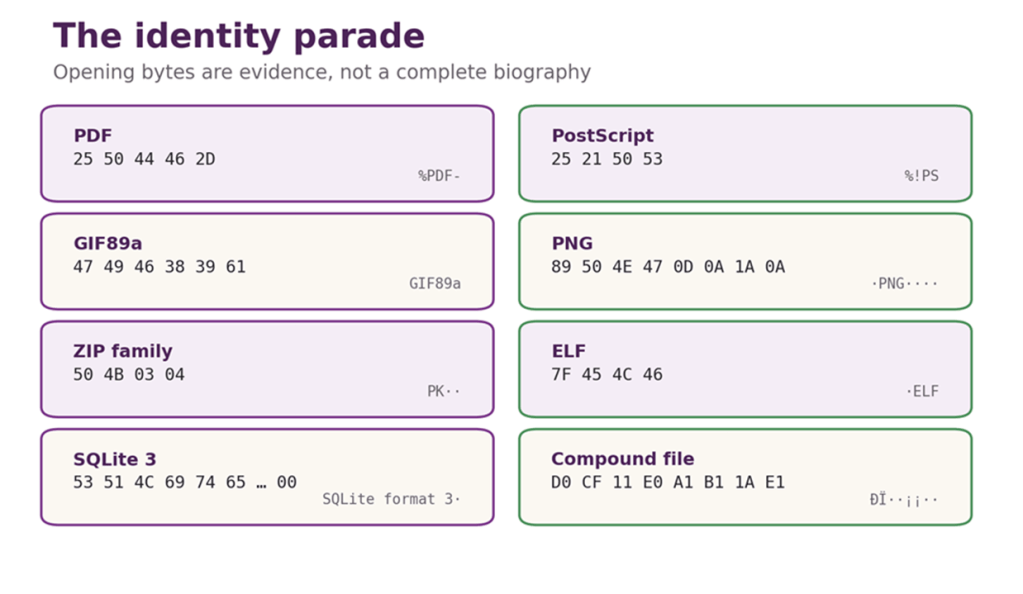
Figure 2: Magic-number specimens. These openings are strong clues to the outer format, not proof that the rest of the file is valid, safe, or singular.
PDF begins %PDF-. PostScript commonly begins %!PS. GIF literally says GIF87a or GIF89a. PNG’s eight-byte signature begins with a non-ASCII byte, contains PNG, and deliberately includes line-ending characters that help expose transfer corruption. ELF executables begin 7F 45 4C 46: DEL followed by ELF. SQLite databases begin SQLite format 3 and a zero byte. ZIP begins with PK, the initials of PKZIP’s author, Phil Katz.
The old Microsoft Compound File Binary Format has the magnificent opening bytes D0 CF 11 E0 A1 B1 1A E1. Read as hexadecimal leetspeak, the first four resemble “DOCFILE”. The remaining bytes make it look as though a wizard has signed the document.[19]
A signature is stronger evidence than an extension, but it is not a full validation. Many related formats share one signature. Some signatures can occur by chance. Self-extracting archives may place an executable before an embedded archive. A hostile file may contain multiple signatures for multiple audiences. Identification tells us which questions to ask; it does not prove the file is benign, complete, or even parseable.
MIME, type metadata, and platform conventions
Internet media types, commonly called MIME types, provide labels such as text/plain, image/png, and application/pdf. Their registration procedures and naming trees are standardised, and IANA maintains the registry.[10] A media type travels separately from the body, for example in an HTTP Content-Type header or an email part. It can therefore be wrong for honest reasons, lazy configuration, or malice aforethought.
Classic Mac OS used four-byte type and creator codes stored as filesystem metadata: one code described the kind of file, and another identified the application that created it. This allowed a document to be opened by its owning application without relying on a visible suffix, but copying it through a filesystem that did not preserve the metadata could produce a file with an identity crisis. Apple’s later Uniform Type Identifiers describe types and conformance relationships more systematically.[11]
Modern systems combine evidence: suffixes, declared media types, signatures, application registrations, and sometimes deeper inspection. The correct choice depends on the question. A file picker can use an extension. A security gateway should be more suspicious. A digital archive needs precise format and version identification, often with a registry such as PRONOM.
| PRONOM: a natural history museum for files PRONOM is The National Archives’ public registry of file formats: more than 2,000 individual formats at the time of writing, ranging from the merely elderly to the magnificently obscure. It records names, versions, extensions, relationships, background information, and (where known) the internal byte patterns or container features by which a format can be recognised from its contents rather than its possibly mendacious filename. Each format version has a persistent PRONOM Unique Identifier, or PUID, such as fmt/2000, so preservation systems can say exactly which digital species they have found. DROID, also developed by The National Archives, uses PRONOM’s signature data to scan entire collections and report what is actually there.This is not merely a list of suffixes. It is a natural history museum for files, complete with taxonomy, fossils, disputed specimens, and occasional creatures still moving when everybody assumed they were extinct.[79] |
Polyglots: one file, two stories
A polyglot is a byte sequence valid, or at least acceptable, under more than one format grammar. This is possible because parsers look in different places, tolerate different junk, or disagree about where meaningful content ends. A PDF reader may search backwards for structures near the end. A ZIP reader may locate its central directory from the tail. An image parser may stop after an end marker and ignore trailing bytes. Put the right components together and the same file can appear to be a harmless image to one system and active content to another.
Parser disagreement is not merely a party trick. Security controls may inspect with one library while an application later interprets with another. Research into file-format polyglots demonstrates how these differentials can support filter bypasses, content smuggling, and evasive malware.[12] The extension said one thing, the media type another, the scanner saw a third, and the victim’s parser had the casting vote. The consequences can be… unfortunate.
| PARSER LESSON • Identification is a chain of claims Name, extension, declared type, magic bytes, structural validation, and actual parser behaviour are distinct evidence. Decide which one your policy trusts, and whether the program that finally opens the file trusts the same one. |
Plain text: the format everyone insists is not a format
“It’s just a text file” is one of computing’s more reliable introductions to an afternoon’s unexpected work.
Bytes are not characters
ASCII standardised a seven-bit code for a modest repertoire of Latin letters, digits, punctuation, and controls. An early network specification recommended carrying those seven bits in an eight-bit byte with the high bit zero.[1] EBCDIC, developed in the IBM mainframe world, arranged characters differently and survives in systems whose longevity has embarrassed several generations of migration plans.[2] National standards and vendor code pages used the eighth bit for additional characters, but not in one universal way.
Consequently, byte 0x5B is [ in ASCII-compatible encodings but $ in some EBCDIC code pages. A byte sequence without its encoding is an unanswered question. Guessing often works for English ASCII because later encodings preserved its first 128 values. Guessing becomes progressively more comic when accents, non-Latin scripts, box-drawing characters, and smart punctuation arrive. What should be increased order can instead descend into the equivalent of a clown-car full of clowns turning up, hurling custard pies and the car falling apart.
CR, LF, and the ghost of the teletype
Two ASCII controls survived far beyond their machinery. Carriage Return moved a printing carriage to the left margin. Line Feed advanced the paper. Unix chose LF as its line separator. CP/M, DOS, and Windows used CR followed by LF. Classic Mac OS used CR. Modern editors can usually recognise all three, but source-control systems, command-line tools, network protocols, and ill-tempered scripts still expose the distinction.[6]
The labels are a miniature museum. We no longer need a carriage to return, yet its motion lives inside billions of files. A line ending is not visually part of the sentence, but it is structurally part of the file. Change it and the checksum changes; mishandle it and every line may appear edited; transfer it through an over-helpful text mode and the bytes can change without anyone having intended to alter the content.
Unicode: one repertoire, several encodings
Unicode assigns abstract characters code points, written U+ followed by hexadecimal digits. UTF-8, UTF-16, and UTF-32 are encoding forms that represent those code points as code units of different widths.[3] UTF-8 uses one byte for ASCII characters and up to four for others. UTF-16 uses one or two 16-bit code units. UTF-32 normally uses one 32-bit code unit per code point, which is simple and magnificently spacious. And quite possibly tending towards the specious.
A code point is not necessarily a glyph, and a user-perceived character is not necessarily one code point. A letter plus a combining accent may render as one mark. Emoji may be sequences joined into one displayed symbol. Fonts and shaping engines decide how a sequence appears. Unicode solved the fatal problem of incompatible character repertoires by defining a common one; it did not promise that “character” would remain an uncomplicated noun.
BOOM! The BOM: byte order mark, signature, or invisible nuisance
Multi-byte numbers can store their most significant byte first (big-endian) or last (little-endian). The byte order mark uses U+FEFF at the start of a stream so a reader of UTF-16 or UTF-32 can determine which order was used. UTF-8 has no byte-order ambiguity. U+FEFF has the numerical value FEFF, but its UTF-8 encoding occupies three bytes: EF BB BF. Those bytes are sometimes placed at the start of a file as a UTF-8 signature.[5]
UNICODE CODE-POINT NUMBERSU+FEFF is a Unicode code-point number, not its stored byte sequence.Its value is hexadecimal FEFF, which would indeed occupy two bytes in UTF-16 big-endian. UTF-8 uses a variable-length encoding, however, and code points from U+0800 to U+FFFF require three bytes.UTF-8’s three-byte pattern (excluding surrogate code points U+D800–U+DFFF, which cannot be encoded in valid UTF-8) is: 1110xxxx 10xxxxxx 10xxxxxxSplitting the bits of FEFF into groups of 4, 6, and 6 gives:U+FEFF: 1111 111011 111111 UTF-8: 11101111 10111011 10111111 Hex: EF BB BFThe same code point therefore has different byte representations: UTF-8: EF BB BFUTF-16BE: FE FFUTF-16LE: FF FEUTF-32BE: 00 00 FE FFUTF-32LE: FF FE 00 00A short written exam will follow…. |
That optional UTF-8 BOM has spent years surprising software that expected the first character to be #, {, <, or a column name. Some tools remove it, some preserve it, some display a zero-width no-break space, and some include its bytes in the first field. The Unicode guidance permits its use as a signature but does not recommend it where a higher-level protocol already identifies UTF-8.[5] Invisible metadata is still metadata; it merely has better hiding skills.
Identical-looking text with different bytes
Many characters can be represented in more than one canonically equivalent way. “é” may be the single code point U+00E9, or e followed by combining acute accent U+0301. Unicode Normalisation Form C tends towards composed forms; Form D tends towards decomposed ones. Both can render identically.[4]
This matters when software compares filenames, usernames, search terms, digital signatures, or hashes byte-for-byte. Two strings can look the same to a human while differing to a machine. Conversely, visually confusable characters from different scripts may look alike without being canonically equivalent at all. A format that stores Unicode text must still decide whether to normalise, which form to prefer, and whether comparisons operate on bytes, code points, or displayed graphemes. The uncertainties and edge-cases provide a veritable cornucopia of different, and sometimes rather unexpected, answers to the question “what could possibly go wrong?”
| FORMAT LESSON • “Plain” describes presentation, not simplicity A plain-text file still depends upon a character encoding, a line-ending convention, a normalisation policy, and often a language-specific grammar. Remove the typography and the dependencies do not politely leave with it. |
CSV: simple enough to explain, hard enough to agree on
Comma-Separated Values appears to be an excellent format. There are records. There are fields. There are commas. What could possibly happen?
Almost everything.
The folk format acquires paperwork
CSV was widely used long before RFC 4180 documented a common form in 2005, and the RFC frankly noted that no formal specification existed.[7] Its familiar rules are concise: one record per line; fields separated by commas; fields containing commas, quotes, or line breaks enclosed in double quotes; and a literal double quote represented by two double quotes inside a quoted field.
Thus this is one record with three fields, not four:
| 018,”Enigma Cillies, operator habits, and intelligence”,”She said “”Never reuse a key””.” |
The fact that a quoted field may contain a line break is where homemade parsers tend to fall into the ornamental pond. Reading one physical line at a time is no longer enough. Splitting on every comma is not enough. Counting quotes is not enough if escaped quotes are mishandled. CSV has a handful of rules, many dialects, and approximately one parser per person who has ever encountered it.
Commas are cultural
In places where a comma is the decimal separator (most of Europe, for example), using it as the field separator is inconvenient. Spreadsheet software may use semicolons instead. Tabs are popular where data itself contains commas. Some files have headers; some do not. Some quote every field; some only when needed. Some use CRLF as RFC 4180 documents; some use LF. Empty field, missing field, empty string, and null may be four concepts or one blank patch of despair.
The result is a family of CSV dialects. A robust importer asks about delimiter, quoting, escape rules, encoding, header presence, and data types. Automatic detection is useful, but it is still inference. The delightful thing about CSV is that everybody can create it. The dangerous thing about CSV is that everybody does.
The spreadsheet that executes a surname
CSV is usually described as passive text. Spreadsheet applications can make it active. If a field begins with characters such as =, +, -, or @, an application may interpret it as a formula when the file is opened. An attacker who can place text in an exported field may arrange for the recipient’s spreadsheet to evaluate a formula, invoke a link, or exfiltrate data when the user interacts with the sheet. OWASP documents this as CSV or formula injection.[8]
Escaping is awkward because the CSV layer and the spreadsheet-expression layer are different grammars. Correct CSV quoting does not neutralise a formula; it merely transports the leading = faithfully. Defences must account for the destination application, and any transformation may change the literal data. A format can be structurally simple and still cross a trust boundary.
| PARSER LESSON • “Export” is not “make inert” If one system writes user-controlled text and another system gives that text formula semantics, the dangerous feature is at the hand-off. Validate for the consumer, not merely for the syntax of the envelope. |
Early word processing: control codes in sensible shoes
Before a document became a graph of XML objects inside a ZIP package, it was often a character stream with instructions threaded through it. Text arrived, then a code said “bold begins”, more text arrived, and another code said “bold ends”. The model was close to the machinery: characters, lines, pages, margins, printer capabilities, and control sequences.
WordStar is a particularly good fossil. Versions and platform ports differed, but surviving format documentation records embedded control characters, dot commands, and the use of high bits to distinguish “soft” spaces and returns inserted by layout from “hard” ones explicitly entered by the writer.[13] That distinction allowed the program to reflow text without forgetting which breaks mattered. It also meant that what looked like ordinary text contained a second, less visible layer of editorial intention.
There is elegance in a stream. A reader can process it from beginning to end. The formatting is adjacent to the text it affects. There is also jeopardy. Lose a closing code and the remainder of the document may remain italic until the reader reaches retirement. Device assumptions leak into the file. Random access is harder. A program trying to answer “what style applies here?” may have to replay everything that came before.
Different word processors made different promises. Some stored commands, some stored measurements, some stored printer-specific effects, and some stored something nearer to the author’s logical intention. “Document” did not imply a universal object model. It meant whatever agreement existed between one writer, one reader, and, quite often, one dot-matrix printer.
WordPerfect: Reveal Codes and a very Utah origin story
Dissecting some fossils.
A municipal beginning
WordPerfect’s story did not begin with lawyers. In 1979, Alan Ashton, a computer-science professor at Brigham Young University, and his student Bruce Bastian produced a word processor for the City of Orem on a Data General minicomputer. They retained commercial rights and built the company that became WordPerfect Corporation.[14] The location matters: Orem and BYU provided people, institutional relationships, and a distinctive corporate setting.
| HISTORICAL CAUTION • The Utah/LDS setting is context, not a monocausal theory Many early WordPerfect figures were connected with Brigham Young University and the Church of Jesus Christ of Latter-day Saints. Contemporary accounts support that biographical and regional context.[14] They do not prove that a particular file-structure decision arose from doctrine, temperament, or a conveniently colourful stereotype. History improves when we distinguish a documented network from a rumoured explanation. |
The stream becomes visible
WordPerfect documents used a stream of text and paired formatting codes. A code could define a margin, font, paragraph property, or table; many codes carried their own data and length information. The family evolved, but WordPerfect’s software-development documentation says that the basic file structure introduced in version 6.x survived through WordPerfect X6, rather confusingly, Corel’s marketing name for version 16. Between them came versions 7–12, followed by X3, X4, and X5.[15][16]
The inspired part was not only the internal model. It was Reveal Codes, which exposed that model to the user. Press the command and a second pane displayed the hidden formatting instructions alongside the text. A mysterious change of font ceased to be poltergeist activity: there was the code, in the stream, waiting to be moved or deleted.
Reveal Codes taught users that formatting had state and boundaries. It made the document inspectable at the level where the problem actually lived. Modern word processors offer style inspectors and XML packages, but comparatively few give ordinary users so direct a view of the grammar. WordPerfect’s interface turned file-format archaeology into a household skill.
The stream model also helped continuity. Self-delimiting codes and grouped data made it possible for readers to navigate, skip, or preserve structures with less dependence on fixed offsets. “Stable” does not mean “unchanged”, nor does it mean every new feature round-tripped through every old version. It means the core architecture gave the family a long, documented lineage rather than requiring a wholly new species for every release.[15][16]
Why lawyers kept it
WordPerfect became unusually tenacious in legal practice. DOS-era keyboard efficiency, sophisticated paragraph and page control, pleading and line-numbering features, macros, and—above all—the ability to diagnose formatting through Reveal Codes all rewarded experienced users. Legal documents are structurally fussy, repeatedly revised, shared through templates, and expensive to get wrong. Once a firm’s knowledge, precedents, macros, and staff fluency live in one ecosystem, a rival format must offer more than the ability to display approximately the same words.[17]
This is not nostalgia defeating progress. It is switching cost made visible. A format can embody years of local procedure. Converting the bytes may be easy; converting the organisation is not.
| FORMAT LESSON • The best debugging tool may be an honest user interface Reveal Codes succeeded because it showed people the representation that controlled the outcome. Hiding complexity can make software approachable. Hiding the cause of a fault merely makes the fault supernatural. |
Word versus WordPerfect: the format as market leverage
The contest between Word and WordPerfect is sometimes flattened into a morality play: one superior product, one villain, and a Windows-shaped trapdoor. Reality is less tidy and more useful.
WordPerfect had a formidable DOS installed base. Microsoft controlled Windows and invested heavily in Word for the graphical environment. Office bundling, pricing, integration, developer tools, training, corporate procurement, and the rapid adoption of Windows all affected the transition. WordPerfect’s own Windows timing, interface decisions, and corporate changes mattered too. No single cause is required when an entire ecosystem is changing underneath the products.
The format amplified every commercial force. The safest document to send is the one the recipient can open faithfully. The more people use a format, the more templates, macros, automation, training, and institutional memory accumulate around it. Each new user increases the value of compatibility for the next. This is a network effect, and it can be stronger than a feature comparison conducted on a clean machine by a person with no colleagues.
Conversion is never perfectly symmetric because formats store different semantics. A WordPerfect document might contain codes or behaviours with no exact Word equivalent. A Word document might depend on layout rules, fields, revision structures, or macros the converter cannot reproduce. A file can “open” while losing numbering, footnotes, tracked changes, comments, hidden text, metadata, or the precise pagination on which a court filing depends. Round-trip it back and the losses may breed.
Format lock-in does not require a smoky room. Defaults, bundling, installed base, interoperability, proprietary extensions, application-specific automation, and fear of conversion loss are measurable mechanisms. A dominant vendor can reinforce them; a cautious customer can rationally perpetuate them. The resulting dependence is no less real for having emerged from ordinary decisions.
| FORMAT LESSON • “Can open” is the lowest rung of interoperability. Above it are faithful appearance, preserved semantics, editable structure, repeatable behaviour, round-trip survival, and long-term readability. Product boxes have historically printed the first and allowed customers to discover the unpleasant reality of the others. |
Office documents become miniature filesystems
A document stopped being merely a stream of words and became a building full of rooms, cupboards, and concealed passages.
RTF: readable, if you squint through the backslashes
Rich Text Format was designed by Microsoft as an interchange syntax for formatted text. It is text-based, group-structured, and festooned with control words such as \b, \fonttbl, and \par.[18] A person can recognise portions of it; nobody should be expected to enjoy the experience. RTF showed that a document could be portable without being plain text, and that “human-readable” is a gradient rather than an absolute thing.
RTF readers are supposed to skip destinations and controls they do not understand, which supports extension. In practice, implementations vary, embedded objects complicate the picture, and active or exploit-bearing content has repeatedly used the format as a convincing moustache. Textual syntax does not confer innocence.
Binary .doc and Compound File Binary
The familiar pre-2007 Word .doc was not one simple stream. Later binary Word formats commonly lived inside Microsoft’s Compound File Binary Format, also called OLE Structured Storage. CFB presents a hierarchy of storages and streams inside one physical file; something like a tiny filesystem, with a directory, sectors, allocation tables, and multiple named contents.[19][20]
One stream might hold the main Word document data, another a table, another summary information, and others embedded OLE objects. The outer file begins with the glorious D0 CF 11 E0 A1 B1 1A E1 signature. The inner Word grammar then supplies its own headers, piece tables, property structures, text encodings, and historical accommodations. Opening a .doc properly is less like reading a letter than entering a building, finding the right office, and asking which filing cabinet contains the file & item you are seeking.
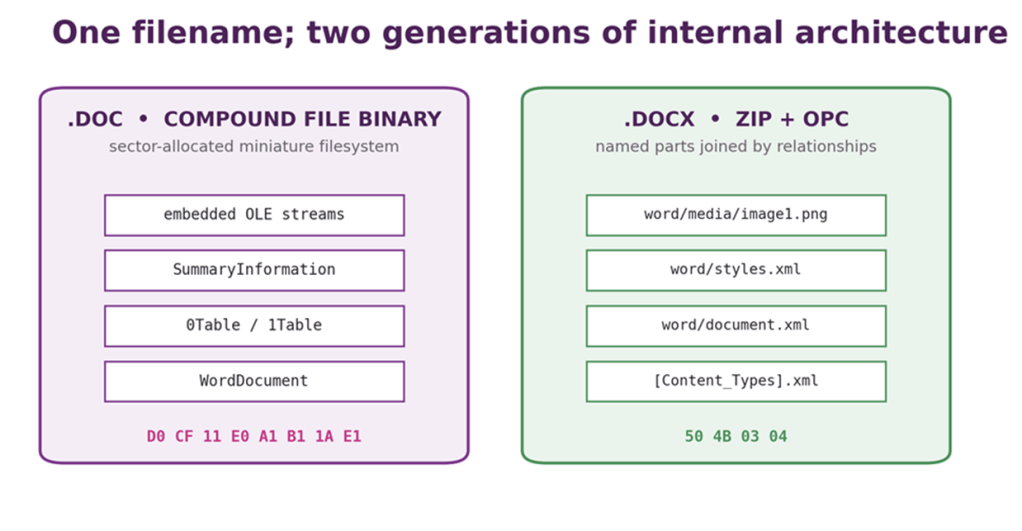
Figure 3: The user sees one Word document. Older .doc commonly used a sector-allocated compound file; .docx uses named ZIP parts connected by OPC relationships.
Fast Save: forensic compost heap
Older versions of Word offered Fast Save. Instead of rewriting and compacting the entire document, Word could record changes incrementally and reconstruct the current document from the resulting pieces later. Microsoft’s binary format documentation includes an fComplex flag indicating an incremental save and a cQuickSaves value recording quick-save generations.[20][21] The application option was described plainly: save only changes, then reconstruct the document when reopened.[22]
The colloquial explanation, wonderfully close to the practical truth, is that Fast Save did not bother doing the garbage collection. Replaced text and obsolete structures could remain in the compound file because rewriting them was precisely the work being avoided. The live document referred to the current pieces; stale bytes became archaeological layers. Depending on version, editing history, and subsequent full saves, investigators could recover deleted or earlier material, while recipients could receive information the author believed had gone.[20][21]
This should not be inflated into the claim that every deleted sentence survived every .doc, or that Fast Save was the only source of hidden data. Word files could also contain revision history, comments, document properties, template paths, author names, embedded objects, cached previews, and other metadata. Government guidance still warns that documents may carry hidden information and recommends controlled conversion, inspection, and sanitisation before release.[22]
What Fast Save illustrates is more general: deletion at the application level may mean “remove the reference”, not “overwrite every byte”. Databases, filesystems, PDF incremental updates, office containers, thumbnails, autosave files, and cloud version histories all repeat the lesson in different layers.
| FORENSIC DELIGHT • What you send may know what it used to say too Fast Save traded tidy storage for speed. Old fragments could remain in the .doc container after the visible text changed. For a forensic examiner, that is a trove. For the unwary author of a redacted briefing, it is the moment the sensitive content escapes, and it may or may not be discovered – now, or later. |
DOCX: a ZIP file applies for office work
The .docx generation replaced the old binary Word container with an Open Packaging Conventions package. At the outer layer it is ZIP. Inside are named parts; XML documents, images, styles, settings, themes, and other resources. All connected by explicit relationships. A content-types file identifies what each part is, and relationship files say how parts refer to one another.[23]
Rename a .docx to .zip and a normal archive tool can display its anatomy: [Content_Types].xml, _rels/.rels, word/document.xml, word/styles.xml, and word/media/…. This is genuinely useful for repair, extraction, validation, and digital forensics. It does not make the semantics small. WordprocessingML contains an extensive vocabulary, and exact layout may still depend on fonts, themes, compatibility settings, embedded content, and application behaviour.
The suffix also signals active content. .docx is not meant to contain VBA macros; .docm may. Templates have corresponding .dotx and .dotm distinctions. This makes policy easier, but a security decision should still inspect content, relationships, embedded objects, and external targets. The extension remains a claim.
| FORMAT LESSON • A “single document” may be a population Compound File Binary and OPC both package many internal objects behind one filename. Users see a letter. Parsers see directories, streams, relationships, embedded media, metadata, and occasionally another complete document waving from inside. |
ODF vs OOXML: standards body joins battle
Document standards are often presented as the cure for vendor dependence. They can improve transparency, interoperability, procurement, and preservation. They are still produced by human institutions under commercial pressure, with deadlines, national delegations, legacy software, and enough acronyms to stun livestock.
Two routes to “open”
The OpenDocument Format grew from the XML format used by OpenOffice.org. ODF 1.0 became an OASIS standard in 2005 and was published as ISO/IEC 26300 in 2006.[25][26] It defined an application-neutral family for text documents, spreadsheets, presentations, drawings, and related content, packaged in ZIP with XML and resources.
Microsoft’s Office Open XML formats were standardised through Ecma as ECMA-376 in 2006 and then submitted to ISO/IEC JTC 1 under the fast-track procedure.[24] OOXML likewise defined document, spreadsheet, and presentation vocabularies packaged using OPC. The scale was enormous because the proposal attempted to standardise both modern structures and compatibility with decades of Microsoft Office behaviour.
The names remain an interoperability test of their own. OpenDocument Format is ODF. Office Open XML is OOXML. OpenOffice.org was an application. Open Packaging Conventions is the packaging layer used by OOXML and other formats. Put all four in a paragraph and even the vowels get confused about their own meanings.
The ballot that did not pass
In September 2007, ISO announced that the initial OOXML ballot had failed the required approval criteria. The process attracted roughly 3,500 comments from national bodies.[27] That number reflects technical objections, editorial corrections, compatibility questions, procedural concern, and the simple physical difficulty of reviewing a specification measured in thousands of pages on a fast-track timetable.
A Ballot Resolution Meeting took place in Geneva in February 2008. ISO described the meeting, the disposition of comments, and the subsequent opportunity for national bodies to reconsider votes.[28] In April, ISO and IEC announced that the revised proposal had received sufficient approval, leading to ISO/IEC 29500.[29]
The chronology matters. “ISO approved it” is true. “The first ballot failed” is also true. So is “the specification changed during resolution”. Compressing the whole affair into victory or fraud prevents us learning how standards actually acquire legitimacy.
National bodies and very visible elbows
The process generated documented controversy. In Sweden, Microsoft acknowledged that an employee had offered marketing support or incentives to partners who joined the national standards meeting and voted for OOXML. The Swedish Standards Institute invalidated that particular vote because one participant had cast two votes, a procedural irregularity separate from the incentive issue.[32] The episode was not a secret theory; it was reported contemporaneously and admitted by the company.
In Norway, members of the national technical committee later resigned amid objections to how the country’s position had been handled.[33] These events do not, by themselves, settle the technical merits of OOXML, nor do they prove that every supportive vote was purchased or improper. They do show that standardisation is institutional behaviour with reputational stakes. Process is not decorative wrapping around the specification; it is how the specification acquires authority.
Strict, Transitional, and the museum inside the standard
ISO/IEC 29500 distinguishes Strict documents from Transitional ones. Transitional includes features intended to migrate legacy Microsoft Office documents and preserve historical behaviour; Strict excludes many of those accommodations. Part 4 of the standard is explicitly devoted to transitional migration features.[30]
The results include flags with names such as useWord97LineBreakRules, whose purpose is to reproduce aspects of old Word layout.[31] There have been similar compatibility settings for Word 95 spacing and other application-era behaviours. These are technically awkward, but they expose the real problem: an “open” format adopted by millions of existing documents cannot simply declare history void. Users expect yesterday’s contract, invoice, and thesis to paginate as before.
OOXML’s initial standardisation was criticised for under-specified legacy behaviours and dependence on Microsoft compatibility. Later editions and implementation notes documented more of them. ODF had its own implementation differences, extensions, and versioning challenges. The fair conclusion is not that both were therefore identical. It is that openness is multi-dimensional: public text, implementability, governance, licence conditions, independent implementations, testability, and preservation all matter.
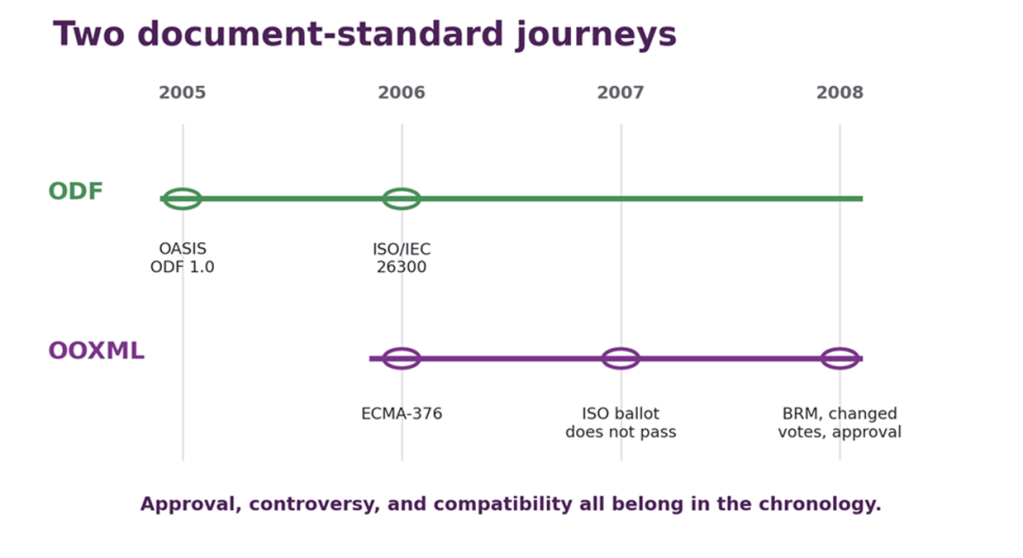
Figure 4: ODF and OOXML reached international standardisation by different routes. OOXML’s first ISO ballot failed; the revised proposal passed after resolution work.
| STANDARDS LESSON • A standard can preserve the scar tissue Strict syntax expresses an ideal model. Transitional syntax acknowledges the installed world. Backward compatibility is not an embarrassing footnote to format design; for successful formats, it is often the largest requirement. |
PostScript: your document is a program
Most document formats describe a page. PostScript can compute one.
Created at Adobe in the 1980s, PostScript is a stack-based programming language for page description. A program defines paths, transforms coordinates, selects colours and fonts, invokes procedures, loops, branches, and draws. Printers containing PostScript interpreters could accept the same high-level description and render it at the device’s resolution. The page became software sent to a printer.[34]
The common opening %!PS-Adobe-3.0 begins with %!, a compact magic-number joke: percent introduces a comment in PostScript, while exclamation marks have long announced executable scripts elsewhere. The line identifies the file to systems and advertises a document-structuring convention to tools, while remaining a valid comment to the interpreter.
PostScript uses reverse Polish notation. Instead of 72 + 36, one writes 72 36 add: place two operands on the stack, then execute the operator. 100 200 moveto pushes two numbers and moves the current point. Procedures are values; dictionaries hold names; graphics state can be saved and restored. It is Turing-complete, which is impressive in a printer and also the sort of phrase that causes security teams to pause mid-coffee and quietly swivel their eyes sideways to take a gander.
The following specimen is not mock code. It is Sophie’s Reducing Cat Limit; an original Level 2 PostScript programme containing no embedded image, font, or borrowed path data, created under a deliberately permissive Creative Commons licence. This was created precisely because, whilst it was possible to find various examples of this type of program, it has proven to be almost impossible to find definitively unencumbered examples. Less effort to actually produce a new example, in the end. Therefore you are free to copy, change, and generally experiment with it – and you are encouraged so to do.
There is also a tiny concealed joke in its history: the first attempt accidentally invoked PostScript’s built-in count operator instead of the intended local variable. The cats consequently escaped the page along a diagonal. They have now been rounded up and successfully herded back into place.
%!PS-Adobe-3.0 EPSF-3.0%%Title: Sophie's Reducing Cat Limit%%Creator: OpenAI, written for Sophie Baskerville%%CreationDate: 2026-09-06%%BoundingBox: 0 0 720 720%%HiResBoundingBox: 0 0 720 720%%LanguageLevel: 2%%Pages: 1%%EndComments% Sophie's Reducing Cat Limit% ----------------------------% An original PostScript program: no path data, composition code, or% imagery has been copied from M. C. Escher or any earlier implementation.% It uses the broad, uncopyrightable ideas of repetition, rotation, and% reducing diminution to build a square-limit-like congregation of cats.%% PUBLICATION LICENCE: CC0 1.0 Universal% To the extent possible under law, the creator has waived all copyright% and related or neighbouring rights to this program and its rendered output.% https://creativecommons.org/publicdomain/zero/1.0/%%BeginProlog/inch { 72 mul } bind def% Four deliberately Sophie-ish colours: purple, cream, teal, and burnt orange./palette [ [ 0.25 0.10 0.38 ] [ 0.92 0.82 0.61 ] [ 0.12 0.42 0.43 ] [ 0.70 0.27 0.16 ]] def/papercolour { 0.965 0.945 0.895 setrgbcolor } bind def/inkcolour { 0.075 0.065 0.085 setrgbcolor } bind def/lightink { 0.985 0.955 0.865 setrgbcolor } bind def/setcatcolour { 4 mod palette exch get aload pop setrgbcolor} bind def% A cat drawn in its own 100 x 100 coordinate system, facing right.% Operands: colour-index detailed? drawcat -/drawcat { 10 dict begin /detailed exch def /ci exch def 1 setlinejoin 1 setlinecap % Tail: a broad, curling stroke tucked behind the body. ci setcatcolour 9 setlinewidth newpath 28 53 moveto 13 57 4 72 10 84 curveto 15 94 29 92 27 82 curveto stroke % Body, haunch, chest, paws, head, muzzle, and ears form one silhouette. newpath 17 28 moveto 19 22 25 19 34 20 curveto 40 21 44 25 46 31 curveto 51 28 58 27 64 29 curveto 67 24 71 20 78 19 curveto 84 18 91 19 94 23 curveto 91 27 85 29 80 29 curveto 81 37 80 44 76 50 curveto 72 55 69 60 69 66 curveto 68 72 70 77 74 80 curveto 73 87 75 93 78 96 curveto 84 91 88 87 91 80 curveto 96 78 99 74 98 68 curveto 98 61 94 56 88 53 curveto 84 51 80 50 77 50 curveto 72 44 68 40 61 38 curveto 51 35 41 35 32 39 curveto 25 42 20 40 17 35 curveto 15 32 15 30 17 28 curveto closepath ci setcatcolour fill % A slim black outline keeps the larger cats legible without turning the % tiny ones into furry circuit diagrams. detailed { inkcolour 1.15 setlinewidth newpath 17 28 moveto 19 22 25 19 34 20 curveto 40 21 44 25 46 31 curveto 51 28 58 27 64 29 curveto 67 24 71 20 78 19 curveto 84 18 91 19 94 23 curveto 91 27 85 29 80 29 curveto 81 37 80 44 76 50 curveto 72 55 69 60 69 66 curveto 68 72 70 77 74 80 curveto 73 87 75 93 78 96 curveto 84 91 88 87 91 80 curveto 96 78 99 74 98 68 curveto 98 61 94 56 88 53 curveto 84 51 80 50 77 50 curveto 72 44 68 40 61 38 curveto 51 35 41 35 32 39 curveto 25 42 20 40 17 35 curveto 15 32 15 30 17 28 curveto closepath stroke % Eye, nose, smile, ear fold, toes, and whiskers. ci 1 eq { inkcolour } { lightink } ifelse newpath 87 69 2.0 0 360 arc fill newpath 98 62 moveto 94 60 lineto 98 58 lineto closepath fill 0.9 setlinewidth newpath 92 58 moveto 89 55 86 56 84 58 curveto 82 86 moveto 84 82 lineto 78 22 moveto 78 28 lineto 84 21 moveto 84 27 lineto 32 22 moveto 34 28 lineto 93 62 moveto 104 66 lineto 92 60 moveto 105 60 lineto 93 58 moveto 104 54 lineto stroke } if end} bind def% Place one cat in a square cell. Rotation occurs about the cell centre.% Operands: x y size angle colour-index placecat -/placecat { 8 dict begin /ci exch def /angle exch def /size exch def /yy exch def /xx exch def gsave xx size 2 div add yy size 2 div add translate angle rotate size 100 div dup scale -50 -50 translate ci size 24 ge drawcat grestore end} bind def% Draw one complete square ring around an existing square.% Cats on each edge flow clockwise. The corners belong to the horizontal% bands, avoiding duplicate cats while preserving the pinwheel rhythm.% Operands: x y inner-width cat-size level drawring new-x new-y new-width/drawring { 14 dict begin /level exch def /size exch def /inner exch def /yy exch def /xx exch def /nx xx size sub def /ny yy size sub def /nw inner size 2 mul add def /ncat nw size div cvi def % Bottom and top edges, including corners. 0 1 ncat 1 sub { /i exch def nx i size mul add ny size 0 level i add 4 mod placecat nx i size mul add ny nw add size sub size 180 level i add 2 add 4 mod placecat } for % Left and right edges, excluding corners already drawn above. 1 1 ncat 2 sub { /i exch def nx ny i size mul add size -90 level i add 1 add 4 mod placecat nx nw add size sub ny i size mul add size 90 level i add 3 add 4 mod placecat } for nx ny nw end} bind def%%EndProlog%%Page: 1 1% Warm paper rather than clinical white.papercolournewpath 0 0 moveto 720 0 lineto 720 720 lineto 0 720 lineto closepath fill% Confine the congregation to its square frame.gsave newpath 50 50 moveto 670 50 lineto 670 670 lineto 50 670 lineto closepath clip % A barely darker field makes the outermost cats visible. 0.93 0.905 0.845 setrgbcolor newpath 50 50 moveto 670 50 lineto 670 670 lineto 50 670 lineto closepath fill % Four large cats turn around the centre like a feline weather system. 200 200 160 0 0 placecat 360 200 160 90 1 placecat 360 360 160 180 2 placecat 200 360 160 270 3 placecat % Successive bands halve the cat size and approach the square boundary. /ix 200 def /iy 200 def /iw 320 def ix iy iw 80 1 drawring /iw exch def /iy exch def /ix exch def ix iy iw 40 2 drawring /iw exch def /iy exch def /ix exch def ix iy iw 20 3 drawring /iw exch def /iy exch def /ix exch def ix iy iw 10 4 drawring /iw exch def /iy exch def /ix exch defgrestore% Double frame: sober enough for a print, theatrical enough for Sophie.inkcolour2.4 setlinewidthnewpath 49 49 moveto 671 49 lineto 671 671 lineto 49 671 lineto closepath stroke0.7 setlinewidthnewpath 44 44 moveto 676 44 lineto 676 676 lineto 44 676 lineto closepath strokeshowpage%%Trailer%%Pages: 1%%EOF
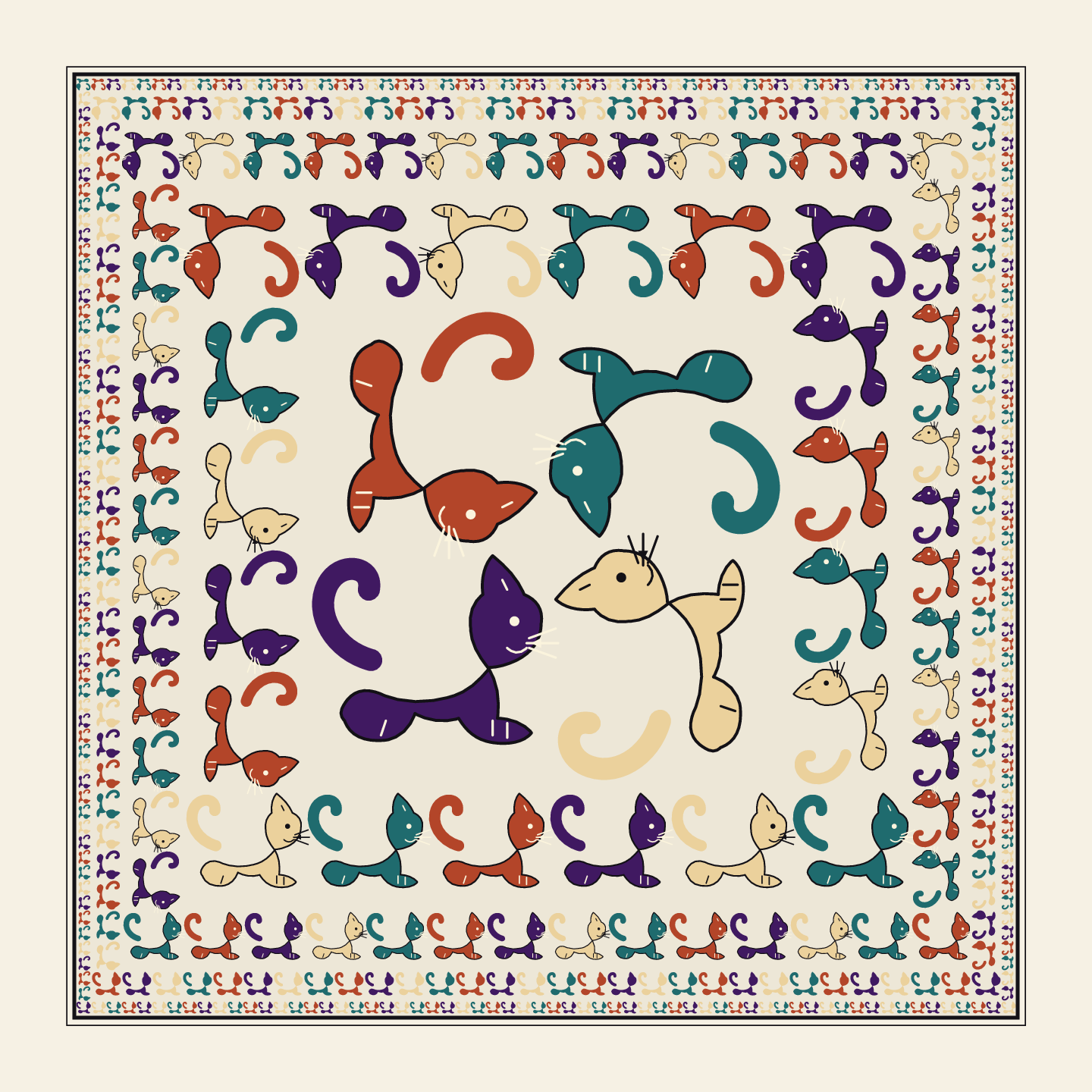
Figure 5: Result from the Source above. The PostScript program places and rotates cats in successive rings, halving their size each step towards the boundary.
The Document Structuring Conventions added comments describing pages, bounding boxes, resources, and other organisation so tools could manipulate a program without fully executing it. Encapsulated PostScript, EPS, constrained the model for placing graphics inside other documents. In principle the program still had all the language’s power; in practice, reliable interchange required etiquette layered upon capability.
PostScript therefore embodies a recurring tension. General programmability makes a format expressive and compact. It also makes resource use harder to predict, validation harder, and hostile content more capable. A language designed to draw a page can loop forever, consume memory, or attempt operations an interpreter must restrict. “Document” has never guaranteed “passive”. Or “safe”.
| PARSER LESSON • Do not casually execute the stationery PostScript is source code whose intended output is a page. Treating it as mere decoration ignores the interpreter, its privileges, its resource limits, and the long history of clever (and potentially dastardly) things happening; there’s many a slip lurks ’twixt save and showpage. |
PDF: freeze the page, then add the world back in
PDF inherited Adobe’s page-description experience but did not simply put PostScript in a nicer coat. A PDF represents a page through a structured collection of numbered objects: dictionaries, arrays, names, strings, numbers, streams, and references. Page content streams contain drawing operators, but the file as a whole is an object graph designed for random access, navigation, incremental change, and reliable display.[35]
Objects, streams, and cross-references
A PDF header announces a version. Indirect objects have numbers and generations. A trailer leads to a root catalogue. Cross-reference information allows a reader to find objects without scanning the entire file, although modern readers are often prepared to reconstruct a damaged file by doing exactly that. Streams carry compressed page commands, images, fonts, and other binary data. Pages inherit resources through a tree.
This architecture supports efficient access and reuse. One font object can serve many pages. A page can refer to an image rather than duplicate it. A viewer can jump to page 700 without interpreting pages 1 to 699. It also means that “a PDF page” depends upon objects scattered throughout the file, possibly compressed inside object streams and revised by later updates. The visible page is the resolution of a graph, not a flat photograph.
Incremental updates: history after %%EOF
PDF permits an update to be appended rather than rewriting the original file. New or replacement objects are added, followed by new cross-reference information and a trailer pointing back to the previous revision.[35]
Signatures rely upon this model: bytes already signed can remain unchanged while permitted later additions are recorded. At the cost, however, of signature verification output becoming considerably more complex and nuanced than “pass/fail”.
The forensic consequence is familiar. An object no longer used by the latest page tree may still exist in an earlier revision. A naïve redaction that merely covers text with a black rectangle leaves the underlying text content intact. Even when a tool removes an object logically, an incremental save can preserve the earlier bytes. Proper redaction must remove the sensitive content, sanitise related metadata and revisions, and produce a file whose actual structures (not merely its appearance) have been checked.
PDF’s end marker, %%EOF, is therefore sometimes followed by another revision ending in another %%EOF. The file is allowed to have an afterlife. Parsers searching from opposite ends can consequently form different views, which is useful for recovery, signatures, polyglots, and trouble with a capital T for others.
Thirty years of things in the page
PDF can contain embedded fonts, colour profiles, images, vector graphics, annotations, forms, digital signatures, attachments, multimedia, JavaScript, encryption dictionaries, optional-content layers, accessibility extensions and external references. Some features exist to make a faithful portable document; others turn the “page” into a small application platform.
Fonts are especially important. Embedding the actual glyph programs reduces dependence on whatever happens to be installed later. Subsetting can include only the glyphs used, saving space while producing font names that look as if the alphabet sneezed. A PDF with missing fonts may substitute different glyph shapes, lose symbols, or display awkward spacing and overlaps. Its pages usually remain fixed; their contents may become considerably less faithful.
PDF 1.7 became ISO 32000-1 in 2008, and later editions continued the standardisation.[35] The PDF/A family constrains PDF for long-term preservation: it requires or forbids features to reduce external dependencies and unpredictable behaviour, with different parts and conformance levels for different needs.[36] PDF/A is not “ordinary PDF, but archival” by ceremonial declaration. It is a profile that must be validated.
| PRESERVATION LESSON • Portable is not necessarily self-sufficient A PDF may carry its fonts, images, colour information, and structure. Or it may point elsewhere, omit what a viewer substitutes, include active content, and retain earlier revisions. The extension tells you which family arrived, not whether the guest brought everything needed for a long stay. |
Raster images: pixels, palettes, and peculiar politics
A raster image is an array of samples. That sentence sounds almost disappointingly manageable, so formats immediately add colour models, palettes, bit depths, row order, compression, metadata, orientation, transparency, thumbnails, profiles, multiple images, and the possibility that the “height” field has been prepared by someone wishing the decoder harm.
| THE PUNCHED CARD’S LAST LAUGH Why 640 pixels wide? IBM’s display lineage was already built around 80-column text, itself descended from the 80-column punched card. With eight pixel clocks per character cell, 80 columns naturally spanned 640 pixels; in one-bit graphics, those same 640 pixels occupied exactly 80 bytes per scanline. VGA subsequently carried that familiar width into its 640 × 480 graphics mode. Strictly speaking, an 80-column colour text row occupied 160 bytes; one byte for the character and another for its attributes, but the ancestral number 80 had travelled from cardboard, through text displays, and into graphics hardware. Punched cards had the last laugh.[85] |
BMP: which way is up?
Windows bitmap formats grew around the practical needs of Windows graphics. Device-independent bitmaps describe pixels using headers, optional colour tables, and scan lines. In the common bottom-up representation, the first stored row is the bottom of the displayed image; a negative height can indicate a top-down DIB.[37] This is not madness in historical context: graphics hardware and coordinate systems often placed the origin at the lower left. It is merely a reminder that even “array of pixels” requires agreement about which corner is first.
BMP became synonymous with uncompressed bulk, although variants support run-length compression and several pixel encodings. Its virtue was directness. Its vice was that directness at screen resolution produced files large enough (at the time) to be unpleasantly unwieldy.
PCX, created for ZSoft’s PC Paintbrush, used a modest header and simple run-length encoding. It spread widely through DOS graphics software because it was implementable and useful, not because future historians would find its plane arrangements soothing. Both BMP and PCX illustrate formats designed close to contemporary display hardware, with later extensions carrying them further than their first machines.
TIFF: a labelled warehouse
TIFF stores images through Image File Directories containing tagged fields. A tag identifies a property, its type, its count, and either a value or an offset to the value. Tags describe dimensions, sample layout, compression, colour interpretation, strips or tiles, resolution, and much more.[38]
This made TIFF extraordinarily extensible. It became a family supporting bilevel scans, photographs, scientific imagery, print workflows, geospatial extensions, multiple pages, and several compression methods. It also made “TIFF support” a sentence requiring a second sentence to qualify that support. A baseline reader may understand one subset. A specialist file may depend upon uncommon compression, private tags, tiled organisation, multiple directories, or externally defined profiles. The format is a warehouse with excellent labels; no promise is made that your forklift reaches every shelf or can fit down every aisle.
For preservation, TIFF’s public specification and long implementation history are strengths. Complexity and profile ambiguity are risks. “Use TIFF” is not a preservation policy until the version, compression, colour space, metadata, and validation requirements are specified.
JPEG is not quite the file you think it is
JPEG names a family of standards for compressing continuous-tone images. The familiar lossy process transforms blocks of samples, quantises coefficients, and entropy-codes the result. The aggressive information loss happens at quantisation: high-frequency detail judged less important is represented more coarsely or discarded. Re-saving a lossy JPEG can therefore compound damage, especially around sharp edges and text.[39]
The coded JPEG data does not, by itself, settle every practical file convention. JFIF defined a widely used interchange structure around JPEG data, including marker usage, pixel density, and colour interpretation.[40] Camera files often use Exif, based on TIFF structures, to carry capture metadata, orientation, thumbnails, dates, and possibly coordinates. A file called “a JPEG” may therefore be JPEG-coded image data travelling with JFIF conventions, Exif metadata, ICC profiles, application segments, and years of accumulated assumptions. Caveat emptor.
The Exif orientation tag created a particularly modern absurdity. A camera can store pixel rows in one physical orientation and attach metadata saying how viewers should rotate them. Software that honours the tag shows the image correctly. Software that strips or ignores it produces a photograph lying on its side while all parties insist they preserved the image. This still bites occasionally; profile pictures uploaded to certain social media applications sometimes appear at rather startling orientations. This is, usually, why.
PNG: chunks, checksums, and deliberate escape routes
PNG begins with an eight-byte signature carefully chosen to identify the file and expose common transmission damage. It then proceeds as a sequence of chunks. Each chunk has a length, a four-letter type, data, and a CRC. Critical chunks define the image; ancillary chunks carry optional information. The case of letters in a chunk name encodes properties such as whether an unknown chunk is safe to copy.[41]
PNG uses lossless compression and filters scan lines before feeding them to the DEFLATE algorithm. It supports palettes, greyscale, truecolour, and alpha transparency. Its chunk design allows readers to skip extensions they do not understand while retaining synchronisation. This was disciplined extensibility, created by people who had just watched a simple image format become a patent dispute.
| FORMAT LESSON • Metadata can rotate reality If pixels, orientation, colour profile, and crop are separate fields, “the image” is the interpretation of all of them. Copying only the pixel array can preserve every sample and still turn the photograph sideways, change its colour, and remove the evidence of when it was made. |
Vector graphics and fonts: geometry wearing typography
Raster images store samples. Vector formats store shapes, paths, text, transforms, paints, and relationships that can be rendered at different sizes. SVG expresses two-dimensional graphics in XML and integrates styling, gradients, clipping, filters, text, linking, and animation.[43] PostScript and EPS describe graphics procedurally. PDF stores vector page content in structured objects. Windows Metafile and Enhanced Metafile record graphics operations from the Windows ecosystem. CAD formats add geometric models, layers, units, tolerances, and enough specialist semantics to make “just export a drawing” a dangerously simplistic request.
Vectors bring their own preservation dependencies. Text may refer to a font not embedded in the file. A filter or blend mode may differ between renderers. A scriptable SVG can be an active document, not a passive icon. An external image or stylesheet may disappear. And converting everything to pixels preserves one appearance at one resolution while discarding editability, semantics, and scale.
Font files are formats too: small programs and data structures that turn character sequences into positioned glyphs. TrueType outlines use quadratic curves; the OpenType family can package TrueType or Compact Font Format outlines alongside mapping, metrics, kerning, and sophisticated shaping tables.[44] Those layout tables help turn stored characters into correctly joined Arabic, selected ligatures, reordered marks, and the thousands of decisions hidden inside decent typography.
| THE FONT OF ALL EVIL A font is not merely a scrapbook of letter-shaped pictures. It can contain character maps, outlines, metrics, hinting instructions, and shaping rules which substitute one sequence of glyphs for another. Scunthorpe Sans exploits this magnificently: its ligature rules recognise selected swear words and replace them visually with censored forms, while exempting Scunthorpe—because the town has suffered enough. The underlying characters remain unchanged; copying, searching, or examining the text by other means may still reveal the uncensored word. The censorship exists in the rendering.[86] That cleverness also reveals the danger. Opening a document or webpage can feed an untrusted font to a substantial parser, shaping engine, and rasteriser. Malformed fonts have caused out-of-bounds writes, memory corruption, arbitrary code execution, and privilege escalation. In Windows 8.1 and earlier, relevant Type 1 font processing occurred inside the kernel-mode Adobe Type Manager driver: a successful exploit could therefore reach Ring 0. Windows 10 moved that engine into the restricted user-mode fontdrvhost.exe, and current Windows provides controls for blocking untrusted fonts, but “not in the kernel any more” is mitigation, not evidence that fonts have become harmless.[87][88]A font does not merely decide what your text looks like. It may contain rules deciding what you are permitted to see. And, historically, a sufficiently malicious one could make the operating system see stars. |
WOFF and WOFF2 package font data for the web, adding compression and metadata around the underlying font structures.[45] Fonts also carry licences, embedding permissions, version quirks, and security exposure. A document can preserve its characters perfectly and render incorrectly because the font changed. A PDF can embed the font and become more self-contained, but perhaps not lawfully editable or redistributable. Typography is where aesthetics, software, linguistics, and licensing meet in a file that users call “that font thing”.
| PRESERVATION LESSON • A character is not its appearance The text stores code points. The font supplies glyphs. The shaping engine chooses and positions them. The layout system wraps them into lines. Preserve only the characters and you preserve the words, but not necessarily the evidence of how the document looked. |
GIF: animation, patents, and the softest hard G
Messaging would be a lot more static without GIF89a.
87a, 89a; a format learning to move
CompuServe published GIF87a in 1987 and GIF89a in 1989. GIF uses a palette with up to 256 colours for an image and LZW compression. The 89a specification added facilities including graphic-control extensions, comments, plain text, application extensions, transparency, delay timing, and disposal methods.[42]
A GIF data stream may contain multiple images. The control extension can specify delays and what happens to the canvas after a frame. This provides the ingredients of animation, but the familiar endlessly looping web GIF depended upon an application extension popularised by Netscape to say how many times the sequence should repeat. The core format supplied frames and timing; ecosystem convention supplied the loop that has prevented millions of reactions from ever reaching closure.
Disposal methods are why GIF animation is more interesting than a stack of complete pictures. A frame can overlay only the changed region, then remain, clear to the background, or ask for the previous state to be restored. Efficient encoders exploit this. Poor decoders leave trails, missing patches, or a visual record of every decision they regretted.
The patent was on LZW, not on little dancing bananas
GIF used the Lempel–Ziv–Welch compression method. Unisys held a patent covering LZW and, in the 1990s, sought licence fees from software developers implementing GIF compression. The controversy was sharpened by the fact that GIF had already become an ordinary web format before many developers understood the patent exposure.[42]
The patent was not “a patent on GIF” in the literal sense, and merely possessing or viewing a GIF was not the central issue. Implementing patented LZW compression in software was. Licence terms and enforcement changed over time and jurisdiction, and the relevant patents expired in the early 2000s.[42] By then the engineering community had already produced PNG as a patent-unencumbered, lossless replacement for still images.[41][42]
PNG did not initially replace animated GIF because its original scope deliberately excluded animation. The later APNG extension gained substantial support, while MNG attempted a richer multiple-image system with less universal success. The supposedly obsolete GIF survived because it occupied a useful, well-supported niche and because ecosystems are under no obligation to reward architectural elegance.
And the pronunciation? Steve Wilhite, who led GIF’s creation, specified a soft G—as in giraffe. This has not prevented decades of people pointing furiously at the hard G in graphics, as though acronyms had ever obeyed the pronunciation of their component words. The format remains readable regardless, proving that interoperability is sometimes easier between machines.
| LEGAL / LICENSING NUGGET • A technically open door may still have a legal turnstile Published bytes are not the same as permission to implement every algorithm they require. GIF’s LZW episode pushed developers to examine patents as part of format design and helped create PNG: a file format born in no small part from collective irritation. |
Chunked and container formats: filesystems all the way down
IFF and the joy of skipping what you do not understand
Electronic Arts’ Interchange File Format described a general pattern in 1985: data is stored in typed, length-delimited chunks. A FORM declares a kind of object, and nested chunks carry properties or content. Because each chunk states its size, a reader can skip an unknown type and continue at the next boundary.[46]
IFF became deeply associated with the Amiga, appearing in graphics, sampled sound, animation, and other media. Its larger legacy is architectural: labelled chunks, padding rules, nested forms, and readers that can ignore unfamiliar extensions without losing the whole file.
Microsoft and IBM’s RIFF applied a closely related little-endian chunk model to Windows multimedia.[47] WAV, AVI, and other forms place typed chunks under a RIFF header. The family resemblance is visible in four-character identifiers and nested containers, while byte-order and ecosystem conventions differ. This is format evolution by adaptation rather than immaculate invention.
ZIP: archive, substrate, and identity crisis
ZIP is an archive format that can store multiple files, metadata, and per-entry compression. Local file headers precede data, while a central directory near the end provides the catalogue. This supports random access and allows a writer to stream entries before finishing the directory. It also means a reader may encounter duplicated names, inconsistent headers, appended material, encryption variants, extra fields, and several notions of what the archive “really” contains.[48]
ZIP is also a substrate for formats that do not present themselves as archives. Java JAR files add manifests and conventions.[50] Android APKs are ZIP-based packages with application structure and signing rules. EPUB is a ZIP container with a prescribed mimetype entry, package documents, publications resources, and navigation.[49] DOCX, XLSX, PPTX, ODF, and many others use ZIP as the outer box.
This creates a lovely identification problem. The first bytes say ZIP. The extension says DOCX. Internal [Content_Types].xml and relationships say OPC. The XML says WordprocessingML. An embedded image says PNG. All are correct at their own layer.
Compound files and packaging conventions
Microsoft CFB packages streams in sectors with allocation tables and an internal directory.[19] OPC packages named parts in ZIP and connects them with relationships.[23] IFF and RIFF package chunks in a linear hierarchy.[46][47] PDF packages objects and streams in its own graph.[35] Each solves “many related things, one user-visible file”, but the access model, update strategy, metadata, and failure modes differ.
Containers are seductive because they make complexity portable. They are also where complexity gathers and edge-cases breed. Nested parsers interpret the outer structure, decompression, filenames, XML, images, fonts, macros, and embedded objects. A security assessor looks at one innocent icon and sees a family reunion of attack surfaces.
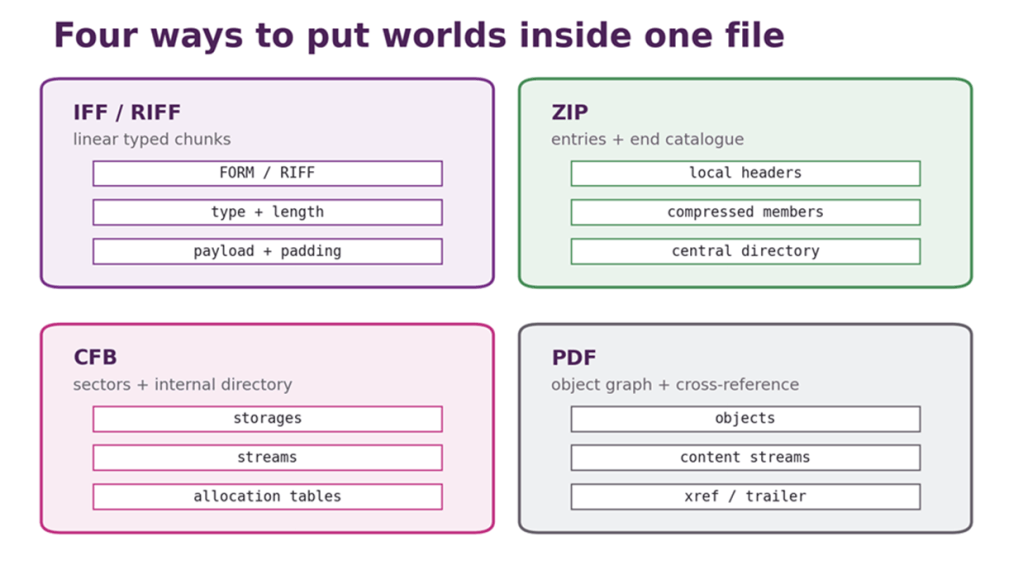
Figure 6: Four container strategies. All create one outer file, but they organise, locate, update, and extend their inner material differently.
| FORMAT LESSON • The outer signature answers only the outer question PK tells you the bytes may be ZIP. It does not tell you whether the intended object is a spreadsheet, ebook, Java archive, application package, office document, or a mendacious Matryoshka doll with forty-seven layers of packaging concealing the payload inside. |
Archives and compression: two ideas humans insist on conflating
An archive collects things.
Compression makes a stream smaller. They are separate operations, despite several decades of icons depicting both as one small yellow filing cabinet under physical distress.

tar, cpio, and ar
The Unix tar format originated with tape archives. It writes file headers and contents sequentially, preserving names and selected metadata in a stream suited to sequential media.[51] Classic tar did not compress. tar -cf creates an archive; piping that stream through gzip creates a compressed archive. Extensions such as .tar.gz and .tgz describe the stack with differing enthusiasm.
cpio likewise collects files in sequential archive forms and has appeared in installation media, initramfs images, and (importantly for our next cabinet) RPM payloads. ar is a simpler archive format strongly associated with static libraries on Unix-like systems. Debian packages also use it as their outer wrapper. A format can survive because a later system finds one of its properties useful, even when the original use ceases to be fashionable.
Archives must preserve more than byte contents if they are to reproduce a filesystem object faithfully: paths, permissions, ownership, timestamps, symbolic links, hard links, extended attributes, sparse regions, and device entries may matter. Different formats, implementations, and platforms preserve different subsets. Extracting onto a filesystem with different semantics introduces another translation.
gzip, bzip2, xz, and Zstandard
gzip wraps a DEFLATE-compressed data stream with a header and trailer including integrity information.[52] It normally compresses one stream, which is why tar and gzip make such a durable couple: one collects the files, the other compresses the collection.
bzip2 uses block-sorting compression and became popular where better compression justified more CPU. xz normally wraps LZMA2 and provides a formally described stream with blocks, checks, indexes, and padding.[53] Zstandard was designed for a broad range of speed and compression trade-offs and has a standardised frame format.[54] The “best” compressor depends upon data, memory, speed, random-access needs, streaming, ecosystem support, and for how many decades you need a decoder to remain easy to obtain.
Compression changes risk as well as size. A small compressed input may expand enormously. Corruption can destroy the remainder of a stream or only one independently coded block. Encryption may make compression ineffective or leak information when secrets and attacker-controlled data share a context. An archive containing compressed members differs operationally from one outer compressed stream: the former may support random extraction, while the latter may require reading from the start.
| LZIP: because the missing bits probably weren’t important The 2000 April Fool project LZIP made the L stand for lossy. Tell it how small the result must be, and it discards however much of the input is necessary. Even achieving, if necessary, the coveted zero-byte file. The compression ratio is magnificent; decompression is left as an exercise for the bereaved. Do not confuse it with today’s lzip, which is an entirely serious, lossless LZMA compressor. [83] |
ZIP does both, so everybody calls both “zipping”
ZIP combines archiving with optional per-entry compression. Entries may even be stored without compression. The format became so culturally dominant that “zip” became a verb for making something smaller, even when no ZIP file was involved. This is linguistically understandable and yet taxonomically both vandalous & scandalous.
FORMAT LESSON • .tar.gz is two formats wearing a moustachetar remembers the files and their selected metadata. gzip compresses the resulting byte stream. Remove the moustache and the archive is still an archive; it is merely larger and slightly self-conscious. |
Packages: archives with installation instructions and opinions
A software package is an archive plus policy. It contains files, but also identity, version, dependencies, architecture, checksums, signatures, configuration rules, triggers, and scripts that may execute with formidable privilege.
Debian’s inspectable nesting doll
A modern binary .deb is an ar archive with three principal members in a required order: debian-binary, a control.tar.* archive, and a data.tar.* archive.[55] The first contains a format version. The control member contains package metadata and maintainer scripts. The data member contains the filesystem payload.
This is delightful to inspect with ordinary tools. ar opens the outer package. A tar tool opens the inner members. Compression may be gzip, xz, Zstandard, or another supported method. Layers designed separately cooperate to express a deployable unit.
It is also a reminder that inspectable is not inert. Maintainer scripts can run before or after installation or removal. Dependency relationships influence what else the package manager retrieves and configures. Signatures and repository metadata establish provenance. The same bytes installed outside that policy framework may have a very different security meaning.
RPM and the venerable cpio payload
The classic RPM v4 layout contains a lead, a signature header, a main header, and a payload. The payload is traditionally a compressed cpio archive, with RPM-specific metadata describing files, attributes, dependencies, scripts, and package properties.[56] The lead survives largely for historical compatibility; the headers carry structured tag data; signatures and digests support verification.
RPM 6.0, released in September 2025, introduced support for the v6 package format, including modernised cryptography, 64-bit size fields, and a revised payload representation. Some specification pages still carry a “DRAFT” heading: documentation labels and shipping software do not always move in step.
Debian and RPM solve substantially similar problems with different packaging cultures and metadata arrangements. Neither is “just a compressed file”. A package manager is a privileged interpreter of a format that can alter an operating system. The parser, signature policy, dependency resolver, script runner, and repository trust model all belong in the security analysis.
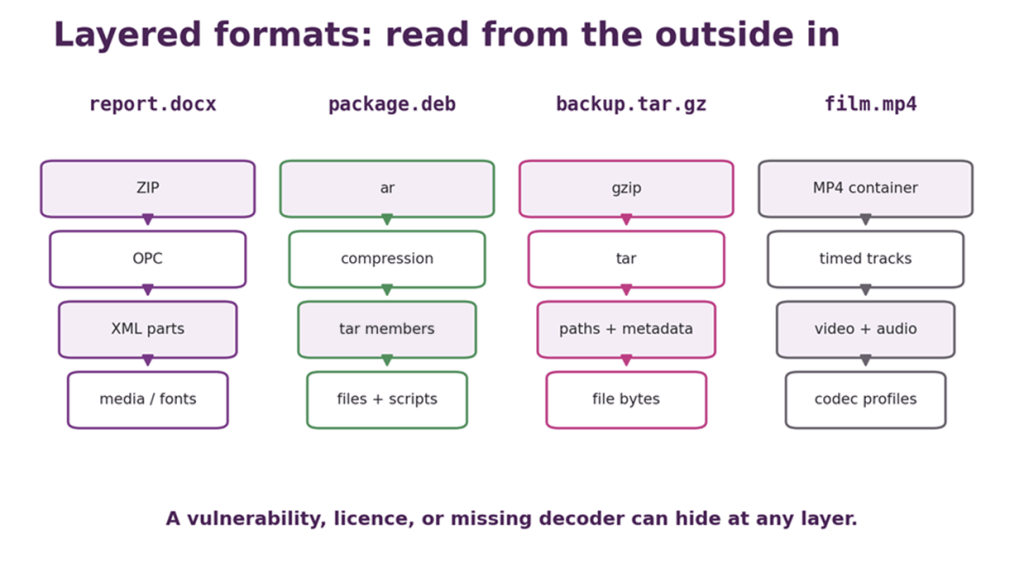
Figure 7: Read layered formats from the outside in. A decoder, licence, security boundary, or preservation dependency can hide at every level.
| PARSER LESSON • Installing is parsing with consequences A package is not cargo waiting to be unpacked. It is a signed or unsigned set of claims and instructions offered to one of the most privileged pieces of software on the machine. |
Executables and object files: formats the loader takes personally
An executable is a file format whose reader may map pages into memory, resolve imported symbols, apply relocations, establish permissions, and finally allow the contents to become a process. Parsing errors here do not merely make the margins untidy.
From a.out and COFF to portable complexity
Early Unix a.out formats provided relatively simple headers and regions for text, data, relocation, and symbols. The name originally described an assembler’s default “assembler output” and survived long enough to become the traditional default filename of compiled programs. COFF, the Common Object File Format, developed a more general section-based structure and influenced later systems.
Object formats must serve several audiences. Compilers and assemblers produce them. Linkers combine them. Loaders map executables and shared libraries. Debuggers need symbols and line information. Signing tools need stable regions and exclusions. Operating systems need to enforce memory protections. The format therefore becomes an agreement among an entire toolchain, not simply a wrapper around processor instructions.
ELF on the shelf
The Executable and Linkable Format announces itself with 7F 45 4C 46, followed by fields identifying word size, byte order, and version. ELF is used for relocatable object files, executables, shared objects, and core dumps across many Unix-like systems.[57]
Two overlapping views are central. Sections organise information for linking and analysis: code, data, symbols, strings, relocations, and debugging material. Segments, described by the program header table, tell the operating-system loader which byte ranges to map, at which virtual addresses, with which permissions. A section need not become a mapped segment, and a segment may cover several sections. The linker sees ingredients; the loader sees a memory plan.
Dynamic executables carry information about required libraries, symbols, relocations, initialisation routines, and runtime linking. Notes can record build identities and ABI details. Extensions support thread-local storage, hardening properties, and architecture-specific behaviour. The format is general enough to be an ecosystem and precise enough that one malformed offset can send an incautious tool wandering beyond the file.
PE/COFF: MZ, PE, and a DOS ghost
Windows Portable Executable is derived from COFF. A PE file normally begins with the DOS MZ signature and a small DOS-compatible stub. A field points to the later PE\0\0 signature and modern headers.[58] The ancestral stub is why running a Windows executable under DOS traditionally produced a polite message explaining that the program could not run there. Compatibility had become a foyer through which every future visitor still entered.
PE sections contain code, data, imports, exports, resources, relocations, exception information, and other directories. Icons, version strings, manifests, and dialogs may sit inside the executable as resources. Authenticode signatures use a carefully defined hashing procedure that excludes or normalises fields which must change. The file is simultaneously program, container, metadata record, and object of cryptographic policy.
Mach-O and the genuinely fat binary
Apple’s Mach-O format uses load commands to describe segments, libraries, symbols, entry information, code-signing data, and platform details.[59] A separate “fat” or universal-binary wrapper can contain several Mach-O images for different architectures. One file may therefore offer an x86-64 executable to one Mac and an Arm64 executable to another. This is a container in the most literal dietary sense.
Universal binaries eased Apple’s processor transitions because the user-visible application could carry old and new machine code together. The price was size and another layer of parsing. The benefit was compatibility without asking every user to understand instruction-set architecture before double-clicking an icon.
Trust begins before the first instruction
Operating systems increasingly validate architecture, page permissions, signatures, entitlements, import constraints, and structural consistency before execution. Yet many other tools parse executables too: antivirus engines, indexers, debuggers, packers, symbol servers, forensic suites, and file managers extracting icons. A malformed executable can attack a parser even if nobody intended to run its code.
Code signing proves that specified bytes were signed by a key and have not changed outside permitted mechanisms. It does not prove the program is wise, kind, vulnerability-free, or wanted. Format validity, provenance, authorisation, and behaviour are separate questions standing very close to one another in the loader.
| PARSER LESSON • An executable is active before it executes The loader and its surrounding tools perform complex work on attacker-controlled structure before control reaches the program’s entry point. “We never ran it” does not mean “we never parsed it”. Danger can precede execution. |
Microcomputer fossils and emulator formats
Sometimes preservation saves a file. Sometimes it saves the medium. Sometimes it freezes the entire machine halfway through a thought and hopes nobody notices the substitution.
Logical file, media image, or machine state?
These are different artefacts:
- A logical file preserves the bytes an operating system or application considered one named object.
- A media image preserves a disc, tape, cartridge, or signal representation, including layout and sometimes timing or error behaviour outside any one logical file.
- A machine snapshot preserves enough RAM, registers, and device state to resume an emulator near the instant of capture.
A snapshot is marvellous for instant access and poor evidence of the original loading experience. A raw disc image may preserve deleted directory entries and unused sectors but omit analogue properties of the magnetic signal. A logical program file may be convenient while discarding copy protection, loader art, recording timing, and the exact medium. Preservation is a choice of layer.
ZX Spectrum tapes: TAP tells the story, TZX performs it
ZX Spectrum .TAP files store logical tape blocks with length information. They work well for conventional ROM-loader recordings, but commercial software frequently used turbo loaders, unusual pulses, pauses, protection schemes, and other timing tricks. TZX was designed to represent a much wider repertoire of tape behaviour, including standard blocks, turbo data, pure tones, pulse sequences, loops, groups, and metadata.[60]
TAP is a transcription of what the normal loader understood. TZX is closer to a score for reproducing what the tape signal did. Neither is the magnetic tape itself. A sampled audio capture preserves more analogue detail at greater size and with different uncertainties. The best choice depends upon whether the object of interest is the software, the loader, the signal, the medium, or the sound of an entire generation waiting.
SNA: put the program counter on the stack and try to look natural
The common 48K Spectrum SNA snapshot consists of a small register dump followed by 49,152 bytes of RAM, 48KiB. The original format had no explicit field for the Z80 program counter. Instead, the saver pushed the PC onto the emulated stack. To resume, the emulator restored registers and memory, then performed the equivalent of RETN to pop the address.[61]
This is wonderfully economical and slightly destructive. Pushing the PC changes two bytes below the snapshot’s stack pointer. The surviving format description calls this regrettable and attributes the convention to the Mirage Microdriver snapshot form.[61] An entire suspended computer was made portable by borrowing two bytes from its own stack and leaving the grubby fingerprints behind.
The .Z80 family took a more explicit and extensible route, adding versions, compressed memory blocks, machine models, and hardware state.[62] The price of richer emulation was a format family whose exact interpretation depends upon version fields and machine type. A snapshot claiming to be a “Spectrum” may actually need to say which Spectrum, which memory map, which sound hardware, and which paging state.
UEF, PRG, ADF, and other jars
Acorn’s Unified Emulator Format uses chunked structures to represent BBC Micro and related emulator data, including tape events and machine state.[63] Commodore PRG files commonly prefix program bytes with a load address: tiny metadata with enormous significance. Amiga ADF files preserve logical floppy-disc sectors, while formats such as IPF were created to capture lower-level characteristics needed for copy-protected originals. Disk-image formats may preserve partitions and filesystems, or merely sectors, or flux transitions close to the physical recording.
The preservation paradox is that an emulator format invented for convenience may become better documented, easier to validate, and more reproducible than the decaying media it represents. At that point the derivative format is not a second-rate copy; it is part of the artefact’s survival history. We should preserve the original capture where possible, the normalised representation where useful, and the documentation that explains the relationship.
| PRESERVATION LESSON • Emulation preserves behaviour by changing the object A snapshot can preserve a running state while discarding the loading process. A tape image can preserve timing while abstracting magnetism. State which layer you kept; otherwise “preserved” becomes an adjective in search of a suitable noun. |
Structured data: humanity reinvents the key/value pair
First, we named things. Then, we assigned values to them. Then, we spent fifty plus years disagreeing about the punctuation.
INI: punctuation by local custom
INI-style files appear simple: sections in square brackets, keys, separators, and values. There is no single universal INI standard. Some parsers use =, some accept :, some recognise comments beginning ; or #, some trim spaces, some preserve quotes, some permit duplicate keys, and some ask Windows compatibility functions to interpret the result according to long-standing implementation rules.[64]
This is a folk format: recognisable by convention, varied by dialect. It is excellent for small human-edited configuration when one implementation controls both ends. It becomes less excellent when five libraries believe they share a grammar because all the examples contained only colour=purple.
| CONFIGURATION BY OPTIMISM As well as keeping her BATs in C:\BELFRY\, the author invariably added BUGS=OFF to SYSTEM.INI.Sadly, it never seemed to help. Evidently, the bugs had been compiled in unconditionally. |
XML: verbosity with institutional memory
In 1998, XML 1.0 standardised a textual syntax for elements, attributes, character data, entities, and document structure.[65] Namespaces allowed vocabularies to coexist without colliding. DTDs, XML Schema, RELAX NG, XPath, XSLT, canonicalisation, signatures, and many other standards grew around it.
XML is often mocked for verbosity, sometimes by systems that then reconstruct namespaces, comments, schemas, binary encodings, and version negotiation in less mature ways. Its explicit closing tags and escaping are indeed bulky. They are also inspectable, streamable, standardised, and supported by a formidable tool ecosystem.
“Self-describing” needs care. <temperature>18</temperature> says more than four anonymous binary bytes, but it does not say Celsius or Fahrenheit or Kelvin or Rankine, indoor or outdoor, current or maximum, integer or decimal, optional or required. Names aid humans. Schemas and application contracts supply constraints. Domain knowledge supplies meaning.
XML’s complexity also created security hazards: external entities, expansion attacks, schema retrieval, signature wrapping, and parser options whose safe defaults arrived after the vulnerable deployments. Mature format ecosystems are usually mature collections of defensive guidance too.
JSON: Who ate all the APIs?
JSON defines objects, arrays, strings, numbers, true, false, and null in a compact text syntax.[66] Its success owes much to being easy to produce and consume in web software, close to common programming-language values, and substantially less ceremonious than XML.
Simplicity still leaves edges. Object member names ought to be unique for interoperable behaviour, yet parsers differ on duplicates: first wins, last wins, or all survive. Number precision varies between arbitrary-precision parsers and IEEE 754 implementations. JSON has no native date, binary byte string, comment, or schema. Text encoding is standardised as UTF-8 for interoperable exchange, but real systems have met stranger specimens.[66]
The absence of comments is either disciplined interchange or a direct attack on configuration files, depending upon context & opinions. JSON-with-comments, JSON5, and numerous local pre-processors demonstrate that users will add comments to any format by force if deprived long enough.
YAML: readability with significant indentation and surprises
YAML supports mappings, sequences, scalars, anchors, aliases, tags, block strings, flow styles, and multiple schema choices in a human-oriented syntax.[67] It can express JSON’s data model and much more. Indentation carries structure. Plain scalars may be interpreted as booleans, numbers, dates, or strings depending upon version and schema.
This richness makes YAML pleasant for carefully reviewed configuration and hazardous when people assume “looks obvious” means “parses identically”. The notorious YAML 1.1 interpretation of values such as yes, no, on, and off as booleans surprised users; YAML 1.2 aligned its core schema more closely with JSON. Libraries and deployed files do not all move versions together.
Anchors and aliases avoid repetition but can create expansion pressure. Application-specific tags may construct types or objects, which is powerful and dangerous if an unsafe loader accepts untrusted input. YAML is not bad because it has features. It is dangerous when the consumer pretends those features are merely decorative whitespace.
Binary serialisation: smaller, faster, and dependent upon the missing book
Protocol Buffers encode fields using numeric tags and wire types. A separate schema defines names, types, and structure; unknown fields can be skipped, supporting evolution when field numbers are managed carefully.[68] Compact integers use varint encoding, so small values occupy fewer bytes. The wire data is efficient and profoundly unimpressed by a human opening it in Notepad.
CBOR defines a compact binary representation for JSON-like and richer data, with explicit major types, lengths, tags, and both definite and indefinite forms.[69] MessagePack likewise represents common data structures in a small binary encoding.[70] These formats reduce parsing and transmission cost in many settings, but “self-describing” remains relative. A byte may announce that the next value is a map; the application still needs to know what sensor_17 means, which units apply, and whether the field became optional in version four.
Schema evolution is a discipline. Reusing a field number, changing a type incompatibly, removing an enum value, or turning optional absence into mandatory meaning can corrupt the social contract while every individual byte remains valid.
| FORMAT LESSON • Syntax can be valid and the data still meaningless A parser may prove that a message contains a map from integers to byte strings. Only a schema, application contract, and shared domain knowledge can prove that key 7 is “systolic pressure in mmHg” rather than “number of badgers detected”. |
Databases and files that contain worlds
Some files are not documents so much as small civilisations. They have pages, indexes, free space, transactions, journals, laws, and recovery procedures for when the lights go out halfway through a constitutional amendment.
SQLite: SQLite format 3
An SQLite database begins with the sixteen-byte header string SQLite format 3\0. The rest of its first 100 bytes records properties including page size, file-format versions, reserved space, change counters, schema information, encoding, and other state. Database pages then form table and index B-trees, overflow chains, free lists, pointer maps, and specialised structures.[71]
SQLite’s on-disc format has been exceptionally stable. The project states that every SQLite 3 release since 2004 can read and write databases created by the original SQLite 3 release, and promises backwards compatibility into the future.[71] This is not accidental simplicity; the format and transactional behaviours are intricate. This is, rather, deliberate stewardship, extensive testing, documentation, and an enormous installed base.
Transactions may also involve rollback journals or write-ahead log files. Copying only the main database while it is live can therefore produce an inconsistent or incomplete view unless the application’s backup mechanisms or locking rules are respected. “Single-file database” describes the durable centre of the design, not permission to copy whichever file looks important during a write.
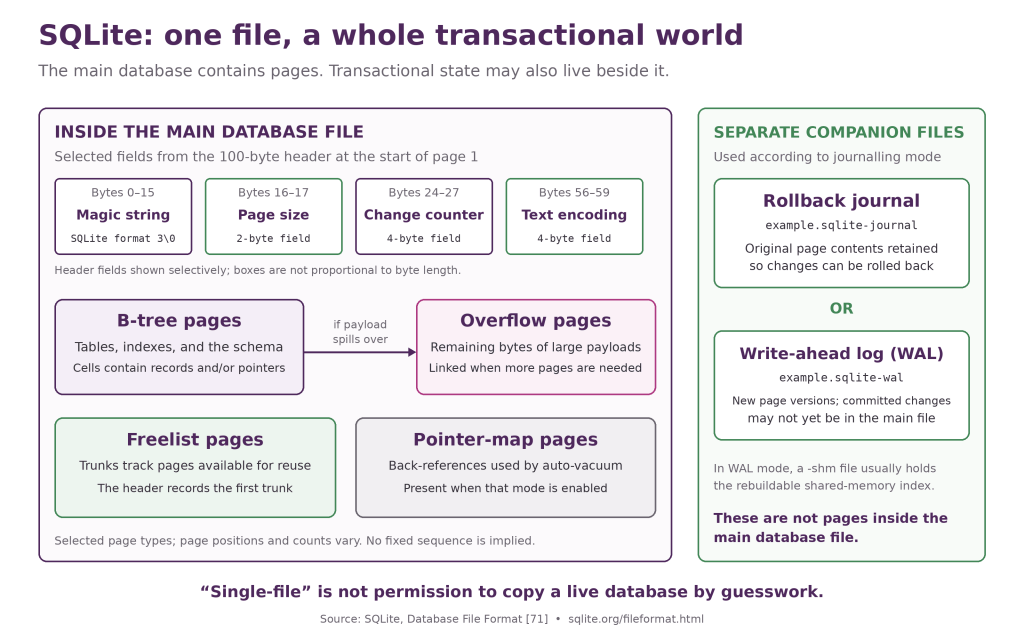
Figure 8: SQLite’s first 100 bytes describe the database, while later pages form B-trees and supporting structures; transactional companion files may also involve a journal or WAL.
DBF: accidental immortality in rows and fields
dBASE DBF files use a header and fixed-size records defined by field descriptors. The family acquired versions, memo companions, code-page issues, and implementation differences, but the simple tabular model escaped its original application and survived in geographic-information systems and other data interchange.[72]
The shapefile is a famous compound survivor: geometry, index, and DBF attribute data commonly travel as several sibling files. Lose the .dbf and the shapes remain but their names and properties disappear. Lose the coordinate-system companion and the points may retain exquisite numerical precision while relocating to the wrong part of Earth. “The file” may be a set whose integrity depends upon filenames and proximity.
Spreadsheets are databases until they very much are not
Lotus 1-2-3 and Excel’s binary BIFF formats store cell records, formulae, formatting, shared strings, workbook structures, and application history. Microsoft’s .xls binary format uses BIFF records inside Compound File Binary storage.[73] A spreadsheet can therefore contain tables, code, named ranges, charts, external links, hidden sheets, and formulae whose cached result differs from what recalculation will produce.
Calling a spreadsheet a database is reasonable when discussing structured rows and disastrous when it causes people to forget types, constraints, transaction isolation, provenance, and concurrent updates. The format permits a cell in an “invoice date” column to contain a date, text, a formula, an error, or a drawing of a surprised hedgehog. Flexibility is the spreadsheet’s gift and, also, its generic alibi.
A server database may not have a portable “file”
PostgreSQL, SQL Server, Oracle, and other server systems maintain sets of data files, logs, control files, tablespaces, and version-specific internal state. Copying their live storage directories is not generally a supported interchange method. The stable contract offered to users may be SQL, a client protocol, a logical dump, or a documented backup format rather than the private on-disc layout.
SQLite is the useful counterexample because its public file format is part of the product’s promise. For a server database, the equivalent preservation artefact may be a consistent backup plus software, configuration, extensions, locale, encoding, and recovery documentation. A file format is only “portable” when its producer and consumer agree that portability is supported.
| PRESERVATION LESSON • A database backup is a transaction. The bytes on disc may be spread across data, journals, logs, and version-specific state. Capture through a mechanism that understands consistency, then test restoration while the last knowledgeable administrator is still answering email. |
The multimedia boundary: a container is not a codec
We shall look over the fence, establish the vocabulary, and withdraw before chroma subsampling starts another 38-page incident.
A codec defines how a media stream is encoded and decoded. A container defines how one or more streams, timing information, metadata, subtitles, chapters, and attachments are packaged. A file extension often names the container, not the codec.
WAV is based on RIFF and can carry uncompressed PCM samples, but it can also identify other audio encodings.[47][74] AIFF performs a comparable container role in an IFF-derived Apple ecosystem. MP3 is closer to a coded audio bitstream with a common file framing, although tags and variants still surround it. “WAV means uncompressed” is often true but is not a rule of nature.
MP4 is a container derived from the ISO Base Media File Format. It can contain video and audio encoded with different codecs, plus subtitles, timing, metadata, and other tracks.[74] Matroska is a flexible container built on EBML. Ogg is an encapsulation format that can carry streams encoded with Vorbis, Opus, Theora, and others.[74] A browser can support the MP4 container while lacking the particular video codec inside; both people in the support conversation then say “but it’s an MP4” and become increasingly correct at different layers without necessarily establishing any mutual understanding.
That is enough mud on our boots. Sampling, psychoacoustics, transforms, motion estimation, frame types, colour spaces, chroma subsampling, bitrate control, digital rights management, patents, and the heroic chaos of codec support belong in Sophie’s Codex of Codecs, Containers, Copyrights, Confusion, and Compression. Please allow several moments for the title to decompress.
| FORMAT LESSON • Container is the suitcase; codec is the packing method The .mp4 label tells you which suitcase arrived. It does not guarantee that your device understands the video, audio, subtitle, or rights-management passengers inside. |
Security: the parser is part of the attack surface
A file is untrusted input wearing a filename. The parser is executable code volunteering to believe it.
Name, type, content: choose your authority
Upload systems often maintain an allow-list of extensions, check a declared media type, inspect magic bytes, and then store the result somewhere a different component serves or parses it. Each check answers a different question. Attackers look for disagreement: double extensions, right-to-left display tricks, mixed case, trailing dots, alternative handlers, misleading Content-Type headers, valid image headers followed by other content, and files whose active interpretation depends upon where they are placed.[75]
MIME sniffing exists because declared types are often absent or wrong. Browsers use algorithms to infer content, while security headers and nosniff policies can limit dangerous reinterpretation.[78] Helpful guessing is valuable for the public web and alarming when a server intended to distribute inert text but the browser discovers executable HTML.
The robust question is not “what is this file?” in the abstract. It is “which parser will interpret these bytes next, with what privileges, under which origin, and after which transformations?” A thumbnail service, virus scanner, document converter, metadata extractor, and end-user application may all parse the same upload before the user opens it.
Polyglots and parser differentials
As we saw earlier, a polyglot can satisfy more than one grammar. Even within one format, parsers may disagree about malformed lengths, duplicate fields, overlapping segments, extra bytes, character encodings, or which copy of a repeated object wins. One security tool accepts the first ZIP entry with a name; the extractor uses the last. One JSON parser keeps the first duplicate key; the authorisation code receives the last. One PDF scanner follows the newest cross-reference chain; another reconstructs an older object from the byte stream.
These are parser differentials. The attack lives not in a universally agreed meaning, but in the gap between meanings. Validation is strongest when the same well-maintained parser and canonical representation govern the security decision and the eventual use. When that is impossible, test the hand-off explicitly and reject ambiguous structures rather than congratulating them on their diversity.[12][75]
Archive traversal: the filename has ambitions
An archive entry may be named images/logo.png. It may also be named ../../../../etc/cron.d/gift, begin at a root, use backslashes where one component expects slashes, contain drive letters, exploit Unicode confusion, or be a symbolic link leading out of the destination. If extraction code joins an untrusted member name to a target directory without canonicalising and enforcing containment, the archive can overwrite files elsewhere. This family is commonly called directory traversal or Zip Slip.[76]
Safe extraction validates every resolved destination, handles links deliberately, limits file types and counts, avoids overwriting sensitive paths, and applies permissions cautiously. It also considers case-insensitive collisions and names illegal on the destination filesystem. The archive’s namespace and the host filesystem’s namespace are different grammars to reconcile.
Decompression bombs and other resource claims
A tiny compressed file can expand into gigabytes, terabytes, or a combinatorial nest of archives. A decompression bomb attacks storage, memory, CPU time, recursion depth, or operational attention. CWE-409 describes the weakness as improper handling of highly compressed data expansion.[77]
Defences include limits on expanded bytes, compression ratio, entry count, nesting depth, dimensions, allocation, and processing time. Image dimensions deserve particular suspicion: a small compressed raster declaring enormous width and height may demand a huge buffer before any pretty pixels appear. Streaming helps only if every downstream stage respects limits.
| THE EVIL SIGNATURE™: 378 bytes in, 2 GiB out The author began putting a uuencoded curiosity into email signatures in 1993, originally to bamboozle anyone inquisitive enough to decode it. The specimen shown here, retrieved from a 2012 archive, is 378 bytes of printable ASCII text. Uudecode it and you obtain a 261-byte bzip2 archive; expand that and you get just under 2 MiB of gzip’d data; expand that and you get exactly 2 GiB of extremely low-entropy data (all null bytes). On a sub-gigabyte 1990s hard disk, this was an effective cure for curiosity. Later, automated mail filters obligingly unpacked the nested layers into memory, sometimes with rather more enthusiasm than available RAM.[84] It is a decompression bomb requiring no executable code: a tiny input merely makes a preposterous claim on storage, memory, CPU time, and patience. Limiting archive depth is not enough. A robust parser must cap cumulative expanded size, compression ratio, memory use, CPU time, and total work across every nested layer, and fail safely and deterministically when a limit is reached. The specimen below is reproduced as an image. Some lessons do not require a live demonstration on a production gateway. 😈 |
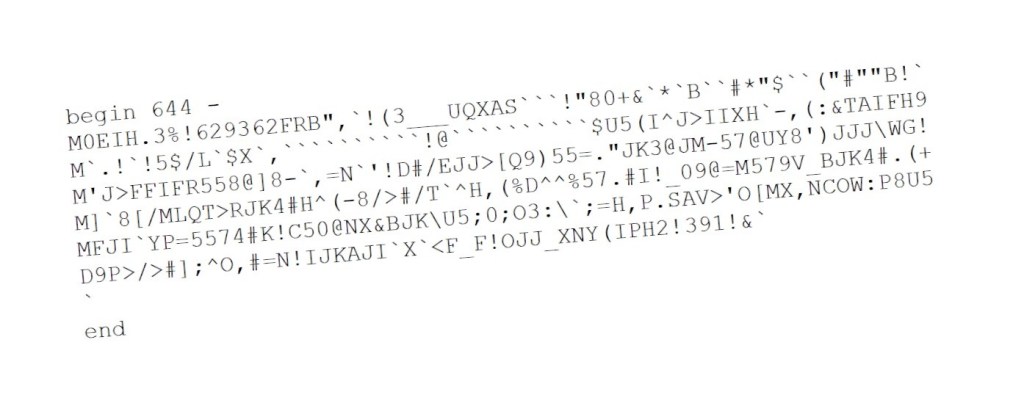
Active content and passive-looking stationery
Office macros, OLE objects, external relationships, spreadsheet formulae, PDF JavaScript and attachments, PostScript programs, SVG scripts, HTML in disguise, and package maintainer scripts all demonstrate that “file” and “program” overlap. Disabling one active feature does not neutralise every embedded parser. Converting to a safer representation can reduce capability, but conversion software becomes the exposed parser.
Memory safety compounds the problem. Image, font, archive, and document readers process attacker-controlled lengths, offsets, counts, compression states, and recursive structures. Historically, integer overflow, out-of-bounds access, use-after-free, and logic errors in these libraries have turned a malformed file into code execution. Sandboxing, privilege separation, memory-safe implementation languages, fuzzing, and attack-surface reduction are not excessive precautions for “opening a picture”. They are what opening a picture has taught us to require.
| PARSER LESSON • Five questions before opening the jar Which bytes are trusted? Which parser sees them? Which optional features will it enable? What resources and privileges does it have? Will the next component interpret the output in exactly the same way? |
Preservation: keeping the bytes is not keeping the meaning
A checksum can prove that yesterday’s incomprehensible file is still exactly as incomprehensible today.
Open, documented, and implemented are different virtues
A public specification helps future readers understand the grammar. It does not guarantee that the specification is complete, that real writers conformed, or that independent software reproduced the important behaviour. A surviving implementation can render files the specification forgot to describe, but may depend upon an obsolete operating system, licence server, dongle, font, or processor. Multiple independent implementations, test corpora, validators, and documented profiles provide stronger evidence than any one virtue alone.
The Library of Congress evaluates sustainability factors including disclosure, adoption, transparency, self-documentation, external dependencies, patents, and technical protection mechanisms.[80] Digital-preservation guidance similarly stresses that format choice is contextual: significant properties, community support, validation, and available migration paths matter.[81] “Open” is valuable. It is not a spell.
Identification is institutional memory
The UK National Archives’ PRONOM registry records file-format information and assigns Persistent Unique Identifiers, or PUIDs. Signature tools can use such records to identify formats and versions from internal evidence rather than filenames alone.[79] Identification at scale lets an archive ask practical questions: how many WordPerfect files do we have, which versions, which are encrypted, which have no current reader, and which migration should be tested first?
Signatures are not infallible. Generic signatures produce false positives. Container formats require deeper inspection. Many formats lack a unique marker. A PUID identifies a described format; it does not guarantee that the file is valid or that every significant property will render. The registry is a map, not the territory, and an unusually useful, permanent, map at that.
Migration versus emulation
Migration converts content to a newer or preferred format. It can reduce dependence on obsolete software, improve access, and support search or reuse. It can also change layout, formulae, colour, timing, macros, metadata, or behaviours. A migration programme must define significant properties, validate outputs, retain provenance, and usually keep the original bytes.
Emulation preserves or recreates the environment that interprets the original format. It may retain interaction, software behaviour, and historically authentic quirks that conversion loses. It also depends upon emulator accuracy, firmware, operating systems, application licences, documentation, and the ability to operate an unfamiliar environment safely.
The methods are complementary. Preserve the original, create normalised access copies, and preserve an executable environment where behaviour matters. The NDSA Levels of Digital Preservation frame good practice across storage, integrity, control, metadata, and access rather than treating “we made two copies” as the end of the meeting.[82]
| MIGRATE THE COPY, NOT THE EVIDENCE Format migration may be essential to keep legal proceeding evidence readable, but it must not replace the preserved native-format original. Keep the original file unchanged, together with its metadata, checksums, provenance, and audit trail; where data was acquired from a device, preserve the verified forensic image. A migrated version may also be supplied as a convenient reading copy, but it does not silently become the original. For disclosure or discovery the original remains the evidential source. If a defence team needs obsolete software, emulation, or specialist help to examine it, that is inconvenient. Overwriting the evidence because modern software cannot open it is something rather worse. |
Dependencies beyond the file
A document may need fonts, linked images, templates, colour profiles, macros, dictionaries, and application-specific layout rules. Structured data may need schemas, code lists, units, and field documentation. A database may need an engine version, extensions, collation rules, and transaction logs. A 3D model may need textures, materials, coordinate systems, and external assemblies. A website may be a graph of files whose links are part of the artefact.
Licences and patents can interrupt interpretation even when the bits are perfect. GIF’s LZW history is the obvious specimen. Encrypted or rights-managed files may depend on keys and servers that disappear. Cloud-native documents may have an export format but no complete portable representation of comments, permissions, revision history, or interactive behaviour.
Preservation therefore needs a dependency inventory, not merely a filename list.
A practical preservation rule
- Keep the original bytes and record provenance.
- Calculate and regularly verify fixity information.
- Identify the format and version using internal evidence where possible.
- Validate structure, but record non-conformance rather than silently “repairing” the only copy.
- Document significant properties: what must still look, calculate, sound, behave, or mean the same?
- Preserve specifications, schemas, profiles, fonts, software, keys where lawful, and configuration needed for interpretation.
- Create tested access or preservation derivatives where risk justifies migration.
- Re-test readers and restore procedures before the last expert and the last compatible machine retire together.
| PRESERVATION LESSON The minimum viable time capsule Bytes, identity, provenance, fixity, interpretation, dependencies, and a tested path to access. Omit one and the future may inherit a perfectly preserved question mark or interrobang. |

Master taxonomy: put the specimens in labelled jars
No taxonomy eliminates overlap. PDF is a document, a page-description system, and a container. SVG is an image, an XML vocabulary, and potentially an active document. An executable is both a semantic program format and a container for resources. The table classifies by primary purpose, then admits the mess in public.
Table 1: A working taxonomy of major file-format families
| Family | Examples | Primary job | Internal model | Self-identification | Principal preservation risk |
| Plain text and source | TXT, Markdown, C, Python | Characters and lines | Encoded character stream | Usually weak; encoding often inferred | Encoding, line endings, dependencies, and build environment |
| Tabular interchange | CSV, TSV | Records and fields | Delimited text | Weak; dialect usually external | Dialect, types, nulls, formula injection, and locale |
| Word-processing documents | WPD, DOC, DOCX, ODT, RTF | Editable authored documents | Streams, object graphs, or XML packages | Often strong family signature; version may need inspection | Layout rules, fonts, macros, metadata, and conversion loss |
| Fixed-layout documents | PDF, PDF/A, PostScript, XPS | Portable rendered pages | Objects and content streams, or programs | Generally strong | Fonts, active content, profiles, revisions, and external resources |
| Raster images | BMP, TIFF, JPEG/JFIF/Exif, PNG, GIF | Pixel samples and metadata | Rows, tiles, chunks, or marker streams | Usually strong | Profiles, metadata, unsupported compression, and decoder safety |
| Vector graphics and CAD | SVG, EPS, WMF/EMF, DXF, DWG | Geometry and drawing operations | Shapes, paths, transforms, layers, and objects | Mixed | External assets, scripts, fonts, proprietary semantics, and units |
| Fonts | TTF, OTF, WOFF/WOFF2, Type 1 | Glyphs, metrics, and shaping | Tables and outline programs | Usually strong | Licence, shaping support, hinting, and missing glyphs |
| Archives | tar, cpio, ar, ZIP, 7z | Multiple files and metadata | Sequential entries or indexed members | Mixed to strong | Paths, links, permissions, encryption, bombs, and implementation dialects |
| Compression streams | gzip, bzip2, xz, zstd | Reduce byte-stream size | Blocks, dictionaries, codes, and checks | Usually strong | Decoder availability, corruption propagation, and resource exhaustion |
| Packages | deb, RPM, APK, JAR | Installable or deployable units | Archive plus metadata, policy, signatures, and scripts | Usually strong | Trust chain, scripts, dependencies, repositories, and signatures |
| Executables and objects | ELF, PE/COFF, Mach-O, WASM | Loadable code and linkage | Headers, sections, segments, imports, and resources | Strong | Architecture, ABI, signatures, dependencies, and parser exposure |
| Structured data | XML, JSON, YAML, CBOR, MessagePack, Protobuf | Interchange of typed structures | Trees, maps, sequences, fields, and schemas | Often weak without media type or schema | Missing schema, duplicate semantics, unsafe loaders, and version drift |
| Databases and tables | SQLite, DBF, MDB/ACCDB, Parquet, HDF5 | Persistent structured collections | Pages, records, trees, indexes, and journals | Mixed; SQLite notably strong | Consistency, engine version, companions, schemas, and query semantics |
| Email and personal stores | EML, mbox, PST, MBOXO/MBOXRD variants | Messages, attachments, and folders | RFC messages, concatenated streams, or proprietary stores | Mixed | Encodings, delimiter variants, attachments, metadata, and proprietary readers |
| Geospatial and scientific | GeoTIFF, Shapefile, NetCDF, HDF5, FITS | Spatial or multidimensional data | Arrays, tables, coordinate systems, and metadata | Mixed | Units, coordinate reference systems, profiles, and companion files |
| Disc, tape, and memory images | ISO, IMG, TAP, TZX, ADF, SNA, Z80, UEF | Preserve media or machine state | Sectors, pulses, blocks, RAM, registers, and chunks | Mixed | Abstraction level, hardware state, timing, and emulator accuracy |
| Multimedia boundary | WAV, AIFF, MP3, MP4, Matroska, Ogg | Timed media streams | Frames or packets inside containers | Usually strong at outer layer | Codec, profile, timing, rights, colour, and external support |
The layering specimens are worth reading from the outside in:
report.docx→ ZIP → OPC parts and relationships → WordprocessingML → embedded PNG, JPEG, fonts, or objects.package.deb→ar→control.tar.zstplusdata.tar.zst→ tar entries → installed files, metadata, and scripts.backup.tar.gz→ gzip stream → tar archive → filesystem names, metadata, and contents.film.mp4→ ISO base-media container → timed tracks → video, audio, subtitle, and metadata encodings; details deliberately detained for the future Codex.program.exe→ PE/COFF → sections and data directories → machine code, imports, resources, manifests, and a signature policy.
| FORMAT LESSON • Categories are tools, not natural law Ask which layer you are naming. “ZIP”, “DOCX”, “Word document”, and “office package” can all describe the same bytes at different levels. Confusion begins when one answer is treated as though it excluded the others. |
Conclusions: eventually every format becomes archaeology
The format that wins is not necessarily the most elegant. It is often the one whose readers, writers, examples, compromises, and surrounding habits survive.
Compatibility outlives intention. A successful format creates obligations for programmers who were not born when its reserved bits were named. PE still walks through an MZ doorway. OOXML carries switches for old Word line breaking. CR and LF preserve teleprinter movements in cloud configuration. A Spectrum snapshot hides its program counter on the stack because a small utility once needed somewhere to put it.
Standards can clarify, stabilise, and open a format. They do not remove its history. ODF and OOXML arrived through institutions with different lineages and contentious encounters. TIFF’s tags enable broad survival and broad ambiguity. PDF/A constrains an already enormous format rather than pretending the enormity never happened. The process, adoption, licences, tests, and implementations are part of the engineering record.
The most fascinating weirdities (like oddities, but moreso) are rarely arbitrary. Bottom-up bitmaps remember coordinate systems. Fast Save remembers that discs and processors were slower, and accidentally remembers text the author deleted. GIF animation remembers an extension adopted by browsers. SNA remembers a missing field and a borrowed stack. File formats are fossils of constraints that once felt immediate.
They are also security boundaries. Every widely used format eventually receives hostile input. The parser must decide where objects begin, how large they are, which unknown features to ignore, which code may run, and which external resources to fetch. Complexity is not automatically vulnerability, but invisible complexity is very good at, shall we say, arranging introductions.
Finally, meaning is a dependency chain:
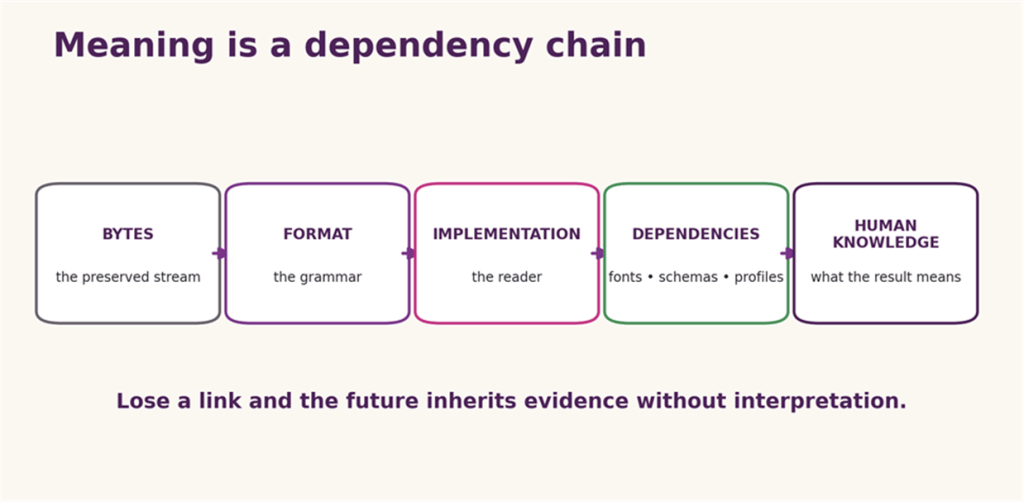
Figure 9: Meaning depends upon more than the bytes; grammar, reader, external resources, and human context all participate in interpretation.
Bytes need a format. The format needs an implementation. The implementation may need fonts, schemas, profiles, codecs, libraries, hardware assumptions, and external resources. The output needs human knowledge to be interpreted as a legal pleading, a scientific measurement, a family photograph, or a very urgent animated cat.
The Storage Encyclopaedia preserves the medium. The Gazetteer finds the byte stream. This Grammar preserves the agreements that let the stream speak. None of the layers is sufficient by itself, and every layer has somebody insisting it is “just” the other one.
The bits may be perfectly preserved. The difficult part is persuading the future to mean the same thing by them.

Glossary
Archive: A format that packages one or more files and metadata; it is not necessarily compressed.
Byte order / endianness: The order in which the bytes of a multi-byte value are stored.
Codec: A method for encoding and decoding a media stream; not the same as a container.
Container: A format that packages multiple streams, objects, or files under one outer structure.
Encoding: A mapping from abstract symbols or values to a byte representation.
Exif: A metadata and image-file convention commonly used by digital cameras, structurally related to TIFF.
File format: A convention specifying the syntax and semantics of bytes in a file.
Fixity: Evidence, usually a cryptographic hash checked over time, that stored bytes have not changed.
FourCC: A four-character code used to identify chunk, stream, codec, or object types in several format families.
Magic number / signature: A byte pattern, often at a fixed location, used to help identify a format.
Media type / MIME type: A label such as application/pdf communicated separately from the content to describe its intended type.
Normalisation: Conversion among equivalent representations into a chosen canonical form; in Unicode, NFC and NFD are common examples.
Parser: Software that interprets a byte stream according to a grammar.
Polyglot: One byte sequence constructed to be acceptable to more than one format parser.
Profile: A constrained selection of a larger format’s features for a particular use, such as a PDF/A conformance level.
Schema: A machine-readable or human-defined contract describing the permitted structure and meaning of data fields.
Serialisation: A representation of structured values as a byte or text stream for storage or interchange.
Significant property: A characteristic that preservation must retain for the object to remain authentic and useful.
Stream: An ordered sequence of bytes or timed packets; in container formats, often one named or typed component.
Syntax / semantics: Syntax defines which structures are valid; semantics define what valid structures mean.
Transitional format: A standardised form that retains legacy features to support migration and compatibility.
UTF: A Unicode Transformation Format, such as UTF-8, UTF-16, or UTF-32.
References and further reading
Reference numbers appear immediately after the relevant text. Primary standards and official documentation are used wherever available; contemporary reporting is retained for the institutional controversies that standards documents do not record themselves.
- V. G. Cerf, ‘ASCII format for network interchange’, RFC 20 (1969): seven-bit ASCII carried in an eight-bit byte, control characters, and the original interchange framing. RFC Editor
- IBM, ‘Extended Binary Coded Decimal Interchange Code (EBCDIC)’: IBM’s description of the EBCDIC character-encoding family. IBM Documentation
- The Unicode Consortium, The Unicode Standard, Version 17.0, Chapter 1: code points, characters, glyphs, and the UTF encoding forms. Unicode Standard
- The Unicode Consortium, Unicode Standard Annex #15, ‘Unicode Normalization Forms’: NFC, NFD, canonical equivalence, and normalisation stability. UAX #15
- The Unicode Consortium, ‘UTF-8, UTF-16, UTF-32 & BOM’: byte order marks and the status of a BOM in UTF-8. Unicode FAQ
- Microsoft, ‘Encodings and line breaks’: CRLF, LF, encoding detection, and editor behaviour in modern tooling. Microsoft Learn
- Y. Shafranovich, ‘Common Format and MIME Type for Comma-Separated Values (CSV) Files’, RFC 4180 (2005): the documented common CSV form and its pre-standard history. RFC 4180
- OWASP, ‘CSV Injection’: spreadsheet formula interpretation of exported, attacker-controlled cell values. OWASP
- The Open Group, POSIX file utility: filesystem, magic-number, and language tests used to classify files; see also the file/libmagic magic database documentation. POSIX file • libmagic manual
- N. Freed, J. Klensin, and T. Hansen, ‘Media Type Specifications and Registration Procedures’, RFC 6838; and IANA’s Media Types registry. RFC 6838 • IANA registry
- Apple, Uniform Type Identifiers, and the retained type-and-creator metadata field: platform type identification beyond filename extensions. Uniform Type Identifiers • Type and creator
- Luke Koch et al., ‘On the Abuse and Detection of Polyglot Files’ (1 July 2024), arXiv:2407.01529. Paper
- MicroPro, WordStar File Format, Release 7: control characters, document/non-document modes, and soft-space and soft-return conventions; surviving manual copy. CP/M Archives
- Deseret News, ‘WordPerfect: Orem company had humble beginnings 10 years ago’ (29 October 1989): Ashton, Bastian, BYU, Orem, and the Data General origin. Deseret News
- Library of Congress, ‘WordPerfect Document Family’: format-family history, structure, identification, versions, and sustainability considerations. Library of Congress
- WordPerfect Software Development Kit, ‘Document File Structure’: documented streaming-file architecture and the shared basic structure of 6.x-and-later formats; archival mirror. SDK mirror
- American Bar Association, ‘Legal tech magic’ (2025), and Corel’s WordPerfect legal-user case study: evidence for the product’s long legal-sector life and valued workflow features. ABA • Corel case study
- Microsoft, Rich Text Format (RTF) Specification, version 1.9.1: groups, control words, destinations, embedded material, and reader behaviour. RTF 1.9.1
- Microsoft, ‘Compound Binary File Format’ [MS-CFB]: sectors, allocation tables, directory entries, storages, streams, and the compound-file signature. MS-CFB
- Library of Congress, ‘Microsoft Word 97–2003 Binary File Format (.doc)’: Compound File Binary packaging, Word streams, format disclosure, and preservation factors. Library of Congress
- Microsoft, [MS-DOC] FibBase: fComplex and cQuickSaves, documenting incremental or quick-save state in binary Word files. MS-DOC FibBase
- Microsoft’s AllowFastSave property, HMRC hidden-data guidance, and the UK Government ‘Share with Care’ checklist: incremental saving and disclosure risks from metadata and concealed content. AllowFastSave • HMRC hidden data • HMG checklist
- Microsoft, ‘Open Packaging Conventions Fundamentals’: packages, parts, content types, relationships, and ZIP mapping. OPC overview
- Ecma International, ECMA-376, Office Open XML File Formats: editions, archive, and present standard text. ECMA-376
- OASIS, ‘OpenDocument v1.0’ (2005): adoption of ODF 1.0 as an OASIS standard. OASIS
- ISO/IEC 26300:2006, Open Document Format for Office Applications (OpenDocument) v1.0: the first ISO/IEC ODF edition. ISO
- ISO, ‘Vote closes on draft ISO/IEC DIS 29500’ (4 September 2007): failed approval criteria and approximately 3,500 national-body comments. ISO news
- ISO, ‘ISO/IEC DIS 29500 ballot resolution meeting’ (5 March 2008): the Geneva BRM and post-meeting vote process. ISO news
- ISO, ‘ISO/IEC DIS 29500 receives necessary votes for approval’ (2 April 2008): final voting result and progression to ISO/IEC 29500. ISO news
- ISO/IEC 29500-4:2016, Transitional Migration Features: the standardised legacy-compatibility component of OOXML. ISO
- Microsoft, useWord97LineBreakRules implementation note: a concrete legacy-layout behaviour within the OOXML compatibility model. Microsoft Learn
- Computerworld, ‘Microsoft admits Swedish employee promised incentives for Open XML support’: contemporaneous reporting, the company’s acknowledgement, and invalidation of the Swedish vote for a separate procedural irregularity. Computerworld
- iTnews, ‘Norway ISO members walk out over OOXML’: contemporaneous reporting of committee resignations and objections to national-body procedure. iTnews
- Adobe Systems, PostScript Language Reference, third edition: language model, operators, graphics state, programming facilities, and document conventions. Adobe PDF
- ISO 32000-1:2008, Document management: Portable document format: Part 1: PDF 1.7: objects, streams, cross-references, incremental updates, page content, and file structure. Published standard copy
- Library of Congress, ‘PDF/A-1, PDF for Long-term Preservation’: archival-profile requirements, disclosure, dependencies, and sustainability factors. Library of Congress
- Microsoft, ‘About Bitmaps’: device-independent bitmap structures, colour tables, scan lines, and bottom-up versus top-down DIBs. Microsoft Learn
- Adobe Developers Association, TIFF Revision 6.0 (1992): Image File Directories, tags, fields, strips, tiles, compression, and extensibility. TIFF 6.0
- ITU-T Recommendation T.81 / ISO/IEC 10918-1, Digital compression and coding of continuous-tone still images: the JPEG coding process and interchange syntax. ITU-T T.81
- Eric Hamilton, JPEG File Interchange Format, Version 1.02: JFIF markers, colour interpretation, units, densities, and thumbnails around JPEG-coded data. JFIF 1.02
- W3C, ‘PNG (Portable Network Graphics) Specification: File Structure’: eight-byte signature, typed chunks, length, CRC, and chunk-property bits. W3C
- GIF89a specification, GNU’s account of the LZW patent problem, and the PNG project’s contemporary history: animation controls, extensions, licensing controversy, and PNG’s origin. GIF89a • GNU: GIF/LZW • PNG history
- W3C, Scalable Vector Graphics (SVG) 2: vector shapes, text, painting, filters, linking, animation, scripting, and document structure. SVG 2
- Microsoft and Adobe, OpenType Specification: the sfnt table architecture, outlines, character mapping, metrics, and layout tables. OpenType
- W3C, WOFF File Format 2.0: web-font packaging, compression, metadata, and reconstruction of input font data. WOFF2
- Electronic Arts, EA IFF 85: Standard for Interchange Format Files: FORM, typed chunks, sizes, padding, and extensible chunk parsing. IFF 85
- Microsoft and IBM, Multimedia Programming Interface and Data Specifications 1.0, RIFF section: RIFF forms, chunks, four-character codes, and multimedia descendants. RIFF specification
- PKWARE, APPNOTE.TXT: .ZIP File Format Specification, version 6.3.10: local headers, data descriptors, extra fields, encryption, and central directory. PKWARE APPNOTE
- W3C, EPUB 3.3: ZIP container requirements, package documents, resources, and navigation. EPUB 3.3
- Oracle, JAR File Specification: ZIP-based Java archives, manifests, signatures, and package conventions. JAR specification
- The Open Group, POSIX tar archive header: file names, sizes, modes, ownership, timestamps, type flags, and sequential archive representation. POSIX tar.h
- P. Deutsch, ‘GZIP file format specification version 4.3’, RFC 1952: gzip members, headers, DEFLATE data, CRC, and original size. RFC 1952
- The Tukaani Project, XZ File Format: streams, blocks, checks, indexes, and padding. XZ format
- Y. Collet and M. Kucherawy, ‘Zstandard Compression and the application/zstd Media Type’, RFC 8878: the Zstandard frame format and decoding requirements. RFC 8878
- Debian Project, deb(5): binary Debian package structure, required ar members, order, control and data tar archives, and supported compression. Debian manpage
- RPM Project, ‘RPM v4 Package Format’: lead, signature, header, tags, and compressed cpio payload; current project documentation. RPM v4
- System V Application Binary Interface, AMD64 Architecture Processor Supplement: ELF identification, headers, sections, segments, relocation, and dynamic linking. x86-64 psABI
- Microsoft, ‘PE Format’: DOS stub, PE signature, COFF and optional headers, sections, data directories, imports, resources, and Authenticode hashing. Microsoft Learn
- Apple, ‘Overview of the Mach-O Executable Format’: headers, load commands, segments, libraries, symbols, and universal-binary context. Apple archive
- TZX technical specification: standard, turbo, pulse, loop, grouping, hardware, and metadata blocks used to reproduce ZX Spectrum tape behaviour. World of Spectrum
- Sinclair file-format documentation, ‘SNA format’: 48K register and RAM snapshot, program counter stored on the stack, and the two-byte side effect. SNA format
- Sinclair file-format documentation, ‘Z80 format’: compressed blocks, extended headers, versions, and emulated hardware models. Z80 format
- Originally by Thomas Harte. Suggestions and additions to tape functionality by Fraser Ross and Greg Cook. UEF specification
- Microsoft, GetPrivateProfileString: the Windows profile/INI compatibility API and implementation-dependent parsing behaviours. Microsoft Learn
- W3C, Extensible Markup Language (XML) 1.0 (1998 Recommendation): elements, attributes, entities, character data, and document syntax. XML 1.0
- T. Bray, ‘The JavaScript Object Notation (JSON) Data Interchange Format’, RFC 8259: data model, syntax, duplicate-name interoperability, numbers, and UTF-8. RFC 8259
- YAML Language Development Team, YAML Ain’t Markup Language, Version 1.2.2: nodes, collections, scalars, schemas, tags, anchors, aliases, and syntax. YAML 1.2.2
- Google, ‘Protocol Buffers Encoding’: field numbers, wire types, varints, length-delimited values, and schema-dependent interpretation. Protocol Buffers
- C. Bormann and P. Hoffman, ‘Concise Binary Object Representation (CBOR)’, RFC 8949: major types, arguments, arrays, maps, tags, and deterministic encoding considerations. RFC 8949
- MessagePack Project, MessagePack specification: compact binary representation of common scalar and collection values. MessagePack
- SQLite Project, ‘Database File Format’ and ‘SQLite As An Application File Format’: 100-byte header, pages, B-trees, journals, and the long-term SQLite 3 compatibility promise. File format • Single-file format
- Library of Congress, ‘dBASE Table File Format (DBF)’: record structure, field descriptors, versions, companion files, code pages, and GIS survival. Library of Congress
- Microsoft, [MS-XLS], ‘Excel Binary File Format (.xls) Structure’: BIFF records inside Compound File Binary storage, workbook structures, and formulae. MS-XLS
- Primary and preservation references for the multimedia boundary: RIFF/WAVE, MP4/ISO Base Media, Ogg encapsulation, and Matroska’s EBML element vocabulary. WAVE (Library of Congress) • MP4 (Library of Congress) • Ogg RFC 3533 • Matroska elements
- PortSwigger, ‘File upload functionality’: security testing for extension, content-type, signature, polyglot, and execution-policy weaknesses. PortSwigger
- OWASP Web Security Testing Guide, ‘Testing Directory Traversal File Include’, and MITRE CWE-23: path canonicalisation and attacker-controlled traversal beyond an intended directory. OWASP • CWE-23
- MITRE CWE-409, ‘Improper Handling of Highly Compressed Data (Data Amplification)’: decompression bombs and resource-exhaustion risk. CWE-409
- WHATWG, MIME Sniffing Standard: browser content-type inference and the security significance of declared versus computed types. WHATWG
- The National Archives, ‘About PRONOM’: official overview of the file-format registry, PUIDs, format signatures, DROID, open-data access, and the contribution process. PRONOM
- Library of Congress, ‘Sustainability of Digital Formats’: disclosure, adoption, transparency, self-documentation, dependencies, patents, and technical protection mechanisms. Library of Congress
- Digital Preservation Coalition, Digital Preservation Handbook: File formats and standards: selection, significant properties, validation, migration, and community support. DPC Handbook
- National Digital Stewardship Alliance, Levels of Digital Preservation: practical maturity guidance across storage, integrity, control, metadata, and access. NDSA Levels
- Linux.com, “Lossy File Compression: (April Fool’s Joke)”, 31 March 2001. https://www.linux.com/news/lossy-file-compression-april-fools-joke/
- Rob/Sophie Baskerville, ‘Confession: The Evil Signature™’ (21 August 2018): the construction and effects of a uuencoded, nested bzip2/gzip decompression bomb placed in an email signature. LinkedIn
- IBM, ‘The IBM punched card’: the 80-column IBM card and its use for approximately 80-byte lines of programs; IBM VGA/XGA Technical Reference Manual (May 1992): VGA display modes and organisation. IBM punched-card history and IBM VGA/XGA Technical Reference Manual.
- Vole, ‘Scunthorpe Sans’: a profanity-censoring font implemented using ligature substitutions and released under CC0. Scunthorpe Sans
- Mateusz Jurczyk, Google Project Zero, ‘CVE-2020-0938: Windows Font Driver Type 1 BlendDesignPositions stack corruption’ (12 January 2021): analysis of an out-of-bounds write in font processing, including the kernel-mode implementation in Windows 8.1 and earlier, and its relocation to fontdrvhost.exe in Windows 10. Google Project Zero
- Microsoft, ‘Block untrusted fonts in an enterprise’: Microsoft’s account of font-parsing attacks and the Windows facility for preventing GDI from loading untrusted fonts. Microsoft Learn

