
Filesystems, formats and the improbable business of finding your data again
From 8.3 to copy-on-write, via a slash nobody has agreed on since 1983.
Part of Sophie’s Cabinet of Computing Curiosities
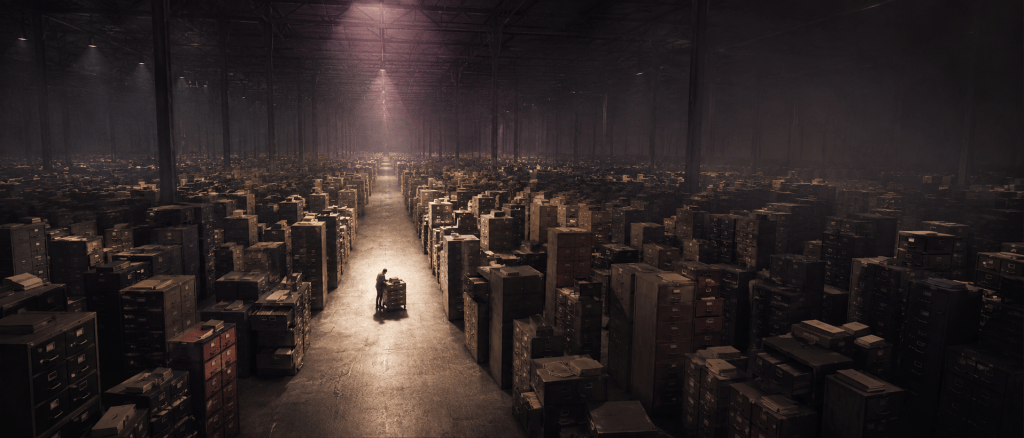
Sophie’s Great Cable Menagerie dealt with the physical ends. Sophie’s Storage Encyclopaedia dealt with where the bits sleep. Sophie’s Compendium of Things That Talk dealt with moving the bits around.
This volume is about how to make sense of what you find; how the stored bits represent the actual files and metadata.
Some images in this article
are generated by

EU AI Act Regulation 2024/1689
| THE GAZETTEER’S PROMISE This is not merely a list of filesystems. It is a field guide to the maps that turn anonymous sectors into named things, the historical compromises that refuse to die, and the entertaining consequences when two operating systems disagree about what a filename is. |
Preface: a map is not the territory, but the operating system needs one
The Storage Encyclopaedia dealt with media: cards, tapes, platters, pits and trapped charge. The Compendium dealt with links that move bits. This volume begins one layer higher, where raw storage is turned into objects that humans can name, applications can open, and operating systems can lose in increasingly sophisticated ways.
A filesystem answers several deceptively simple questions: Which allocation units belong to this object? Where is its metadata? What is its name? Which directory contains that name? Who may read it? What happens if power fails halfway through changing the answer? Modern filesystems also answer questions their ancestors never dreamt of: Which old blocks must remain for a snapshot? Is this block still trustworthy? Can two files share it until one is modified? Is this “copy” really just another set of references?
A file format is a different layer again. A filesystem can faithfully preserve 37,418 bytes without the faintest idea whether they are a JPEG, an executable, a spreadsheet, a ZIP archive or an extremely terse novel. The filesystem knows where the bytes are. The format tells software what the bytes mean.
| THE FIRST RULE A filename is not the file. It is a name in a namespace that leads, through metadata and allocation structures, to the bytes. Confusing those layers is the source of an astonishing quantity of folklore, bugs and support calls. |
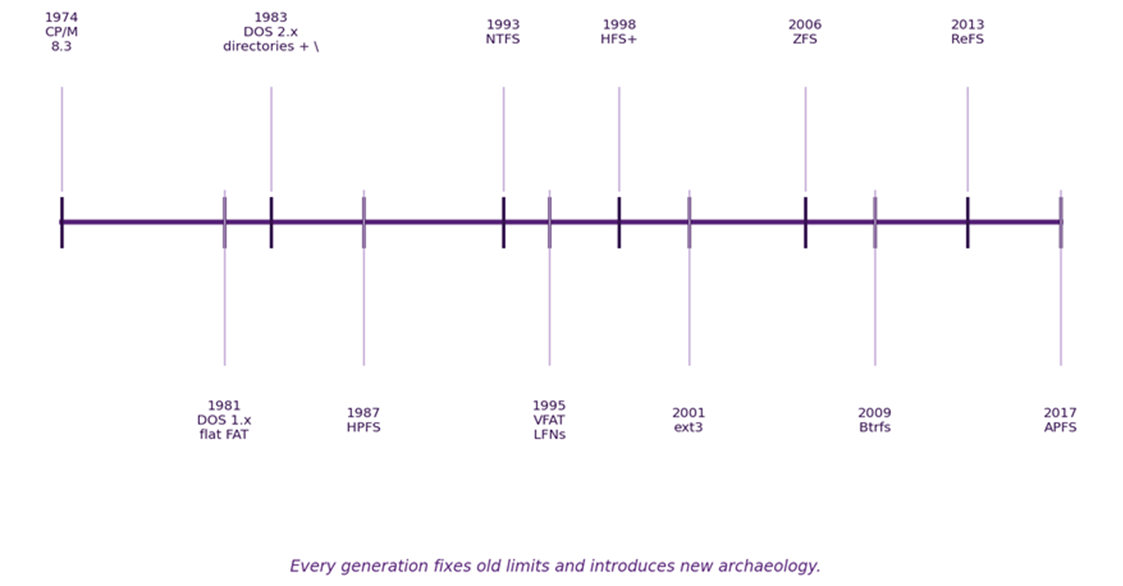
The recurring theme is compatibility. FAT survived because almost everything could understand it. Unix separated names from inodes and accidentally gave us hard links. Windows 95 hid Unicode long filenames inside old FAT directories by making them look like entries ancient software would ignore. NTFS can keep tiny file contents inside the same metadata record that describes them. ZFS and Btrfs make old versions of blocks useful rather than immediately overwriting them. The cleverness is rarely isolated: it is usually cleverness under constraint.
Contents
The layers: medium, partition, volume, filesystem, namespace and format
Storage conversations become muddled because “disk”, “drive”, “volume”, “filesystem”, “directory” and “format” are casually used as if they were interchangeable. They are not. A physical device can contain several partitions; a logical volume can span devices; a filesystem inhabits a volume; the filesystem exposes one or more namespaces; files live in that namespace; and the file format gives meaning to their byte streams.
| Layer | What it contributes | Typical failure |
| Medium / device | addressable storage blocks | media failure, controller failure |
| Partition map | boundaries and type/identity of regions | lost/corrupt partition table |
| Volume | logical container presented to a filesystem | missing member, wrong mapping, encryption unavailable |
| Filesystem | allocation, metadata, consistency rules | corruption, unsupported implementation |
| Namespace | names, directories, links | case/encoding/path mismatch |
| File | logical stream(s) and metadata | deleted name, damaged extents, permissions |
| Format | internal meaning of the bytes | obsolete codec/application, malformed content |
| PRESERVATION LESSON A disk image can perfectly preserve the medium-level bytes while still leaving you without a usable partition map, filesystem implementation, filename encoding, application or format decoder. “We copied the disk” is therefore a beginning, not a complete preservation strategy. |
Before directory trees: CP/M and the flat-floppy worldview
Early filesystems did not so much organise files as put them all in one room and trust you to remember why.
“8.3” came before DOS
MS-DOS inherited its familiar eight-character name plus three-character extension convention from CP/M. The choice became so culturally durable that many operating-system files kept 8.3-safe names long after the technical necessity had vanished. [2–3]
On tiny floppy systems, this was not as absurd as it looks from a modern workstation. A directory could be a compact fixed-format table; the user organised projects by swapping diskettes; and “the files on this disk” was a usable mental model. CP/M even had numbered “user areas”, a primitive organisational device rather than serious access control. [4]
| DRIVE LETTER CONFUSION The Research Machines 380Z provided a particularly memorable example of CP/M’s flexible relationship with floppy hardware. Each usable side of a disk drive was presented as a separate logical drive. On a single-drive system fitted with a double-sided drive, the two sides therefore appeared as A: and C:. With two double-sided physical drives, the first supplied A: and C:, while the second supplied B: and D:. Two single-sided drives, more conventionally, appeared as A: and B:. This was not a universal CP/M rule: physical-disc geometry and logical-to-physical mapping were largely matters for the machine-specific BIOS. It was nevertheless a splendid way to ensure that anyone expecting drive letters to correspond neatly to physical drives was rapidly cured of that assumption. |
DOS 1.x: no subdirectories because there was nowhere to go
DOS 1.0 did not support subdirectories. There was one directory on each volume, what later terminology would call the root. Raymond Chen’s explanation of reserved device names makes the historical dependency wonderfully clear: “magic” names such as NUL had to work everywhere because, at the time, “everywhere” meant the one directory on the disk. [2]
| HISTORICAL NUGGET A surprising amount of modern Windows pathname behaviour is preserved not because it is elegant, but because software written decades ago still expects it. Compatibility is an archaeological force: once enough programs depend on an oddity, the oddity becomes infrastructure. |
The Great Slash Schism: / versus \
Like a knife-wielding lunatic, there are slashes and backslashes everywhere.
DOS 2.0 acquires directories and discovers it has already spent the slash
When MS-DOS 2.0 added hierarchical directories, Microsoft wanted a path syntax compatible in spirit with Unix/Xenix. Unfortunately, DOS 1.x command syntax was already using the forward slash for command options. Microsoft’s own released MS-DOS 2.0 README records a last-minute compatibility change made to match IBM’s PC DOS implementation: use the backslash (\) instead of slash (/) as the path separator, and slash instead of hyphen as the switch character. [1]
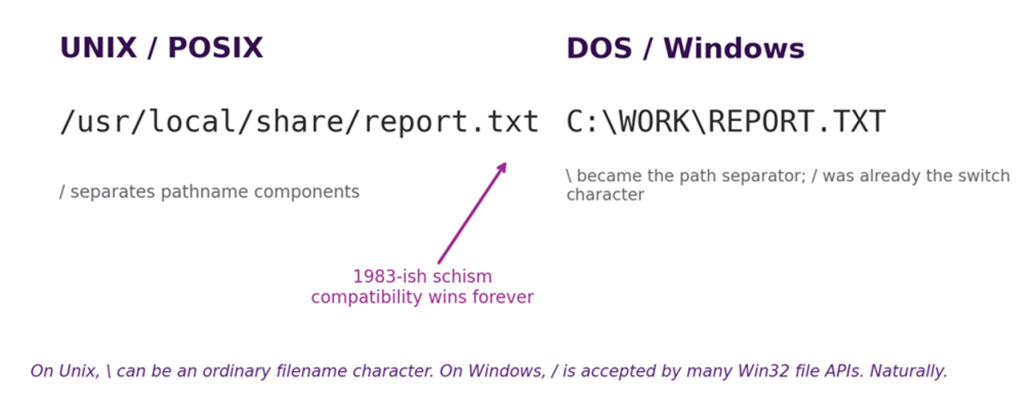
The Great Slash Schism. Nobody planned for this to become a forty-year typography test.
The result persists. POSIX pathnames use slash to separate components, and a slash therefore cannot appear inside one component; the NUL byte is the other fundamental prohibition. A backslash, however, can be an ordinary Unix filename character. Windows conventionally uses backslash as the path separator, yet many Win32 file APIs accept forward slash too. This asymmetry explains the particularly cursed experience of moving names between systems: something that looks like a path on one system may be a perfectly literal filename on another. [9–10,39]
The schism even leaks into URLs. The Web Hypertext Application Technology Working Group URL Standard treats a backslash in a special-scheme URL such as HTTP or HTTPS as an “invalid-reverse-solidus” validation error, yet its parser handles that backslash as a slash in the relevant path states. So a malformed URL such as “https://example.org\path” may still be interpreted in a surprisingly helpful way. This is excellent for compatibility and terrible for teaching humans which diagonal stroke they meant. On Unix, meanwhile, that same backslash may simply be part of a perfectly legal filename. [44]
| COMPATIBILITY LESSON Do not “correct” a separator until you know which namespace is interpreting it. A path is syntax, not typography. Converting every \ to /, or vice versa, can change meaning rather than merely improve style. |
FAT: a linked list with an empire attached
At heart, FAT is just a vast collection of “the next bit is over there” notes. An alarming amount of civilisation was subsequently built on this, and the consequences eventually included most of the planet’s removable storage.
The File Allocation Table idea
FAT’s core idea is gloriously direct. The directory entry identifies the first cluster belonging to a file. The File Allocation Table contains an entry for each cluster; that entry says which cluster follows, or that the chain ends, or that the cluster is free/bad/reserved. To read a fragmented file, follow the chain. [36]
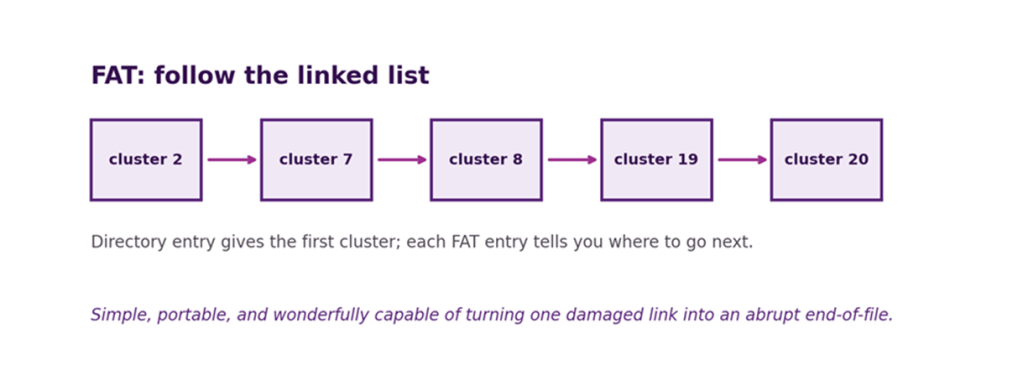
FAT in one picture: a linked allocation chain and a great deal of accumulated compatibility.
FAT12, FAT16 and FAT32 are about cluster-number width
The familiar FAT family names are principally about how many bits are available to identify clusters. More cluster identifiers allow larger volumes without forcing each cluster to become enormous. That matters because the allocation unit is also the granularity of ordinary file space. A 1-byte file generally consumes a whole cluster. Increase cluster size to stretch a small cluster-number space across a bigger disk and the unused tail of every file becomes expensive.
FAT12 dominated floppies; FAT16 scaled into hard disks but ran into cluster-count and size limits; FAT32 expanded the cluster number space and made the root directory a normal cluster chain rather than the fixed root-directory region of FAT12/16. The conceptual structure remained reassuringly familiar, which was exactly the point.
Directories are records too
| FOLDERS AND DIRECTORIES The original term directory made perfect sense when computer use was largely the preserve of specialists. As graphical interfaces brought computing to a much wider audience, designers increasingly represented directories as physical folders, and the friendlier metaphor stuck. In ordinary filesystem use the two terms are effectively synonymous: a folder is the graphical representation of a directory. Strictly, however, some modern interfaces also provide virtual folders that do not correspond to a real directory on disk. |
Classic FAT directory entries are 32-byte records containing the short name, attributes, timestamps, starting cluster and file size. FAT differs from inode-based Unix designs because a great deal of a file’s metadata lives directly in the directory entry. That simplicity makes the disk format easy to implement, but it also helps explain why hard links are not a natural FAT feature: there is no separate file object for multiple directory entries to reference. [21]
| FORENSIC NUGGET FAT deletion traditionally marks a directory entry as deleted and releases the cluster chain for reuse. Until those clusters are overwritten, the bytes may remain. The name and allocation map can disappear before the magnetic or flash representation does. “Deleted” is initially a namespace state. |
Allocation units, cluster sizes and slack
This is, of course, terminology that originates decades before Slack became something you used for team communications.
For the avoidance of doubt, I’ll use the term slack space to clearly differentiate.

Sector, block, cluster: same family, different jobs
A sector is the device’s addressable unit in the traditional disk model; a filesystem block is the filesystem’s unit of I/O and structure; a cluster or allocation unit is the amount of space the filesystem allocates to ordinary file content at a time. Terminology varies by filesystem, and modern devices add their own translation layers, so none of these words should be treated as a universal synonym for “the smallest thing on disk”.
Why cluster size is a trade-off rather than a setting to maximise
Large allocation units reduce the number of units needed to describe a large volume and can improve sequential allocation and metadata scaling. They also waste more tail space for collections of small files. Small units minimise slack space but require larger allocation maps and more bookkeeping. Microsoft’s FAT32 defaults demonstrate the historical compromise: as volumes grow, the default cluster size rises from 4 KiB through 8, 16 and 32 KiB. [38]
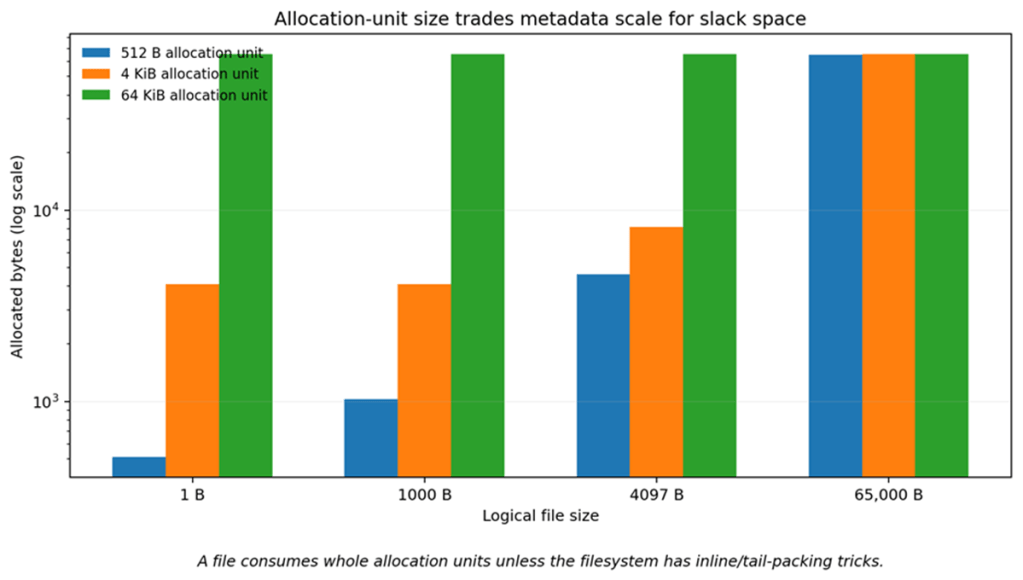
Slack space is the price of rounding file allocation up to whole units.
NTFS similarly fixes cluster size when the volume is formatted; current Windows supports NTFS cluster sizes from small sectors through very large units, with the maximum supported volume and file size rising with cluster size. exFAT permits clusters up to 32 MiB specifically to keep its allocation structures practical on huge media. ext4 normally uses 4 KiB blocks but supports a range from 1 KiB to 64 KiB, subject to architecture and page-size constraints. [15,22,36–38]
| DESIGN LESSON The “best” allocation unit depends on workload. Millions of tiny files and a few multi-terabyte sequential images have different requirements. Filesystem defaults are compromises, not commandments. |
“8.3” names, spaces and the quoting years
Names.can include.any spaces.but shells.may insist.you quote.the path.
The dot is a convention, not eleven bytes arranged as prose
In the classic FAT short directory entry the base name and extension occupy fixed fields: eight bytes plus three. The displayed dot is not stored between them as part of the 11-byte name. DOS converted ordinary short names to uppercase and inherited CP/M’s compact expectations. [3,6]
Spaces were technically possible before they were practically useful
Here is a lovely correction to common memory: DOS could represent spaces inside an 8.3 filename. A name such as “LOOK AT.ME” was legal at the filesystem level. The problem was reaching it. Command-line parsers treated spaces as argument separators, and early DOS did not provide the quoting conventions that later made spaces routine. The filesystem and the command language disagreed about what was comfortably expressible. [11]
When long filenames made spaces normal, a new generation discovered that a perfectly ordinary filename can become two arguments when quotes are omitted. Shell commands, application launch strings, registry associations and scripts all became places where “friendly names” could turn into parsing problems. Or security nightmares. Quoting is not cosmetic; it defines token boundaries.
Windows process creation provides the canonical unpleasant example. Microsoft’s CreateProcess documentation warns that if the application name is omitted and an executable path containing spaces is passed unquoted in the command line, the first whitespace-delimited token may be tried as the program name. Thus an intended path beneath “C:\Program Files\…” can create an opportunity to execute “C:\Program.exe” if permissions and circumstances allow it. The filesystem has done nothing wrong; the parser has simply been asked an ambiguous question. [45]
| PARSER LESSON A filesystem may allow a character that the shell, URL parser, archive format, API or application treats as syntax. “The filesystem accepts it” is therefore not the same as “the path is safe to pass unquoted through five other grammars”. |
VFAT: long filenames hidden in plain sight
C:\BELFRY>llanfairpwllgwyngyllgogerychwyrndrobwllllantysiliogogogoch.bat
‘llanfairpwllgwyngyllgogerychwyrndrobwllllantysiliogogogoch.bat' is not recognized as an internal or external command, operable program or batch file.C:\BELFRY>
(Personally, I always kept my .BATs in C:\BELFRY>)
Compatibility by pretending metadata is something old software ignores
Windows 95 needed long Unicode filenames on disks full of software that understood only old 32-byte FAT directory entries. Redesigning FAT would have made the installed base unhappy. So the long-name machinery was engineered as a compatibility overlay: a file keeps an 8.3 short-name entry, while one or more preceding directory slots carry fragments of the long name. A checksum ties those fragments to the following short alias. [5–6]
The inspired part is the attribute byte. Long-name slots use the combination read-only + hidden + system + volume label, value 0x0F. Older low-level disk utilities were overwhelmingly inclined to ignore entries that looked like volume labels, and the other bits increased the chance of being left alone. The slots also use a zero starting-cluster field and are ordered so a modern implementation can detect orphaned or rearranged fragments. [4–5]
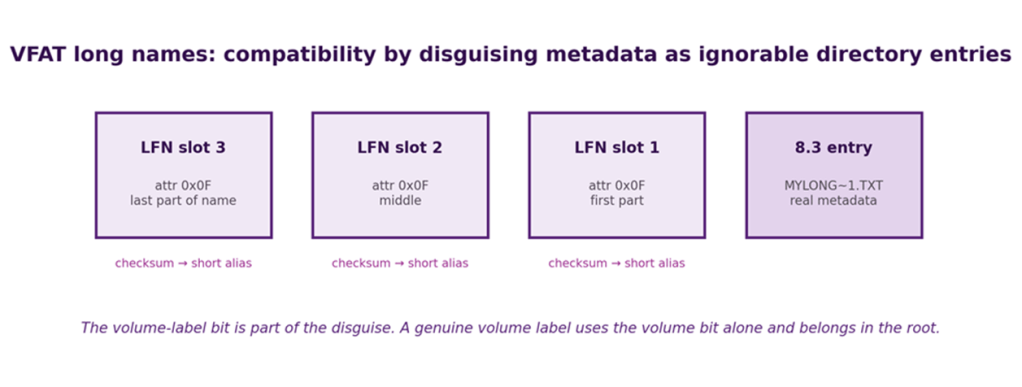
Long filenames wear a compatibility dress and disguise themselves as additional directory entries.
A real volume label is not just “the first LFN entry”
The folklore is sometimes told as “VFAT stores long filenames as extra volume labels”. Mechanically, the volume-label bit is indeed central to the disguise, but a genuine FAT volume-label entry uses the volume attribute without the read-only/hidden/system combination and is valid in the root directory. Long-name slots use 0x0F and can appear wherever long names are needed. Correct code distinguishes them by the full attribute pattern, not merely by choosing the first apparent label. [4–5]
| MYTH CHECK: DOES THE V IN VFAT MEAN “VOLUME”? The long-filename mechanism absolutely exploits the old volume-label attribute, which makes the folk expansion irresistibly neat. I have not been able to find a primary Microsoft source establishing “Volume” as the official expansion of VFAT’s V. Treat the mechanism as fact and the etymology as folklore. The pun is still allowed to look smug. |
Reserved device names and the day NUL/NUL could fell Windows
| “CONfused PRNters AUXiliarly NULlify CLOCKwork COMmands through eLPTical logic.” –Ancient* 1980s Saying (*made up) |
Device names from a world before subdirectories
DOS reserved names such as CON, PRN, AUX, NUL and the COM/LPT device families because the filename syntax doubled as a convenient way to refer to devices. The names remain special in modern Windows naming rules because removing them would break old software and scripts. Their apparent presence “in every directory” is another inheritance from DOS 1.x, when there were no subdirectories to distinguish. [2,9]
Contrast this with the less ambiguous /dev/{devicename} structure in Unix.
Multiple device names: a pathname parser meets history
In March 2000 Microsoft published bulletin MS00-017 for Windows 95, Windows 98 and Windows 98 Second Edition. Windows correctly rejected a path containing a single DOS device name, but failed to check paths containing multiple device names. Attempting to interpret such a path as a file resource could trigger an illegal resource access and crash the system. Microsoft explicitly noted that a hostile hyperlink or HTML mail could entice a user into attempting the access. [8]
This is the historical home of examples remembered as NUL/NUL or NUL\NUL. The interesting lesson is not the exact crash string; it is the composition failure. Each subsystem “knew” about DOS devices, paths and URLs, yet the combined parser reached a state nobody intended.
| SECURITY LESSON Legacy names are part of the attack surface. Validation must happen on the canonical object the operating system will actually open, not merely on the string shape an application expects. A reserved device, alternate spelling or path normalisation rule can turn a harmless-looking name into a different object. |
Legal folklore: what Microsoft actually patented around FAT
| “The Door-Mouse was much too FAT to escape the teapot, although whether this was obvious to a person skilled in the art became the subject of surprisingly expensive litigation.” Alice’s Adventures in Prior Art: Being an Account of Several Curious Claims, Obvious and Otherwise |
Not “FAT”, but the long-name compatibility machinery
The famous Microsoft patents in this area did not claim ownership of the basic File Allocation Table idea. US Patent 5,579,517 is titled “Common name space for long and short filenames”. It describes the technique of providing adjacent directory entries so that a file can have both a user-friendly long name and a compatibility short name. Its own background explicitly discusses the 8.3 limitation and the need to minimise disruption to existing applications and disk utilities. [6]
The patent was subjected to ex parte re-examination after a 2004 request recorded by the US Patent and Trademark Office. Related patents subsequently appeared in litigation, which has helped compress a messy legal history into the much better pub story that “a judge said FAT was obvious”. [7]
| LEGAL FOLKLORE: “FAT WAS OBVIOUS” There is a true kernel buried in the anecdote, but the simple version is misleading. The disputed Microsoft patents concerned long/short filename compatibility mechanisms, not FAT as a whole, and the history includes re-examination, invalidity arguments and litigation rather than one clean U.S. judgement declaring “FAT is obvious”. The design lesson survives intact: a compatibility hack can become important enough to acquire both patents and case law. |
There is something satisfyingly recursive about a filesystem compatibility layer generating a legal namespace problem of its own: what, precisely, does the claim name, and exactly how much prior art points to the same underlying object?
What HPFS actually changed
The High Performance File System appeared with OS/2 1.2. Microsoft’s own documentation describes it by name and credits it with long filenames up to 254 double-byte characters, automatic directory sorting, richer attributes and 512-byte physical-sector allocation rather than FAT-style clusters. HPFS divided disks into bands, maintained allocation bitmaps and used FNODE structures to describe files. [12]
These choices addressed several FAT weaknesses at once: directory lookup, long names, small-file space efficiency and the need for richer server-oriented metadata. HPFS was an evolutionary signpost toward the more metadata-rich filesystems that followed.
Windows NT 3.1 through 3.51 could access HPFS; Windows NT 4.0 dropped that support. Filesystems are therefore not only on-disk formats but ecosystem contracts: once the operating system stops carrying the driver, a perfectly healthy volume can become a preservation problem. [12]
NTFS: everything is an attribute, sometimes even the file
NTFS does not merely store files; it keeps dossiers on them. The Master File Table is where the paperwork lives.
The Master File Table
NTFS revolves around the Master File Table (MFT). Microsoft describes at least one MFT entry for each file on an NTFS volume, including the MFT itself. File size, timestamps, permissions, and content are stored either in MFT entries or in external space described by those entries. In other words, the MFT is both a catalogue and a map. [13]
Resident data: tiny files can live inside metadata
NTFS can store the contents of sufficiently small files inside the MFT record itself. Microsoft’s filesystem comparison calls this “tail packing” and states that small files are made resident in the MFT stream descriptor.
“Sufficiently small” is not a simple figure. A typical MFT record is 1 KiB; this commonly means files of roughly 700 bytes or less, although there is no fixed threshold: the exact amount available depends on the filename and the other attributes already occupying the record.
Once the data no longer fits, the $DATA attribute becomes non-resident and describes runs of clusters elsewhere on the volume. [14]
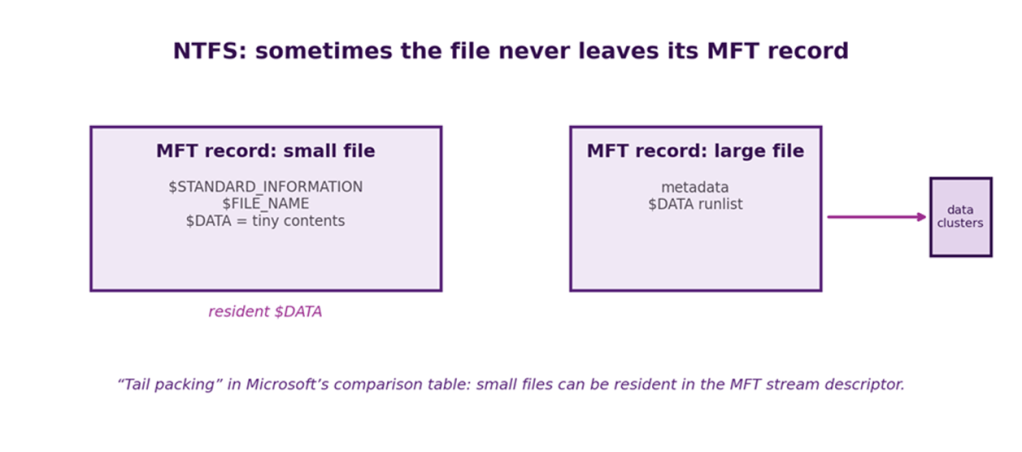
For small files, the answer to “where are the bits?” can genuinely be “inside the metadata record”.
Attributes, streams and links
NTFS models much of a file as typed attributes. $STANDARD_INFORMATION carries common metadata; $FILE_NAME carries names; $DATA carries the ordinary byte stream; other attributes implement indexes, security, object identifiers and more. A file may have named data streams in addition to its unnamed default stream, each with its own allocation and size state. [16]
Hard links let several names refer to the same file record. Reparse points allow name resolution to hand control to other mechanisms such as mount points or symbolic links. Sparse files represent large logical holes without allocating physical clusters. The journal protects metadata consistency, while the USN change journal records changes for consumers such as indexers and backup software. The result is not “FAT but bigger”; it is a richer object model wearing familiar Windows paths.
Cluster size still matters
Current Windows supports NTFS volumes and files whose maximum supported size increases with cluster size: 4 KiB clusters imply 16 TB, 64 KiB clusters 256 TB, and Microsoft documents the newest supported 2 MiB cluster size as reaching “8 PB” (oddly not PiB, may be a documentation error). These are implementation-support limits, not a licence to assume every application layered above NTFS can cope with an 8 PB file. [15]
| ASSESSOR’S RULE When an application says “file size”, ask which size. Logical stream length, allocated clusters, compressed size, sparse extents, alternate streams and filesystem metadata can all make different answers simultaneously correct. |
ReFS: checksums, block cloning and resilience
ReFS takes several ideas that are optional or external in older filesystems and makes them central to a server/storage design. Microsoft documents checksummed metadata, optional integrity streams for file data, very large volumes/files, block cloning and integration with Storage Spaces for repair. Current documentation gives a 35 PB maximum file and volume size. [17,19]
Block cloning: copy the mapping, not the bytes
ReFS block cloning can make a copy operation a metadata remap. Multiple file regions may refer to the same physical region, tracked with reference counts; a later write to shared content triggers allocate-on-write so the files diverge safely. This is especially useful for virtual-machine images where huge logical copies can be created or merged without dragging every byte through the storage stack. [18]
Integrity streams: checksums are a policy too
ReFS always checksums metadata. Checksums for ordinary file data are optional through integrity streams; when enabled, corruption can be detected and, with suitable redundant Storage Spaces, repaired from a good copy. The trade-off is that integrity behaviour and workload performance must be considered together. [19]
| LESSON A checksum answers “is this the same data I wrote?” Redundancy answers “can I obtain a good copy when it is not?” The two are complementary. A checksum without another copy is an unusually precise way to confirm that you are going to be left disappointed. |
Unix: directories point at inodes
Unix refuses to confuse a thing with what you happen to call it, a discipline humans have not yet mastered.
The name lives in the directory; the object lives in the inode
The classic Unix design makes a clean conceptual split. A directory entry associates a name with an inode number. The inode stores the file’s owner, mode, size, timestamps, link count and the mapping to data blocks. Dennis Ritchie and Ken Thompson’s descriptions of early Unix show this name-plus-i-number design at the foundation of the filesystem. [20]
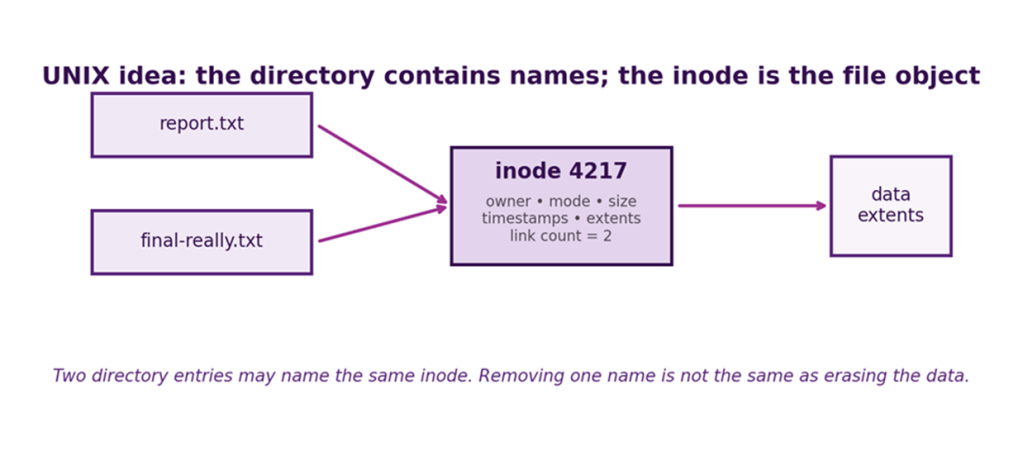
A filename is a directory entry. Hard links make the distinction impossible to ignore.
Hard links: n names, one file object
Because the inode is separate from the name, another directory entry can point at the same inode. The inode’s link count records how many such directory entries exist. Removing one name decrements the count; storage is not reclaimed merely because one pathname disappears. Open file handles add another lifetime wrinkle: a process can continue using an unlinked file until the last open reference is closed.
| INODE LESSON “Which filename is the real one?” is the wrong question for a hard-linked inode. The object may have several equally real directory entries. Names are references, not intrinsic properties of the bytes. |
Directories are files with rules
Traditional Unix directories are specialised files whose contents map names to inode numbers. The kernel does not let ordinary applications scribble arbitrary bytes into them because that would be a quick route to filesystem ruin, but the conceptual simplicity is powerful. The special entries “.” and “..” then become names pointing to the current directory and its parent respectively. A simple convention with important consequences for path walking.
The ext family: blocks, extents and journals
The “ext” is simply “Extended File System”. There was never really an ext1: the 1992 original was just ext, and ext2 was the Second Extended File System, a name which accidentally committed Linux to counting indefinitely. The ext lineage grew with Linux through successful incremental evolution rather than appearing fully armoured from the outset.
| EXTENDED FILE SYSTEM, ext The original ext appeared in April 1992, largely because Linux had inherited the Minix filesystem and was rapidly outgrowing it. Minix was limited to 64 MB filesystems and very short filenames; ext raised the filesystem limit to 2 GB and allowed filenames up to 255 characters. |
ext to ext2
ext had some distinctly first-attempt qualities. It did not maintain separate access, inode-change, and data-modification timestamps, and it tracked free blocks and inodes using linked lists. As a filesystem filled and changed, those lists became unsorted, allocation became poor and fragmentation/performance deteriorated.
So in January 1993, Rémy Card, Theodore Ts’o and Stephen Tweedie produced ext2 as a substantial redesign. It introduced, among other things:
- the separate Unix-style timestamps;
- variable block sizes;
- much better free-space management using bitmaps and block groups rather than ext’s degrading linked lists;
- an explicitly extensible on-disk format, with room for future compatible features;
- much larger potential filesystem sizes;
- the familiar inode/block-group architecture that became the basis of the later iterations.
ext2 to ext3: add a journal
ext3 added a journal, essentially a small transaction log describing filesystem changes that are in progress. Before important metadata changes, such as allocating blocks, creating directory entries or updating inodes, are considered complete, the filesystem records enough information in the journal to make the operation recoverable. Once the transaction has safely reached the journal, the corresponding metadata can be written to its normal locations on disk. If power disappears halfway through, ext3 can examine the journal at the next mount and replay completed transactions or discard incomplete ones, restoring the filesystem to a consistent state. This was a considerable improvement over ext2, where an unclean shutdown could require fsck to inspect much of the entire filesystem and reconstruct what had happened to get to a self-consistent state.
Crucially, journalling does not normally mean that every byte of file data is written twice. In ext3’s usual data=ordered mode, metadata is journalled and new file data is written to its final location before the metadata transaction that refers to it is committed. Other modes trade safety against performance: data=writeback relaxes that ordering, while data=journal journals file contents as well as metadata. The journal therefore primarily protects filesystem structural consistency, not the truth or completeness of the user’s data. A perfectly consistent filesystem can still contain a document whose last paragraph vanished when the power did. Journalling is crash recovery, not a backup system.
ext3 to ext4: extents
ext4 retained that lineage while adding extents, larger addressing, delayed allocation and many other scaling features.
Block groups and locality
ext4 divides a filesystem into block groups so related inodes and data can be kept reasonably close. With the typical 4 KiB block size, the default group contains 32,768 blocks, or 128 MiB. The allocator attempts to keep a file’s blocks within a group where practical, reducing fragmentation and seek costs on rotating media while still helping metadata locality on modern devices. [22]
Extents: say “this run of blocks” rather than list every block
An extent describes a contiguous range. ext4 stores an extent tree whose root fits into the inode’s traditional block-map area; the first few extents can therefore be represented without a separate metadata block. This scales vastly better for large contiguous files than a long list of individual block pointers. [21–22]
Journalling protects consistency, not necessarily every byte
ext4 inherited ext3’s journalling model but moved from the original JBD layer to its expanded successor, JBD2. The principle remains much the same: avoid leaving filesystem metadata halfway through a structural change after a crash. In the default data=ordered mode, metadata is journalled while associated ordinary file data is written to its final location before the metadata transaction is committed; full data journalling remains available but slower. JBD2 extends the machinery for ext4’s larger world, including 64-bit block numbers, journal checksums and newer facilities such as fast commits. The internal journal is itself normally a hidden file, commonly inode 8. [23]
So ext4 did not replace ext3’s crash diary. It gave it larger page numbers, better error checking, and rather more paperwork.
| CRASH-CONSISTENCY LESSON A journal is not a backup and does not magically preserve the last application-level state. It is primarily a mechanism for making filesystem updates recoverable and structurally consistent after interruption. |
XFS, JFS and the B-tree school
As disks, files and directories grew, balanced trees and extent maps became recurring answers. SGI’s XFS was designed for large files and parallel I/O; IBM’s JFS carried journalling and tree-based structures from enterprise systems into other environments. Both are reminders that “Unix filesystem” is a family resemblance, not one on-disk format.
ReiserFS pushed tree-based organisation aggressively, particularly for directories and small files, and was technically influential in Linux around the turn of the century. Its eponym later became exceptionally awkward: Hans Reiser, its principal developer, was convicted in 2008 of murdering his wife, Nina Reiser, and was later sentenced to 15 years to life after the conviction was reduced to second-degree murder following his cooperation in recovering her body. The filesystem’s engineering history is independent of that crime, but the permanent association demonstrates one practical advantage of impersonal technical names. [46]
ReiserFS subsequently reached a more ordinary technical end. After a deprecation period, the Linux kernel removed it in the development cycle that became Linux 6.13; Jan Kara’s removal commit was titled, with admirable finality, “reiserfs: The last commit”. [47]
| NAMING LESSON Naming a filesystem after what it does may lack romance, but an acronym is considerably less likely to acquire an unforeseen biography. |
| TAXONOMY NUGGET Filesystems tend to converge on the same mathematical furniture: B-trees or relatives for scalable indexes, extents for contiguous runs, checksums for integrity, logs or copy-on-write for crash consistency, and caches everywhere because storage is never as fast as someone wants. |
Btrfs and ZFS: copy-on-write changes the mental model
Traditional filesystems edit the page. Copy-on-write filesystems write a new page and leave the old one lying around as evidence.
Do not overwrite the old block
Copy-on-write (COW) turns the traditional update model inside out. Rather than overwrite an in-use block, write the changed data elsewhere and then update metadata to point at the new version. OpenZFS’s documentation makes the consequence wonderfully explicit: almost everything distinctive about ZFS follows from the rule that an in-use block is never overwritten. [25]
Copy-on-write makes snapshots a reference-management problem rather than a bulk-copy problem. A familiar technology solution: move the problems elsewhere, preferably to where they are Somebody Else’s Problem.
Snapshots and clones become cheap
If the old tree already remains valid, a snapshot can preserve that root while the live filesystem moves on. ZFS snapshots are nearly instantaneous and initially require almost no additional data space; Btrfs similarly provides writable/read-only snapshots and reflinked copies. Space is consumed as versions diverge and old blocks must remain referenced. [24,27]
| SNAPSHOT ≠ BACKUP A snapshot is wonderfully useful against accidental change and for consistent local recovery, but it commonly shares the same storage, controller, administrator and failure domain as the live filesystem. Replicate important snapshots elsewhere. Geography remains a feature. |
Checksums finally let the filesystem distrust the disk
Btrfs checksums data and metadata and can repair corruption when redundant copies exist. ZFS stores a block checksum in its parent pointer, so a damaged block cannot authenticate itself; scrubs can read the tree, detect latent corruption and repair from redundancy where available. [24,26]
Btrfs documents a 16 EiB on-disk maximum file size with a practical 8 EiB Linux VFS limit. Numbers at this scale are useful less because anyone needs one eight-exbibyte file today and more because they demonstrate that the arithmetic has stopped being the immediate bottleneck. [24]
Apple: HFS, HFS+, forks, and APFS
Apple’s filesystems have long treated “a file is just a stream of bytes” as an unnecessarily limiting suggestion.
HFS and the allocation-block penalty
Classic HFS used 16-bit allocation-block numbers. A volume could therefore have fewer than 65,536 allocation blocks, so larger disks forced larger blocks and increasingly comical slack space for small files. HFS Plus expanded allocation block numbers to 32 bits, allowing much smaller allocation units on large volumes and therefore far less wasted in slack space. [28]
Resource forks: a file can have more than one meaningful stream
Classic Mac files could have a data fork and a resource fork. The resource fork held structured resources such as menus, icons and application data that did not naturally belong in the main byte stream. HFS Plus preserved this two-fork model and also introduced richer attribute storage. Moving such files through filesystems that understand only one unnamed stream is why Mac interchange accumulated sidecars and packaging conventions: the problem is not copying bytes, but preserving the full file object.
Unicode is not merely “support 255 characters”
HFS Plus stores names as Unicode, up to 255 characters, and specifies canonical decomposition rules. A visually identical accented character can have more than one Unicode encoding; the filesystem therefore normalises how names are stored and compared. HFSX can provide case-sensitive comparison. Cross-platform copying must reckon with these rules rather than assuming that a filename is just an opaque display string. [28]
APFS: cloning, snapshots and shared space
APFS replaced HFS+ as Apple’s default on modern platforms. Apple highlights cloning, snapshots, space sharing between volumes, sparse files, fast directory sizing and atomic safe-save operations. Its copy-on-write metadata and flash-oriented design are modern answers to the same old problem: keep the namespace consistent while changing where the bits live. [29]
| MAC LESSON A “file” may be more than the bytes returned by the obvious open/read call. Forks, extended attributes, ACLs, streams and Finder metadata all create information that can be silently lost when crossing to a less rich filesystem. |
Optical namespaces: ISO 9660, Joliet, and UDF
One disc, several maps, and every operating system confidently insisting that its view is the obvious one.
Same sectors, several directory maps
Optical media produced one of the nicest demonstrations that a namespace can be metadata layered over shared content. A disc can contain ISO 9660, Joliet and UDF indexes that independently reference the same data files. Microsoft’s image-mastering documentation explicitly notes that these filesystem headers can coexist without duplicating the underlying data. [30–31]
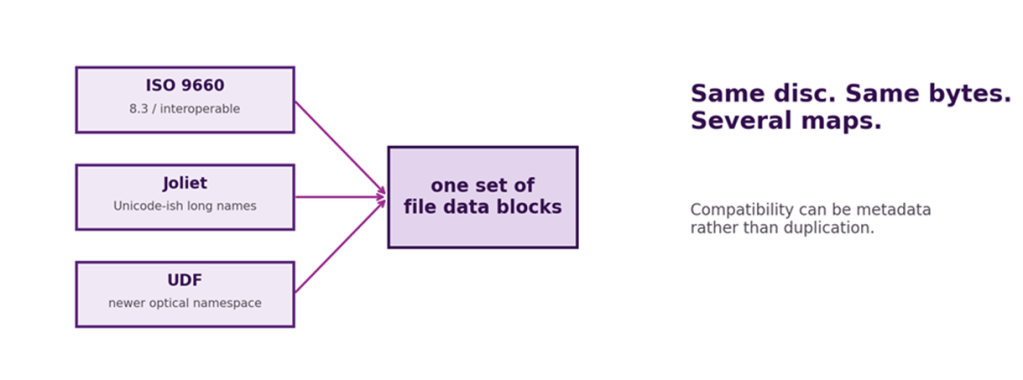
Same bytes, several maps: compatibility as parallel namespaces.
ISO 9660 and the tyranny of interchange
ISO 9660 was designed for interchange, which means conservative naming and structural rules bought broad readability. Microsoft’s summary describes Level 1 with 8.3 names, Level 2 with longer names, and Level 3 as removing the 2 GB file limit. Joliet layers Unicode-oriented longer names while retaining the ISO namespace. UDF became the more common modern optical filesystem, especially on DVDs and rewritable media. [30–31]
ECMA-119, the standard corresponding to ISO 9660, reached a sixth edition in December 2025. That is a delightful reminder that “old optical format” and “dead standard” are not synonyms. Interchange formats can remain worth maintaining long after their cultural peak. [30]
Other delightful species: Amiga, Acorn and OpenVMS
Amiga, Acorn, and OpenVMS remind us that there was never one inevitable way to organise files, only several incompatible ways to become deeply attached to one.
Amiga: DOS0 through DOS5, because one filesystem name was too easy
The Linux AFFS documentation still enumerates the Amiga variants as DOS0 through DOS5: original filesystem, Fast File System, “international” versions that fixed case handling for accented letters, and directory-cache variants. All support block sizes from 512 bytes to 32 KiB. The sequence is a miniature history of real-world filesystem evolution: performance fix, internationalisation fix, caching fix, then combinations thereof. [32]
Acorn/RISC OS: file type is metadata, until another system needs a suffix
RISC OS FileCore stores file type separately from the filename. When such files cross into systems that do not understand the metadata, a convention appends a hexadecimal suffix such as “,ffb” to represent a BASIC file type. The Linux ADFS driver documents this translation explicitly. It is a perfect Gazetteer specimen: one operating system’s metadata becomes another system’s filename syntax. [33]
OpenVMS Files-11: the version number is part of the name
OpenVMS Files-11 is delightfully explicit about versions. A traditional specification looks like DEVICE:[DIRECTORY.SUBDIRECTORY]NAME.TYPE;VERSION, and the version number may run from 1 to 32767. Save a file again and the system can create another version rather than overwriting the previous one. [34–35]
ODS-2 historically used comparatively constrained names and stored them uppercase. ODS-5 extended the character set, length and case preservation to make OpenVMS more comfortable serving files from Windows and Unix worlds. The current VSI documentation allows name plus type up to 236 8-bit characters or 118 16-bit characters on ODS-5. [34]
| HISTORICAL NUGGET OpenVMS users had routine file versioning in the pathname decades before cloud sync products rediscovered “version history” and put it behind a cheerful clock icon. |
Names are data: case, Unicode, separators and forbidden characters
A filename is text right up until an operating system, filesystem or Unicode standard decides to make that statement unexpectedly complicated.
Case-sensitive, case-preserving and case-folding are three different things
A filesystem can preserve the case you typed while comparing names without regard to case; it can compare case-sensitively; or it can force names into one canonical case. NTFS is case-preserving and can support case-sensitive semantics in selected contexts. HFS+ normally preserves but case-folds. Traditional OpenVMS ODS-2 stores uppercase. Unix filesystems commonly treat bytes with different case as different names. Copying a tree between these models can create collisions that were impossible at the source.
Unicode normalisation: visually identical does not mean byte-identical
Unicode permits multiple encoded sequences for some visually equivalent text. HFS+ mandates decomposed canonical forms; other filesystems and applications may preserve a different normalisation. A sync tool, security policy or archive extractor that compares raw strings in one place and normalised names in another can misidentify duplicates or create files that appear identical to a human. [28]
Reserved characters are parser decisions
POSIX reserves slash as the separator and NUL as the string terminator, leaving almost everything else technically available in a pathname component. Windows reserves a broader family of punctuation and device names in Win32 naming rules. URLs use forward slash. Shells assign special meaning to spaces, wildcards, quotes, dollar signs, backslashes and more. Every crossing between these grammars needs an explicit encoding or escaping policy. [9,39]
| THE NAME RULE Never apply policy to one spelling and open another spelling. Normalise, resolve and authorise the same object representation that the filesystem will actually use. |
Limits: when “more than anyone will ever need” meets reality
Filesystem limits are exceptionally good at becoming folklore because there are several different ceilings: the on-disk field width, the filesystem driver’s supported limit, the operating system’s block-device limit, the formatter’s policy limit, the API’s pathname limit and the application’s own assumptions. The table below therefore labels representative practical or documented limits rather than pretending one number applies everywhere.
| Filesystem | Representative max file | Representative max volume | Limit notes |
| FAT32 | 4 GiB − 1 byte | implementation-dependent; commonly up to TiB scale | file size field is 32-bit; cluster/sector geometry and OS tools constrain volumes |
| exFAT | 64-bit file size field | spec theoretical ~64 ZiB; recommended ~512 TiB | clusters up to 32 MiB; implementation support matters |
| NTFS | up to 8 PB on current Windows with 2 MiB clusters | up to 8 PB on current Windows | 4 KiB default cluster gives 16 TiB supported maximum |
| ReFS | 35 PB | 35 PB | current Microsoft documented limit |
| ext4 | 16 TiB at common 4 KiB blocks with extents | on-disk arithmetic can reach ZiB scale | practical kernel/device limits lower; block size matters |
| Btrfs | 16 EiB format / 8 EiB practical Linux VFS | very large 64-bit address space | practical deployments constrained far below arithmetic |
| ISO 9660 | Level 1/2 commonly 2 GiB; Level 3 removes that limit | optical-medium sized | implementation and interchange level matter |
| OpenVMS ODS-2/5 | implementation/version dependent | volume-set and platform dependent | file version number 1–32767; name limits differ ODS-2/ODS-5 |
Microsoft’s own filesystem comparison lists FAT32’s maximum file at 4 GiB, exFAT and NTFS with 64-bit file-size fields, and current NTFS documentation refines the supported size by cluster size. The exFAT specification is a particularly good example of “field width is not product guidance”: its volume-length field permits absurd theoretical sizes, while the specification recommends a much smaller cluster-count regime that works out around 512 TB with the largest clusters. [14–15,36]
ext4’s documentation similarly demonstrates why “the max ext4 size” is incomplete. Block size changes both filesystem and per-file ceilings; a 4 KiB extent-based file is documented up to 16 TiB, while 64-bit filesystem block addressing makes the theoretical filesystem space vastly larger than typical Linux deployments. [22]
| LIMITS LESSON A huge theoretical maximum is often just proof that the designer used enough bits. Ask what the shipping OS, formatter, boot environment, backup product and application actually support. |
Filesystems versus file formats
A filesystem tells you where the bytes live. A file format tells you what they mean. Archives, naturally, decided this distinction was far too tidy.
Where it is versus what it is
A filesystem maps names and metadata to byte streams. A file format gives structure and semantics to those bytes. You can store a PNG on FAT32, NTFS, ext4, APFS or inside a ZIP archive without changing the PNG format. Conversely, an NTFS volume can contain almost any file format because NTFS does not need to understand the contents.
Extensions are hints, signatures are evidence, parsers are the verdict
Filename extensions are conventions used by shells and applications. They are useful but not authoritative. Many formats carry magic numbers, signatures or internal headers; MIME types add another classification layer; container formats such as ZIP, RIFF, ISO Base Media and Matroska hold substructures with their own names and metadata. A robust identification workflow uses more than the final dot in the pathname.
A .docx Word document is itself an example: the file is an Open Packaging Conventions ZIP package containing XML parts, relationships and embedded media. The filesystem sees one byte stream; Word sees a document; a ZIP tool sees a container; an XML parser sees multiple structured documents. None is “wrong”. They are different understandings of the same bits.
Archives are little filesystems pretending to be files
A ZIP or tar archive has names, directory-like prefixes, metadata and file contents inside one outer file. Extracting it therefore crosses two namespace models: the archive’s and the destination filesystem’s. That transition is where separator rules, forbidden names, case collisions, symbolic links and path traversal stop being abstract format trivia and become security decisions.
| FORMAT LESSON Do not conflate extension, MIME type, magic value, container and semantic validity. A file can have the “right” extension and still be malformed; it can have no extension and still be perfectly identifiable. |
Deletion, recovery and forensic ghosts
Deleting a file has traditionally meant destroying the directions rather than the destination. Modern storage has become rather better at disposing of the body.
Unlinking a name is not erasing a medium
In inode-based filesystems, unlink removes a directory entry and decrements a link count. In FAT, deletion releases the directory entry and allocation chain. In both cases the storage blocks may survive until reused. Journals, snapshots, copy-on-write trees, backups and SSD translation layers can create further copies or references. The word “delete” therefore describes a logical operation before it describes a physical outcome.
Carving can recover bytes without recovering identity
Forensic carving looks for file-format structure in unallocated space without relying on the original filesystem metadata. It can recover recognisable byte sequences after directory information is gone, but it may not recover the original filename, timestamps, ownership or even the correct fragmentation order. Recovering “a JPEG” is not the same as recovering “the photograph called evidence-final.jpg with provenance intact”.
TRIM and encryption changed the recovery folklore
On SSDs, discarded logical blocks can be communicated to the device through TRIM/discard, allowing the controller to erase or recycle flash pages independently. This can drastically reduce the window in which traditional undelete assumptions hold. Encryption adds another boundary: ciphertext blocks without the relevant key material may be physically present yet practically unrecoverable.
| FORENSIC RULE Preserve the original, capture at the lowest useful layer, record hashes, and distinguish recovered content from recovered metadata. A plausible filename reconstructed after the event is not provenance. |
Security: the namespace is a trust boundary
Once names can redirect, alias, escape, race or conceal data, the filesystem namespace stops being bookkeeping and becomes part of the security model.
Path traversal and canonicalisation
Applications frequently make an authorisation decision about a textual path and then ask the operating system to resolve it. If the two operations do not use the same canonicalisation rules, “inside this directory” can become an illusion. Parent components, alternate separators, case folding, Unicode normalisation, symlinks, mount points and platform-specific reserved names all alter what a string ultimately names.
Links and races
A symbolic link intentionally redirects resolution to another path. A hard link provides another name for the same object. Both are useful; both defeat security logic that assumes one pathname uniquely defines one object. Time-of-check/time-of-use races add motion: a path can resolve to one object when checked and a different object when opened if an attacker can modify namespace components in between.
Alternate streams and metadata
NTFS named streams demonstrate why scanning only the unnamed data stream can miss content associated with a file. Extended attributes, resource forks and filesystem-specific metadata create similar blind spots. Security tools must define whether they protect the pathname, the file object, every stream/fork, or some reduced view of it.
Archive extraction is cross-filesystem path handling
An archive entry named by an untrusted producer is not automatically a safe destination path. Extraction should resolve each entry against an intended root, reject escapes and dangerous link behaviours, and handle names that collide after the destination filesystem applies its case or Unicode rules. The archive’s idea of a filename must not silently overrule the host filesystem’s security boundary.
| ASSESSOR’S RULE Ask two questions: “What string did the application validate?” and “What object did the filesystem finally open?” If the answers pass through different normalisation, link or device-name logic, the gap is part of the attack surface. |
Network and object namespaces
Sometimes the path names a remote file. Sometimes the slash is decorative. Sometimes location has been replaced by identity altogether.
A remote filesystem exports semantics, not just bytes
NFS and SMB make a remote namespace look local, but the illusion has edges. Case rules, locking, identity mapping, ACL models, file IDs, rename atomicity and caching semantics may differ between server, protocol and client. The path string is only the visible tip of a distributed consistency problem.
Object stores: the slash may be theatre
Object storage usually addresses objects by keys in a flat or implementation-defined namespace. User interfaces commonly treat slash characters inside keys as “folders”, but the hierarchy may be a presentation convention rather than an on-disk directory tree. This is simultaneously liberating and a rich source of migration surprises for software that assumes directories are first-class objects.
Content-addressed storage: ask what it is, not where it was
Content-addressed systems identify objects by a digest of their content rather than primarily by a human path. Merkle trees extend the idea so a root digest can commit to a hierarchy of objects. Git is the familiar everyday example: human branch and pathname names ultimately lead to content-addressed objects. This does not abolish namespaces; it separates mutable human references from immutable object identity.
| FUTURE-PAST LESSON The filesystem world keeps rediscovering the virtue of separating human names from object identity. Unix did it with inodes. Modern content-addressed systems do it with hashes. The details differ; the instinct is recognisably related. |
The future
More semantics, more checksums, fewer honest directories
The future is unlikely to be one universal filesystem. Different layers optimise for different failure domains: local flash wants low write amplification and snapshots; servers want integrity, deduplication and huge namespaces; clusters want distributed consensus and failure isolation; object stores want scale and immutable versions; archival systems want fixity and format longevity.
Three trends are particularly durable. First, content integrity is moving closer to the filesystem through checksums, scrubs and authenticated structures. Second, copying is increasingly a metadata operation through reflinks, block cloning and snapshots. Third, the boundary between local filesystem and distributed object namespace is becoming less obvious to applications, while the security consequences of pretending they are identical become more obvious to assessors.
Persistent memory and byte-addressable storage may change allocation granularity, but they do not abolish naming, ownership, crash consistency or the need to recover from human mistakes. A future medium can make access nanoseconds faster and still contain a directory called FINAL_final_v7_really-final.
| PREDICTION The next filesystem will promise vastly more capacity, instant snapshots, stronger integrity and simpler administration. Someone will still lose a file because they saved it in the wrong directory. Human compatibility is the one legacy feature nobody has (yet) managed to deprecate. |
Master taxonomy
The table deliberately mixes historical, current and specialist filesystems. The point is not a beauty contest; it is to show how different designs answer the same questions: where metadata lives, how names map to objects, how blocks are allocated and what happens after a crash.
| Family | Namespace / object model | Allocation / consistency | Character |
| FAT12/16/32 | directory entry owns most metadata; short names + VFAT overlay | linked cluster chains; no journal | simple, ubiquitous, compatibility fossil |
| exFAT | FAT-family directory sets with Unicode names | bitmap + optional FAT chains; no journal | flash/removable scale without NTFS complexity |
| HPFS | sorted directories + FNODEs | 512-byte sector allocation; richer metadata | important OS/2 bridge between FAT and NTFS era |
| NTFS | MFT records + typed attributes; links/streams | extents/runlists; metadata journal | rich Windows object model; tiny resident files |
| ReFS | Windows namespace + resilient metadata | checksums, allocate-on-write, block clone | large-scale resilience and virtualisation |
| ext4 | directory name → inode | block groups, extents, jbd2 journal | mature general-purpose Linux workhorse |
| XFS | inode + scalable B-tree indexes | extent/B-tree allocation + journal | large files, parallel scale |
| Btrfs | subvolumes, snapshots, inodes | COW extents; data+metadata checksums | integrated volume management and reflinks |
| ZFS | datasets, snapshots, clones | COW tree; end-to-end checksums | filesystem + volume manager as integrity system |
| HFS+ | catalog B-tree; forks; Unicode normalisation | allocation bitmap + extents; journal option | classic Mac richness with historical baggage |
| APFS | volumes sharing container space; clones/snapshots | COW metadata, sparse files, cloning | modern Apple flash-oriented design |
| ISO 9660/Joliet | read-only interchange namespaces | extent-based optical layout | compatibility above elegance |
| UDF | portable optical/removable namespace | version/implementation dependent | richer successor for optical media |
| Amiga FFS/AFFS | Amiga namespace variants | 512 B–32 KiB blocks; caches/FFS variants | delightfully versioned DOS0–DOS5 family |
| Acorn ADFS/FileCore | RISC OS metadata incl. file types | FileCore maps/directories | file type may become a suffix such as ,ffb elsewhere |
| OpenVMS Files-11 | device:[dir]name.type;version | ODS structures, extents, versioned files | versioning as everyday pathname syntax |
Choosing a filesystem by requirement
| Requirement | Usually favours | Watch for |
| Maximum interoperability | FAT32 / exFAT / ISO/UDF | feature loss, 4 GiB FAT32 file limit, filename rules |
| Windows workstation/server | NTFS | cluster size, ACL/stream semantics, VSS/application limits |
| Resilient Windows storage | ReFS | feature matrix by Windows edition/workload |
| General Linux | ext4 / XFS | inode/block sizing, journal/data guarantees |
| Snapshots + checksums | ZFS / Btrfs | RAM/space planning, COW fragmentation, replication discipline |
| Apple platform | APFS | cross-platform metadata/normalisation semantics |
| Legacy recovery | whatever the original expects | driver, reader, code page, filename encoding, tools and patience |
| Long-term preservation | documented open format + fixity + migration | filesystem longevity is not file-format longevity |
Conclusions: eventually, every path becomes archaeology
Filesystem history begins with wonderfully modest ambitions: fit a directory on a floppy, remember which clusters belong to a file, and perhaps allow eight useful characters before the dot. Then storage grew, names became international, machines acquired users and networks, crashes became unacceptable, attackers became interested, and “where are my bits?” expanded into a surprisingly philosophical question.
The recurring pattern is abstraction under pressure. FAT hides fragmentation behind a cluster chain. Unix separates names from inodes. VFAT hides long Unicode names behind entries old software will ignore. NTFS turns files into bundles of attributes and sometimes stores tiny contents inside metadata. Journals make interrupted updates recoverable. Copy-on-write filesystems preserve old trees, making snapshots and clones cheap. Object stores finally question whether a directory has to be a thing at all.
And yet nothing has removed the oldest problems. Names still collide. Paths still need quoting. Metadata still gets lost crossing systems. Huge theoretical limits still meet smaller application limits. “Delete” still means different things at different layers. A filename remains a promise between software components, and promises made in 1983 are surprisingly difficult to renegotiate.
| THE LAST RULE If you need to find the bits, first identify which map you are holding. Then preserve the map as carefully as the territory. |
The storage medium remembers the bits. The filesystem remembers where they belong. The format remembers what they mean. Successful preservation requires all three, plus enough surviving software or documentation to persuade a future machine to agree.

Glossary
Allocation unit / cluster: Smallest ordinary unit of storage allocation to a file in many filesystems.
Block: Filesystem or device unit used for data and metadata; meaning varies by layer.
B-tree: Balanced search tree widely used for scalable directories, extents and metadata indexes.
Canonicalisation: Converting a path/name to a consistent representation before comparison or use.
Copy-on-write (COW): Update method that writes new blocks elsewhere and switches references rather than overwriting live blocks.
Directory entry: Namespace record associating a name with file metadata or an object identifier.
Extent: A contiguous run of allocation units described by start and length.
File format: Rules giving semantic meaning and internal structure to a file’s bytes.
Fixity: Confidence that stored content has not changed, commonly checked with cryptographic hashes.
Fork / stream: One of several byte streams or metadata-bearing components associated with one file object.
Hard link: Additional directory entry referring to the same file object/inode.
Inode: Unix-style metadata object identified by number; stores file metadata and allocation mapping, not the filename itself.
Journal: Log used to make filesystem updates recoverable after interruption.
MFT: NTFS Master File Table: central collection of file records and attributes.
Namespace: Rules and structures by which objects are named and located.
Reflink: Copy-like reference that initially shares underlying extents, splitting on write.
Resident data: File contents stored directly inside a metadata record rather than separate data clusters.
Slack space: Allocated but unused tail space caused by rounding a file up to whole allocation units.
Snapshot: Point-in-time view, often implemented by preserving references to old blocks.
Sparse file: Logical file whose unwritten holes consume little or no physical storage.
Symlink: Symbolic link: a file-like object whose content redirects pathname resolution.
VFAT: FAT long-filename extension/driver family; long-name slots use the 0x0F attribute combination.
Volume: Logical storage container on which a filesystem may reside; not necessarily one physical device.
References and further reading
[1] Microsoft, MS-DOS 2.0 release README: last-minute IBM compatibility changes, including backslash as path separator and slash as switch character. https://github.com/microsoft/MS-DOS/blob/main/v2.0/source/README.txt
[2] Raymond Chen, “What’s the deal with those reserved filenames like NUL and CON?”, The Old New Thing. https://devblogs.microsoft.com/oldnewthing/20031022-00/?p=42073
[3] Raymond Chen, “Why does MS-DOS use 8.3 filenames instead of, say, 11.2 or 16.16?”, The Old New Thing. https://devblogs.microsoft.com/oldnewthing/20090610-00/?p=17953
[4] Raymond Chen, “The early history of Windows file attributes…”, volume-label attribute and Windows 95 long-name reuse. https://devblogs.microsoft.com/oldnewthing/20180830-00/?p=99615
[5] Raymond Chen, “Random musings on the introduction of long file names on FAT”, long-name slots, attributes and checksum. https://devblogs.microsoft.com/oldnewthing/20110826-00/?p=9793
[6] US Patent 5,579,517, “Common name space for long and short filenames”. https://patents.google.com/patent/US5579517A/en
[7] USPTO, request for ex parte re-examination of US 5,579,517, filed 19 April 2004. https://www.uspto.gov/web/offices/com/sol/og/2004/week21/patrequ.htm
[8] Microsoft Security Bulletin MS00-017, “DOS Device in Path Name” vulnerability, 16 March 2000. https://learn.microsoft.com/security-updates/securitybulletins/2000/ms00-017
[9] Microsoft, Naming Files, Paths, and Namespaces. https://learn.microsoft.com/en-us/windows/win32/fileio/naming-a-file
[10] Microsoft, CreateFile: slash/backslash behaviour and Win32 path semantics. https://learn.microsoft.com/en-us/windows/win32/api/fileapi/nf-fileapi-createfilea
[11] Raymond Chen, “Filenames can contain spaces even on FAT”, historical command-line ambiguity. https://devblogs.microsoft.com/oldnewthing/20090709-00/?p=17563
[12] Microsoft, overview of FAT, HPFS and NTFS filesystems. https://learn.microsoft.com/en-us/troubleshoot/windows-client/backup-and-storage/fat-hpfs-and-ntfs-file-systems
[13] Microsoft, Master File Table (NTFS). https://learn.microsoft.com/en-us/windows/win32/fileio/master-file-table
[14] Microsoft, File System Functionality Comparison. https://learn.microsoft.com/en-us/windows/win32/fileio/filesystem-functionality-comparison
[15] Microsoft, NTFS overview and current supported volume/file limits by cluster size. https://learn.microsoft.com/en-us/windows-server/storage/file-server/ntfs-overview
[16] Microsoft, File Streams (NTFS). https://learn.microsoft.com/en-us/windows/win32/fileio/file-streams
[17] Microsoft, Resilient File System (ReFS) overview. https://learn.microsoft.com/en-us/windows-server/storage/refs/refs-overview
[18] Microsoft, Block cloning on ReFS. https://learn.microsoft.com/en-us/windows-server/storage/refs/block-cloning
[19] Microsoft, ReFS integrity streams. https://learn.microsoft.com/en-us/windows-server/storage/refs/integrity-streams
[20] D. M. Ritchie and K. Thompson, “The UNIX Time-Sharing System”, inode/i-number and directory model. https://www.nokia.com/bell-labs/about/dennis-m-ritchie/cacm.html
[21] Linux Kernel documentation, ext4 inodes and extent tree. https://www.kernel.org/doc/html/latest/filesystems/ext4/inodes.html
[22] Linux Kernel documentation, ext4 blocks and limits. https://www.kernel.org/doc/html/latest/filesystems/ext4/blocks.html
[23] Linux Kernel documentation, ext4 journal (jbd2). https://www.kernel.org/doc/html/latest/filesystems/ext4/journal.html
[24] Btrfs documentation, Introduction and feature overview. https://btrfs.readthedocs.io/en/stable/Introduction.html
[25] OpenZFS documentation, Copy-on-Write. https://openzfs.github.io/openzfs-docs/Basic%20Concepts/Copy-on-write.html
[26] OpenZFS documentation, Checksums and Their Use in ZFS. https://openzfs.github.io/openzfs-docs/Basic%20Concepts/Checksums.html
[27] OpenZFS documentation, Snapshots, Clones and Bookmarks. https://openzfs.github.io/openzfs-docs/Basic%20Concepts/Datasets/Snapshots%20and%20Clones.html
[28] Apple Technical Note TN1150, HFS Plus Volume Format. https://developer.apple.com/library/archive/technotes/tn/tn1150.html
[29] Apple Developer Documentation, About Apple File System. https://developer.apple.com/documentation/foundation/about-apple-file-system
[30] Ecma International, ECMA-119, Volume and file structure of CD-ROM for information interchange, 6th ed., December 2025. https://ecma-international.org/publications-and-standards/standards/ecma-119/
[31] Microsoft, Disc Formats: ISO 9660, Joliet and UDF. https://learn.microsoft.com/en-us/windows/win32/imapi/disc-formats
[32] Linux Kernel documentation, Overview of Amiga Filesystems. https://docs.kernel.org/filesystems/affs.html
[33] Linux Kernel documentation, Acorn Disc Filing System / FileCore formats and file-type suffix. https://docs.kernel.org/filesystems/adfs.html
[34] VMS Software, VSI OpenVMS Guide to Extended File Specifications. https://docs.vmssoftware.com/vsi-openvms-guide-to-extended-file-specifications/
[35] VMS Software, TCP/IP Services for OpenVMS Concepts and Planning: OpenVMS and UNIX file specification formats. https://docs.vmssoftware.com/vsi-tcpip-services-for-openvms-concepts-and-planning/
[36] Microsoft, exFAT File System Specification. https://learn.microsoft.com/en-us/windows/win32/fileio/exfat-specification
[37] Microsoft, FORMAT command: allocation-unit options. https://learn.microsoft.com/en-us/windows-server/administration/windows-commands/format
[38] Microsoft Support, Description of default cluster sizes for FAT32. https://support.microsoft.com/en-us/topic/description-of-default-cluster-sizes-for-fat32-file-system-905ea1b1-5c4e-a03f-3863-e4846a878d31
[39] The Open Group Base Specifications, pathname/filename definitions. https://pubs.opengroup.org/onlinepubs/9799919799/basedefs/V1_chap03.html
[40] U.S. International Trade Commission, Investigation 337-TA-744, Microsoft v Motorola mobile-device patents (context for later FAT-patent folklore). https://www.usitc.gov/press_room/news_release/2010/er1102hh2.htm
[41] Microsoft, Files and Clusters: NTFS streams and allocation concepts. https://learn.microsoft.com/en-us/windows/win32/fileio/files-and-clusters
[42] Microsoft, file/path whitespace behaviour. https://learn.microsoft.com/en-us/troubleshoot/windows-client/shell-experience/file-folder-name-whitespace-characters
[43] VMS Software, Guide to OpenVMS File Applications: Files-11 on-disk structures. https://docs.vmssoftware.com/guide-to-openvms-file-applications/
[44] WHATWG, URL Standard: invalid-reverse-solidus handling for backslashes in special-scheme URLs. https://url.spec.whatwg.org/
[45] Microsoft, CreateProcess: quoting paths containing spaces and the Program.exe ambiguity. https://learn.microsoft.com/en-us/windows/win32/api/processthreadsapi/nf-processthreadsapi-createprocessa
[46] Wired, “Hans Reiser Guilty of First Degree Murder”, 28 April 2008; later sentence reduced following recovery of Nina Reiser’s body. https://www.wired.com/2008/04/reiser-guilty-o/
[47] Linux kernel commit fb6f20ecb121, “reiserfs: The last commit”, 21 October 2024. https://gbmc.googlesource.com/linux/+/fb6f20ecb121cef4d7946f834a6ee867c4e21b4a
Web sources checked 23 August 2026. Historical limits are labelled conservatively where on-disk arithmetic, operating-system support and formatter policy differ.
© 1977–2026 Sophie Baskerville • Reproduction/reuse enquiries to sophie @ baskerville.net

