
From Punched Cards to Solid State
A taxonomy, history and practical review of data-storage media
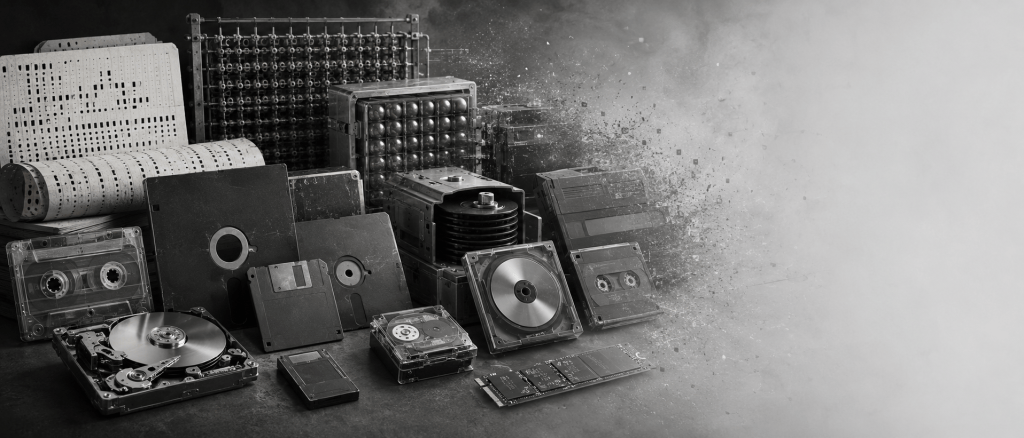
Part of Sophie’s Cabinet of Computing Curiosities.
Storage is where physics, economics and human optimism collide. The result is a glorious assortment of cards, tapes, platters, bubbles, pits, trapped electrons and formats whose designers were quite sure someone would still own the reader in thirty years.
Some images in this article
are generated by

EU AI Act Regulation 2024/1689
Preface: what counts as “remembering”?
This encyclopaedia classifies media by the physical mechanism that records information, by access method, by mutability and by the hardware ecosystem needed to recover it. It deliberately includes a few technologies normally called memory rather than storage, such as magnetic core, plated-wire and bubble memory, because they illuminate the same central problem: how to make a bit survive after the immediate computation has moved on.
Capacities are slippery historical facts. A medium may have raw, unformatted and formatted capacities; vendors may count decimal bytes while operating systems display binary quantities; file systems consume overhead; and old machines often supported several incompatible geometries on physically similar media. Where one number would mislead, this book gives a range or names the format explicitly.
The final chapters distinguish media longevity from information longevity. A perfectly preserved platter is useless without a working drive, controller, interface, firmware, encoding knowledge and file-system implementation. The BBC Domesday Project is the canonical British warning that ‘the disc still exists’ and ‘the information remains conveniently readable’ are very different statements. [12–14]
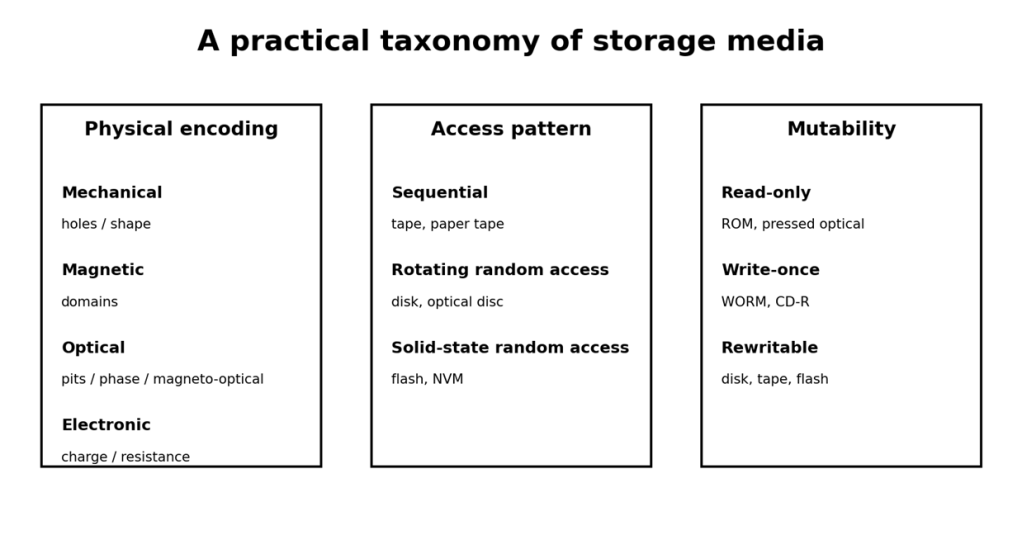
Figure 1. Four overlapping ways to classify a storage medium.
Contents
Foundations: cards, tape and physical holes
The 80-column punched card
IBM’s 80-column rectangular-hole card appeared in 1928 and became the dominant punched-card format in commercial data processing. Each column usually represented one character position through combinations of punches in twelve row positions. The card was not merely an input convenience: boxes and cabinets of cards were databases, source-code repositories, job-control streams and, occasionally, confetti after someone dropped a deck without sequence numbers. [1]
- Nominal information content: commonly 80 character positions, though the encoding did not make a card equivalent to a modern 80-byte sector in every use.
- Access: manual or electromechanical sequential decks; sorting and collating could turn a physical deck into a surprisingly capable data-processing system.
- Strength: visible, inspectable encoding and excellent compatibility when the machinery exists.
- Weakness: extremely poor volumetric density, mechanical handling, and the alarming ease with which gravity can perform an unscheduled database shuffle.
- Blank cards are now valued at a premium, being ideal shopping-list size, without having to wriggle your writing around the (fairly chunky) rectangular holes. (Check the prices on ebay. I should dig out my boxes of unused cards and sell them).
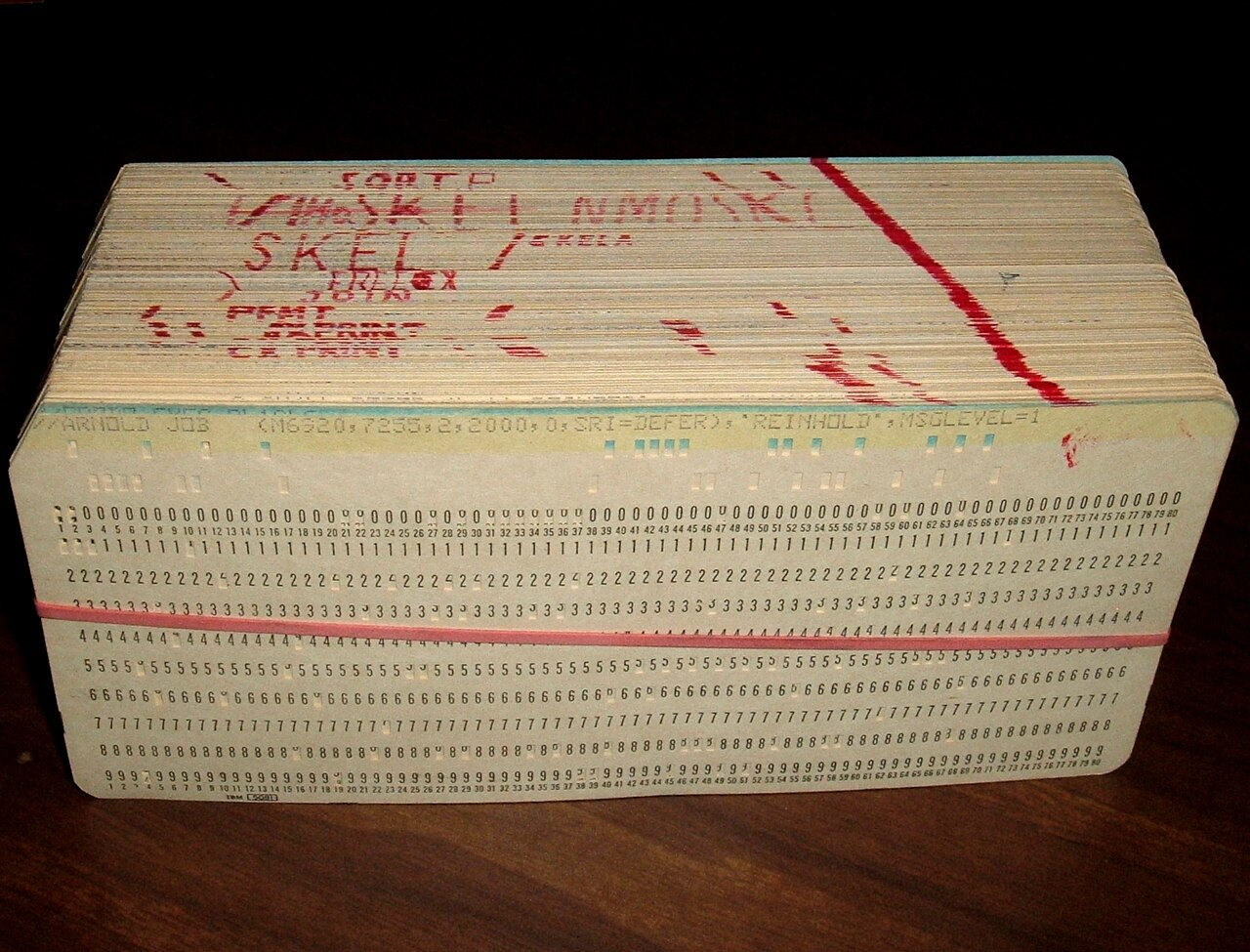
licensed under the Creative Commons Attribution-Share Alike 3.0 Unported license
Photograph: Arnold Reinhold
Punched paper tape
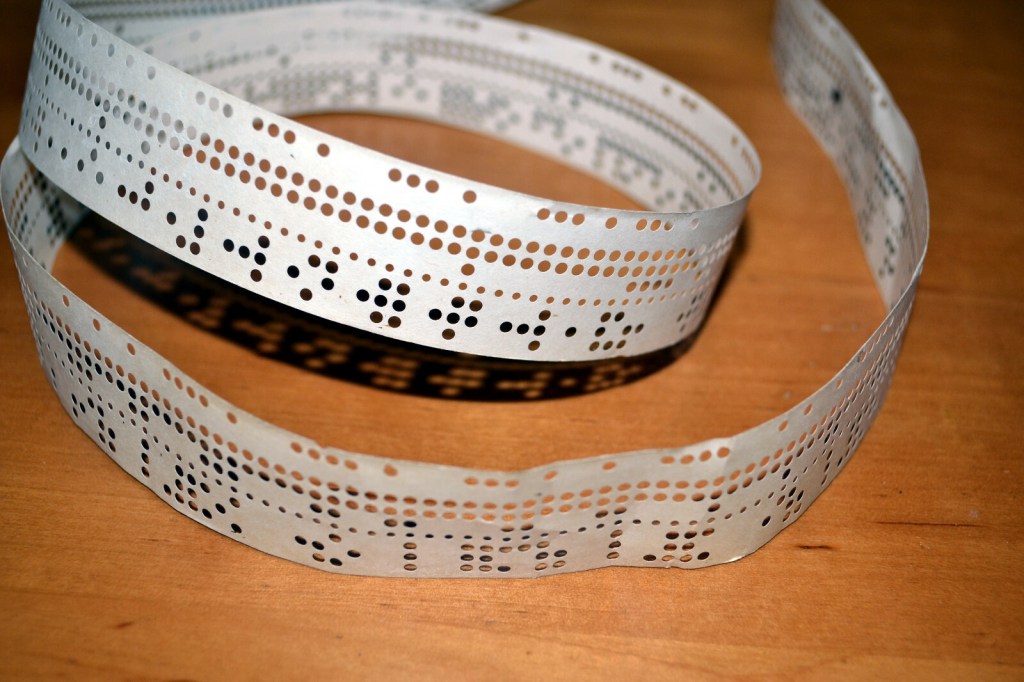
Paper tape carried rows of holes along a continuous strip. Five-, six-, seven- and eight-level schemes appeared in telegraphy and computing, usually with a smaller sprocket or feed hole used for transport. Compared with cards it was compact and naturally sequential. It could also be spliced with sticky-tape and edited with a punch, which made ‘patching software’ disconcertingly literal.
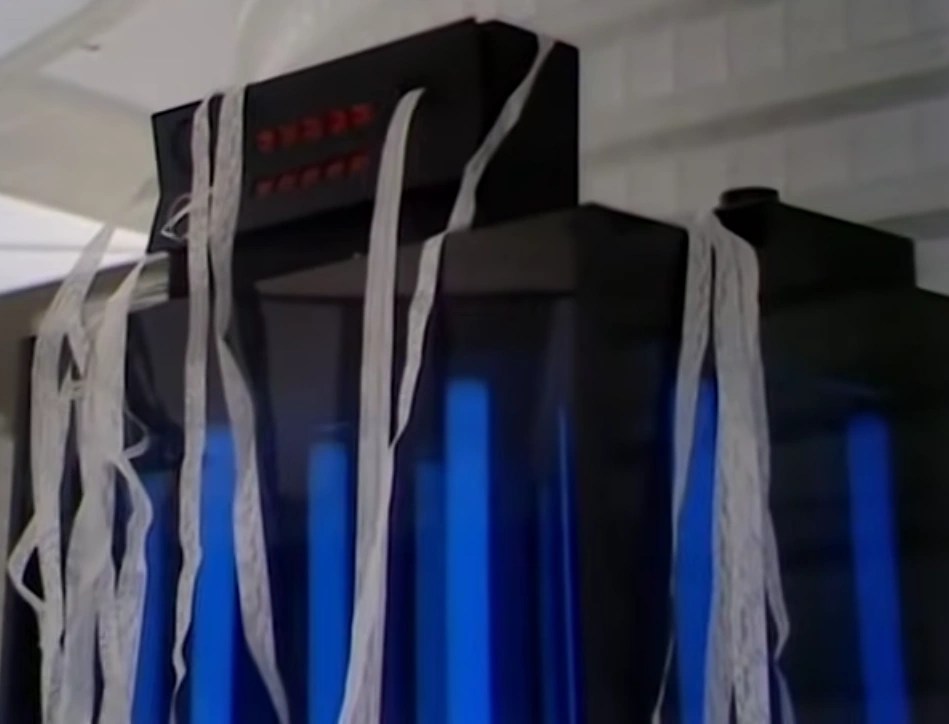
| Storage lesson: physical readability is not semantic readability A future archivist can see every hole in a paper tape and still not know the character code, parity convention, byte framing, record structure or application format. Preserving the marks is only the first layer of preserving meaning. |
Magnetic memory before the disk
Drums and delay-line ancestry
Magnetic drums stored tracks around a rotating cylinder, with fixed heads arranged along its length. They were random-access only in the rotational sense: the desired word had to come around under the head. Earlier acoustic delay lines stored pulses circulating through mercury or other media and were volatile, sequential and timing-sensitive. Both helped establish a principle that would recur for decades: capacity, latency and physical motion are inseparable engineering trade-offs.
Magnetic-core memory
Core memory used tiny ferrite rings threaded by wires. Magnetising a core one way or the other represented a bit. Mature core arrays were non-volatile, robust and for years served as main memory rather than mass storage. MIT’s Whirlwind became the first computer to use magnetic-core memory in 1953; widespread semiconductor DRAM eventually displaced it. [3]
Core-rope memory: software woven into hardware
Apollo’s guidance computers famously used core-rope memory for fixed software. Wires passed through or around magnetic cores to encode bits. This was effectively read-only storage manufactured as a physical wiring pattern: exceptionally robust, but with a software deployment cycle that made today’s ‘restart required’ messages look positively merciful.
Voyager: plated wire, not ordinary core
Voyager is often casually described as using magnetic core memory. NASA’s own documentation is more precise: each Computer Command System has 4096 18-bit words of non-volatile plated-wire memory. Across the six onboard computers, NASA describes about 32K words in total. Plated-wire memory stores magnetic state in a thin ferromagnetic coating on wire and can provide non-destructive readout. [5–6]
Magnetic bubble memory
Bubble memory stores small cylindrical magnetic domains, or ‘bubbles’, in a thin magnetic film and moves them around patterned tracks. It promised non-volatility, no moving mechanical parts and respectable density. Intel introduced a 4 Mbit bubble-memory array in 1979, but faster and cheaper semiconductor memories squeezed the technology into niches before largely eliminating it. [23]
| Technology | Typical role | Access | Non-volatile? | Why it mattered |
| Magnetic drum | Main / working store | Rotational | Yes | Early high-speed magnetic storage |
| Core memory | Main memory | Random | Yes | Robust, reliable ferrite-bit arrays |
| Core rope | Fixed program store | Random-ish | Yes | Very robust read-only code |
| Plated wire | Spacecraft memory | Random | Yes | NDRO capability and reliability |
| Bubble memory | Solid-state-like store | Serial within tracks | Yes | No mechanical transport |
Home-computer tape and the Sinclair Microdrive
Compact Cassette: an audio format pressed into computing service
The Philips Compact Cassette became the cheap mass-storage peripheral of the 1970s and early 1980s home computer because households already owned recorders. Data was converted to audio-frequency tones, recorded as ordinary analogue audio, then decoded back into bits. The 1975 Kansas City Standard attempted interoperability at 300 bit/s using frequency-shift keying; many home-computer vendors nevertheless invented incompatible schemes. [24]
- Sinclair ZX Spectrum: compact cassette, commonly around 1500 bit/s for standard ROM routines, although some games came with a small initial Turbo Loader program which sacrificed robustness for speed loading the remainder.
- BBC Micro: 300 and 1200 baud modes, with the faster CUTS-derived mode widely used.
- Commodore: proprietary encoding and the dedicated Datasette transport.
- Advantages: very low media cost, easy duplication and audio equipment everywhere.
- Disadvantages: sequential access, head alignment, tape stretch, noise, drop-outs and the exquisite suspense of discovering an error after several minutes of loading, with the doom-laden
R Tape loading error

Sinclair Microdrive
The ZX Microdrive, launched in 1983, used a tiny endless loop of magnetic tape inside a cartridge rather than a disk. The ZX Interface 1 could control multiple drives. A formatted cartridge was guaranteed at roughly 85 KB on the Spectrum, with exact capacity depending on bad sectors and mechanical tolerances; the QL used a different format and somewhat higher capacity. [25]
The Microdrive Refuses to Die: QL, One Per Desk and Thor
The Sinclair Microdrive might have been expected to disappear with the Sinclair QL. Instead, like several questionable storage technologies, it enjoyed an afterlife.
The ICL One Per Desk (OPD), launched in 1984 and developed jointly by ICL, Sinclair Research and British Telecom, was substantially derived from QL technology. It retained the Motorola 68008 processor, Sinclair’s ZX8301 and ZX8302 custom logic, 128 KB of RAM and, importantly, two built-in Microdrive units. ICL re-engineered the Microdrive implementation in an attempt to improve reliability. The machine added an integrated telephone, modem and speech facilities, turning the QL-derived architecture into what would now be called a communications workstation. British Telecom sold its version as the Merlin Tonto, while Telecom Australia marketed the Computerphone.
Thus the Microdrive briefly escaped the home-computer market and found itself, somewhat uncomfortably, wearing a suit and sitting on an executive’s desk.
The CST Thor family belongs to the same evolutionary branch, but with an important distinction. Cambridge Systems Technology’s original Thor was built around QL hardware and developed QDOS into its own Argos operating system, making it one of the first serious QL-compatible computers. Unlike the QL and OPD, however, the Thor normally used 3½-inch floppy discs rather than built-in Microdrives. Later machines developed the architecture still further.
Microdrive compatibility was not entirely abandoned. A surviving CST technical note dated 16 December 1986, entitled Using external Microdrives with the THOR, describes the modifications necessary to attach them. Because the Thor motherboard omitted the original QL’s internal Microdrive mechanisms, the Microdrive-selection chain had to be electrically bridged across the missing positions before external drives could be recognised.
The sequence therefore makes a pleasing miniature history of storage engineering:
Sinclair QL → built-in Microdrives
ICL One Per Desk / Merlin Tonto → re-engineered built-in Microdrives
CST Thor → floppy discs by default, Microdrives possible for compatibility
In only a few years the Microdrive went from ingenious low-cost substitute for a floppy drive, to inherited compatibility technology, to something requiring a technical note explaining how to put it back.
That is generally how storage technologies die: not with a clean break, but with adaptors, compatibility modes and somebody insisting they still have important files on one.
| Taxonomic troublemaker A Microdrive looks like a miniature cartridge disk system, behaves like a fast sequential tape loop, and was marketed as disk-like mass storage. Classification by physical medium therefore puts it under magnetic tape; classification by user experience puts it beside removable disks. Both views are useful. |
Floppy disks: the removable magnetic empire
IBM developed the floppy in the late 1960s and began selling drives in 1971. The original 8-inch medium was created primarily for loading microcode and updates, then evolved into a general removable storage medium. IBM notes that the original floppy could replace thousands of punched cards. [2]
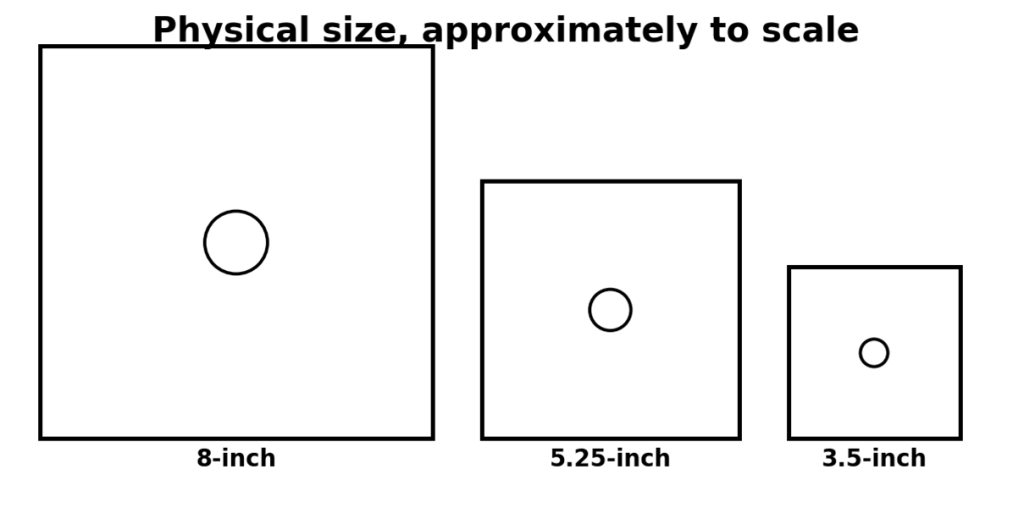
Figure 3. The familiar shrinking sequence: 8-inch, 5.25-inch and 3.5-inch media.
The 8-inch family
There was never one universal ‘8-inch capacity’. IBM’s first read-only-style application held roughly 80 KB. The IBM 3740-style single-sided single-density format used 77 tracks, 26 sectors per track and 128-byte sectors, giving about 250 KB of user-addressable sector data; double-density and double-sided variants increased that substantially. The important taxonomy point is that physical diameter, magnetic coercivity, track density, sector geometry and encoding all matter. The physical size allowed jokers, including my dad, to attach 8” floppies to the side of a filing cabinet using a magnet carefully placed centrally away from the data. Those who tried to emulate this but without appreciating the careful placement requirement often regretted it.
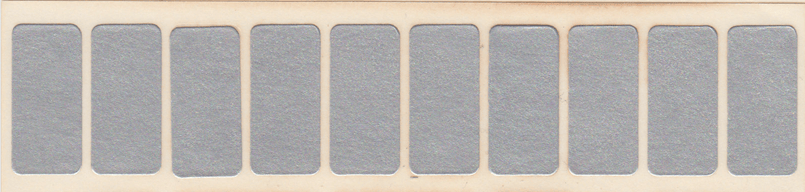
Those old enough will recognise the term “stickies”. These were rectangular stickers which you placed to cover the “notch” in the disk envelope, acting as a write-protect indicator to the hardware.
The 5.25-inch minifloppy becomes personal
Shugart Associates’ 5.25-inch format helped make floppy storage practical for desktop micros. Early systems used many incompatible capacities. On the IBM PC lineage, commonly encountered DOS geometries included 160 KB and 180 KB single-sided formats, 320 KB and 360 KB double-sided double-density, and later 1.2 MB high-density media. Apple, Commodore, Atari and others had their own encoding and geometry choices, so identical-looking disks were emphatically not guaranteed to be interchangeable.
The 3.5-inch rigid shell, sliding shutter, floppy medium
The 3.5-inch disk wrapped the flexible magnetic disk in a rigid shell with a spring-loaded shutter. The best-known PC formats were 720 KB double-density and 1.44 MB high-density. The latter is correctly a 1.44 MB-class formatted disk in conventional usage, not 1.44 Mb: bits and bytes remain different even when marketing departments are tired.
During the era when the 5.25″ and 3.5″ disks co-existed, it was not uncommon to hear the former called “floppies” and the latter “stiffies”. This terminology is not recommended in the modern work environment, but knowledge of this old technology may be incomplete without understanding this slang.
The 2.88 MB ED; a standard with an afterlife
Extra-density 3.5-inch drives and 2.88 MB media never became mainstream PC storage, but the capacity survived in firmware and standards. The El Torito bootable optical-disc specification defined floppy-emulation types including 1.2 MB, 1.44 MB and 2.88 MB. Briefly, the bootable CD/DVD/Blu-Ray disks work by the firmware finding the Boot Record Volume Descriptor, locating the Boot Catalog, and that identifies the boot image; in floppy-emulation mode that image can then be presented as an emulated 1.2, 1.44 or 2.88 MB floppy. Microsoft’s boot-media API still explicitly lists a 2.88 MB floppy emulation type. Thus a largely unsuccessful physical format achieved a surprisingly durable ghost life inside bootable CD/DVD-era conventions. [10–11]
Write protection: PS/2 wrinkle
A 3.5-inch diskette’s own write-protect slider is a physical medium feature sensed by the drive. Separately, some IBM PC/PS/2-era systems and later IBM setup utilities offered a firmware/security setting usually described as ‘Diskette Write Protect’, under which all diskettes were treated as write-protected. That is a policy control implemented above the medium itself, and should not be confused with immutable hardware write inhibition. Treat software- or firmware-enforced write protection as a security control whose strength depends on where it is enforced, not as a property of the magnetic coating. [26]
| An important distinction Physical tab: the drive senses the medium and inhibits writing. Firmware or setup policy: the computer chooses to treat the drive/media as read-only. The latter can be excellent accident prevention, but it is not logically equivalent to a mechanically enforced write-inhibit signal. Software detection of write-protection: the software reads the write-protect switch, and the write protection is implemented in software only. Caveat emptor! |
| Physical format | Representative PC-era formatted capacities | Notes |
| 8-inch | ~80 KB; ~250 KB SSSD; higher DD/DS variants | Many incompatible geometries; capacity depends heavily on format |
| 5.25-inch | 160/180/320/360 KB; 1.2 MB | IBM PC lineage only; other micros differed |
| 3.5-inch | 720 KB; 1.44 MB; 2.88 MB | DD, HD and ED families; rigid shell |
Beyond the floppy: removable magnetic disks
Iomega Zip
Iomega’s Zip drive arrived in the mid-1990s with 100 MB cartridges, later 250 MB and 750 MB versions. The cartridges were physically compact and the head flew over a rigid magnetic surface, making the technology closer to a removable hard disk than to a conventional floppy. Zip became a popular bridge between tiny floppies and recordable optical media. [4]
The crowded removable-disk menagerie
| Family | Typical capacities | Medium / mechanism | Fate |
| Iomega Jaz | 1 GB, 2 GB | Removable hard-disk cartridge | Fast, relatively costly; displaced by cheaper HDD/optical/flash |
| SyQuest | Tens to hundreds of MB; later GB-class | Removable rigid platter cartridge | Strong desktop publishing / workstation niche |
| Imation SuperDisk (LS-120/LS-240) | 120 MB / 240 MB | High-capacity floppy-like magnetic disk | Some backward compatibility with 1.44 MB disks |
| Floptical | ~21 MB | Magnetic disk with optical servo tracking | Interesting hybrid, limited adoption |
| Bernoulli Box | Various tens/hundreds of MB | Flexible disk held near head by aerodynamic effect | Specialised removable storage |
These systems illustrate a recurring extinction pattern: a proprietary removable format succeeds when its capacity leap is large enough, then becomes vulnerable when a more universal medium catches up. USB flash storage eventually combined high capacity, no moving parts, tiny readers and a standard interface. Proprietary cartridges suddenly had to justify both their price and their continued existence, an unpleasant meeting to attend.
Optical storage: LaserDisc, WORM, MO, CD, DVD and Blu-ray
Videodisc and LV-ROM
LaserDisc was primarily an analogue video medium, but optical videodisc systems also carried computer-addressable data. The BBC Domesday Project used two specially mastered 12-inch LaserVision discs in the LV-ROM format, each combining still images, video, audio and roughly 648 MB of digital data. Playback depended on a specialised Philips VP415 player, BBC Master hardware and associated software. [12]
The BBC Domesday Project: preserved disc, endangered system
Created for the 900th anniversary of the 1086 Domesday Book, the 1986 project became one of digital preservation’s favourite cautionary tales. Within roughly fifteen years the specialist playback ecosystem had become obsolete enough that contemporary reports described the material as effectively unreadable. The CAMiLEON project later recovered data and demonstrated emulation, showing that preservation sometimes means reproducing behaviour, not merely copying bytes. [13–14]
| Domesday lesson The medieval parchment remained readable for centuries because the human interface was eyes plus language. The 1986 digital system needed a working disc, laserdisc player, SCSI interface, computer, operating environment, application and knowledge of the format. Every dependency is another component that time may remove. |
Pressed optical discs
CD-ROM, DVD-ROM and BD-ROM store factory-mastered data as optical structures read by a laser. Their capacities rose from roughly 650–700 MB for common CD-ROMs to 4.7 GB per layer for DVD and 25 GB per layer for conventional Blu-ray. Multiple layers and sides expanded capacity further. The technology is genuinely read-only at the user level because the information is formed during manufacture.
Recordable and rewritable optical media
CD-R and DVD±R are write-once media using a recordable layer altered by the writing laser. CD-RW, DVD-RW/+RW and related formats use reversible phase-change materials. DVD-RAM, often supplied in cartridges in early versions, behaved more like a sector-addressable rewritable disk and found archival and professional niches.
WORM and magneto-optical
WORM means Write Once, Read Many. Professional optical WORM formats existed well beyond CD-R: ECMA and ISO standardised 130 mm cartridges at capacities including 1.3 GB, 2.6 GB and 5.2 GB, with later standards climbing much higher. Magneto-optical (MO) media combined laser heating with magnetic field switching, enabling rewritable optical cartridges. Standards such as ECMA-184 and ECMA-322 formalised interchange properties. [27–29]
Note that it is still important to read back the written content to check it. Otherwise, without realising, WORM can become WORN – Write Once, Read Never.
| Optical family | Write behaviour | Typical strengths | Typical weaknesses |
| Pressed ROM | Read-only | Mass distribution, stable mastering | No user write capability |
| Recordable dye / write-once | Write once | Cheap distribution/archive | Ageing, write quality, drive compatibility |
| Phase-change rewritable | Rewritable | Convenient removable storage | Finite rewrite life; ecosystem ageing |
| WORM cartridge | Write once | Compliance / archive | Specialised drives and format obsolescence |
| Magneto-optical | Rewritable | Robust cartridges, random access | Cost, speed, specialist hardware |
| LV-ROM / videodisc hybrid | Mostly read-only | Huge multimedia content for its era | Extreme dependency on specialised playback |
Magnetic tape: from open reels to LTO-10
Open-reel computer tape
UNIVAC’s Uniservo and IBM’s 1950s tape systems established magnetic tape as a core digital storage technology. Tape offered enormous sequential capacity compared with cards and remained economical for backup and archive. IBM’s 726, announced in the early 1950s, stored about two million digits per reel in its early configuration. [30]
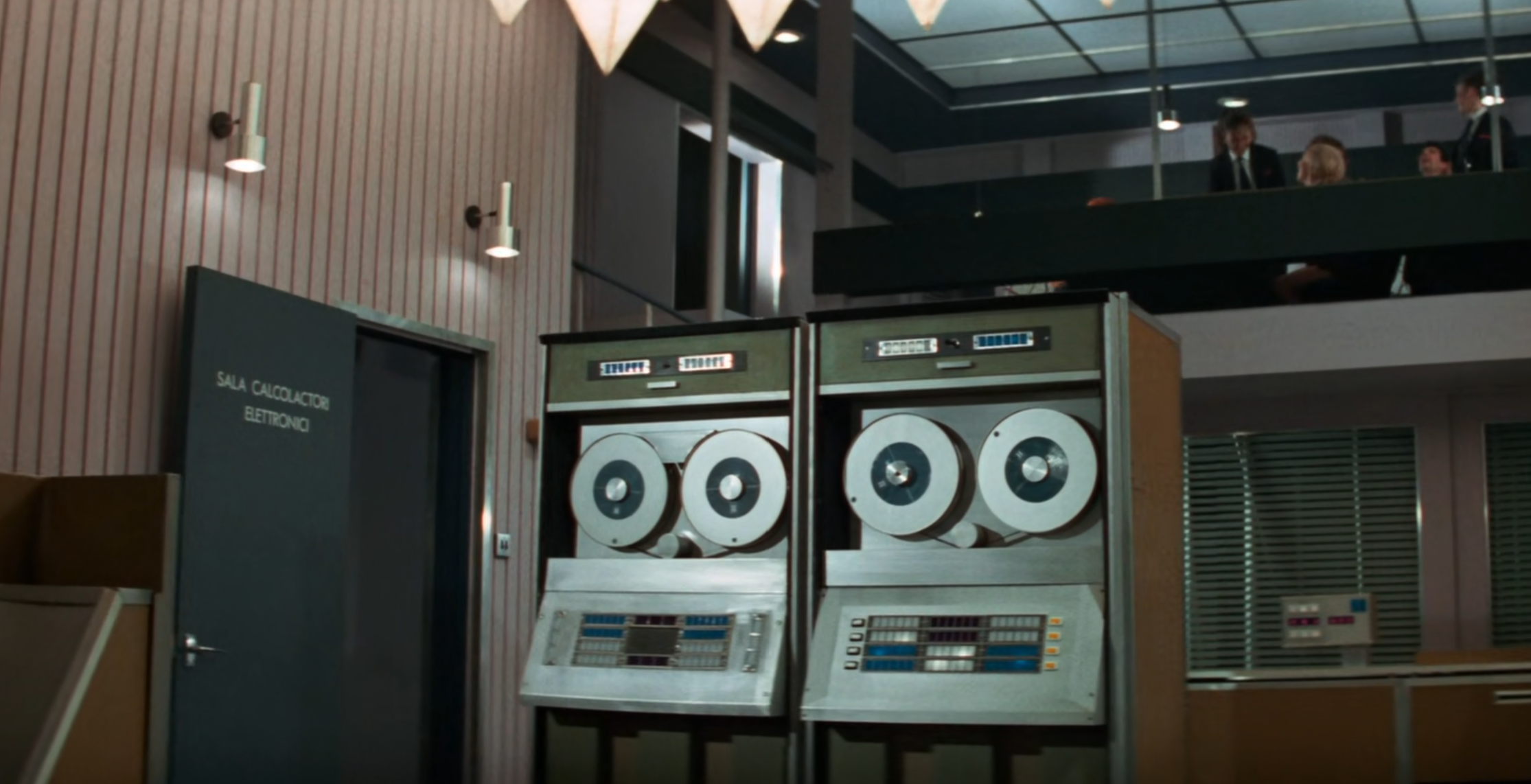
The open reel-to-reel tapes were very cinematic, and appeared in many films of the era – indeed, even much later, because they look like a computer is supposed to look.
Here’s a frame from the 1969 film The Italian Job. And a concealed joke that few people seem to have noticed: the city they chose for their heist was Turin. The traffic control computer, which they subverted, was referred to as “The Turin Computer”. Given Turin/Turing and the plot’s computer connection, I refuse to believe this was entirely accidental, although I have yet to find documentary proof that the filmmakers intended the joke. Impressively subtle too for a 1969 pun.
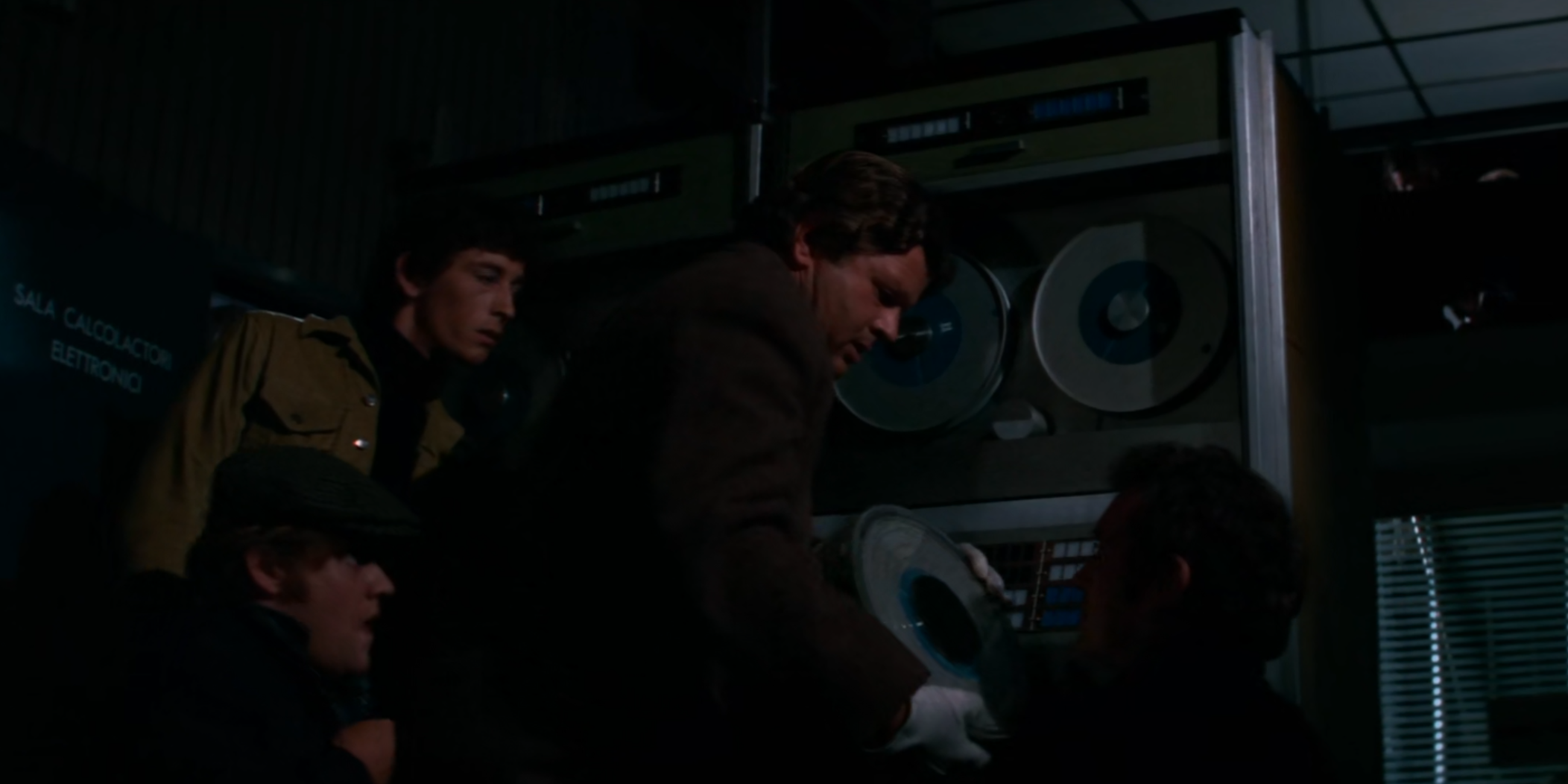
The Italian Job, 1969
Cartridge and cassette lineages
| Family | Era / use | Representative characteristics |
| 9-track open reel | 1960s–1980s mainframe | Half-inch tape; sequential; multiple densities and encodings |
| QIC | 1980s–1990s PCs/workstations | Quarter-inch cartridge; many QIC standards |
| DAT / DDS | 1990s–2000s backup | Helical-scan derived from Digital Audio Tape; compact cartridges |
| 8 mm / Exabyte | 1980s–2000s backup | Helical-scan; high capacity for its size |
| DLT / Super DLT | 1990s–2000s enterprise | Linear serpentine; robust enterprise backup |
| AIT | Late 1990s onward niche | Sony helical-scan data tape |
| LTO Ultrium | 2000–present enterprise | Open multi-vendor ecosystem; LTFS, encryption, WORM in later generations |
LTO: tape refuses to die because physics and economics remain inconvenient
LTO has become the dominant open-format enterprise tape family. As of August 2026, LTO-10 specifications cover 30 TB and 40 TB native cartridges, with 400 MB/s native transfer rates quoted by the LTO programme. WORM support, hardware encryption and LTFS remain important enterprise features. Unlike older generations with broader backward-read compatibility, LTO-10 drives read and write LTO-10 media only, so migration planning remains essential. [17–18]
| Why tape survives Tape is sequential and mechanically elaborate, yet remains extraordinarily competitive for cold data because media cost, shelf power consumption and offline isolation can beat continuously spinning disks or powered flash. The access-time penalty matters much less when the workload is “write once, retrieve next year, maybe”. |
Hard disks: from RAMAC to HAMR
RAMAC: random access arrives
IBM’s 305 RAMAC, introduced in 1956, used the 350 disk storage unit with fifty magnetically coated platters. IBM describes it as storing five million characters and, more importantly, delivering random access in seconds rather than the sequential search behaviour of cards and tape. Modern retellings often call this ‘about 5 MB’; historically, ‘characters’ is the safer original unit. [3–4]
Removable disk packs
1960s and 1970s disk systems frequently placed several rigid platters in removable packs. Operators could physically swap whole disk assemblies, but drives were large, alignment-sensitive and expensive. The pack became a transportable data volume, rather like an enormous cartridge whose internal surfaces nobody sensible touched.
Winchester and sealed drives
The Winchester lineage moved disks and heads into sealed assemblies, reducing contamination and improving density. By 1980 Seagate’s ST-506 put a 5 MB hard disk into the footprint of a 5.25-inch floppy drive, helping bring fixed disks into microcomputers. [23]
Why “Winchester”?
The name has nothing to do with the English city. IBM’s 3340 disc project was originally specified with two 30 MB units, giving rise to the nickname “30-30”. Project manager Kenneth Haughton reportedly quipped that a “30-30” ought to be a Winchester, after the .30-30 Winchester rifle cartridge. The nickname escaped from the project and “Winchester disc” became a generic term for sealed hard-disc technology during the 1970s and 1980s, often applied even to disks that technically were not Winchesters. [36]
Interfaces and form factors
- ST-506/ST-412 and controllers: early PC hard-disk interfaces exposed low-level drive signalling.
- ESDI: higher-performance evolution used in workstations and servers.
- SCSI: command-oriented interface that supported disks, tapes, scanners and much else.
- IDE/ATA and later SATA: controller intelligence moved onto the drive; consumer standardisation accelerated.
- SAS: enterprise serial successor in the SCSI family.
- 3.5-inch and 2.5-inch form factors became dominant, while enterprise designs increasingly optimise for density, vibration control and power.
Modern capacity: HAMR and multi-tibibyte reality
Conventional magnetic recording eventually runs into thermal-stability limits as bits shrink. Heat-assisted magnetic recording (HAMR) briefly heats a tiny region so it can be written at higher coercivity, allowing higher areal density. Seagate’s current Exos/Mozaic family lists a 32 TB model and Seagate has shipped samples of 36 TB Exos M drives, using ten 3.6 TB platters, while ramping capacity points up to 32 TB into volume production. A marketed 36 TB disk contains 36,000,000,000,000 bytes, which is about 32.74 TiB. [19]
Solid-state storage: flash, SSD and NVMe
From ROM and EEPROM to flash
Semiconductor non-volatile memories eliminate mechanical motion. EPROM stored charge and was erased with ultraviolet light; EEPROM allowed electrical erasure; flash memory made block erase practical enough for high-density storage. NAND flash became the basis of memory cards, USB sticks and SSDs because its cell organisation favours density and bulk storage.
How NAND trades endurance for density
| Cell type | Bits per cell | General trade-off |
| SLC | 1 | Highest endurance and performance; lowest density / highest cost |
| MLC | 2 | Greater density; reduced voltage margins and endurance |
| TLC | 3 | Mainstream SSD compromise |
| QLC | 4 | Very high density; lower endurance, often best for read-heavy workloads |
| PLC (research/roadmaps) | 5 | Even tighter margins; not yet a universal mainstream tier |
Modern SSD controllers hide a remarkable amount of housekeeping: wear levelling, bad-block management, error correction, over-provisioning, garbage collection, logical-to-physical mapping and power-loss handling. The nominal medium is solid-state, but the useful product is really a storage computer wrapped around arrays of NAND.
This, incidentally, is why wiping SSD drives with high assurance is difficult especially when the contents are of high value – such as cryptographic keys; shredding and smelting is really the only way to be sure.

SATA, PCIe and NVMe
Early SSDs often presented themselves through familiar SATA interfaces. PCI Express removed much of that bottleneck, while NVMe defined a protocol designed for highly parallel low-latency non-volatile storage. Form factors now include M.2 for clients and U.2/U.3 or EDSFF variants such as E3.S and E3.L for enterprise systems.
The 245.76 TB single-drive milestone
Kioxia’s LC9 E3.L enterprise NVMe SSD is specified at 245.76 TB using 3D QLC NAND and PCIe 5.0. In May 2026, Kioxia and Dell demonstrated forty such drives in a 2U server for 9.8 PB of raw flash capacity. The eye-catching number is decimal; 245.76 TB corresponds to about 223.52 TiB. [20–21]
| SSD retention is not immortality Flash stores charge in structures whose state can drift with time, temperature and wear. An unplugged SSD is not automatically a better archival object than tape or optical media. Controllers, firmware, error-correction state and cell wear all matter. |
Binary prefixes versus decimal prefixes
Computers naturally make powers of two convenient. For decades, programmers informally used kilobyte, megabyte and gigabyte for 1024, 1,048,576 and 1,073,741,824 bytes, while SI prefixes formally mean powers of ten. The IEC resolved the ambiguity in 1998 by standardising binary prefixes: kibi (Ki), mebi (Mi), gibi (Gi), tebi (Ti), and so on. NIST publishes the same distinction. [7]
| Prefix | Decimal SI | Binary IEC |
| kilo / kibi | 1 kB = 1,000 B | 1 KiB = 1,024 B |
| mega / mebi | 1 MB = 1,000,000 B | 1 MiB = 1,048,576 B |
| giga / gibi | 1 GB = 1,000,000,000 B | 1 GiB = 1,073,741,824 B |
| tera / tebi | 1 TB = 1,000,000,000,000 B | 1 TiB = 1,099,511,627,776 B |
| peta / pebi | 1 PB = 10^15 B | 1 PiB = 2^50 B |
The problem is that, as the data sizes increase, so does the discrepancy between the two measures;
| Prefix | Decimal | Binary equivalent | Binary is larger by |
|---|---|---|---|
| k / Ki | 10³ | 2¹⁰ | 2.40% |
| M / Mi | 10⁶ | 2²⁰ | 4.86% |
| G / Gi | 10⁹ | 2³⁰ | 7.37% |
| T / Ti | 10¹² | 2⁴⁰ | 9.95% |
| P / Pi | 10¹⁵ | 2⁵⁰ | 12.59% |
| E / Ei | 10¹⁸ | 2⁶⁰ | 15.29% |
| Z / Zi | 10²¹ | 2⁷⁰ | 18.06% |
| Y / Yi | 10²⁴ | 2⁸⁰ | 20.89% |
Drive manufacturers conventionally advertise decimal capacity. Seagate explicitly describes the industry convention: 1 TB means 1,000,000,000,000 bytes, while systems that display the same byte count in binary units produce about 0.909 TiB. [8] This is mathematically legitimate, though it has the delightful commercial side-effect that the number printed on the box is larger. The honest cure is not to accuse either base of theft; it is to label the units correctly.
| The Sophie rule for capacities Use kB/MB/GB/TB for powers of ten and KiB/MiB/GiB/TiB for powers of two whenever precision matters. When quoting a historical format whose conventional name is “1.44 MB floppy”, keep the conventional name, then explain the exact byte count if relevant. NB: The SI prefix kilo is uniquely lowercase: k = 10³. The IEC forms all use uppercase, so KiB. No possibility of confusion here, eh? |
Moore’s Law, storage growth and the great capacity escalation
Moore’s Law is about integrated circuits, not hard disks
Gordon Moore’s 1965 observation concerned the economically practical number of components on integrated circuits. His original projection was roughly annual doubling for a decade; in 1975 he revised the pace to about every two years. It became an industry planning heuristic, not a law of nature. [9]
Storage had its own exponential eras
Disk areal density, flash-layer counts and tape track density have all enjoyed periods of astonishing compound improvement, but with different mechanisms and rates. Calling every capacity curve ‘Moore’s Law’ hides the engineering. Hard-disk historians sometimes use ‘Kryder’s Law’ informally for rapid areal-density growth; even that is better treated as an observed technological trend than as a fixed rule.
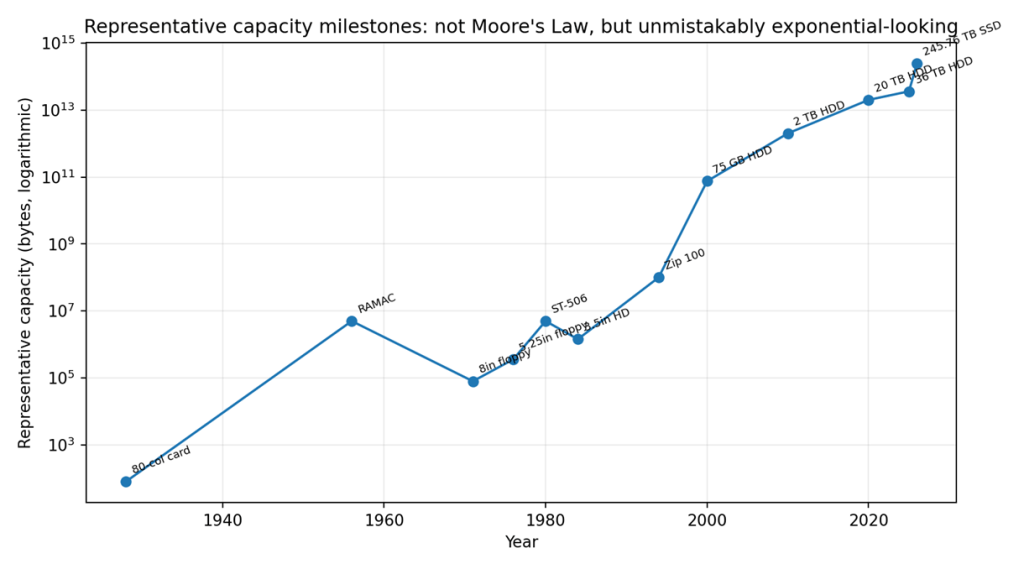
Figure 5. Representative milestones on a logarithmic scale. Different technologies and definitions are intentionally mixed to show orders of magnitude, not a single law.
The long view is nevertheless startling. A single 80-column card held on the order of tens of characters; RAMAC stored five million characters; an early 8-inch floppy held tens to hundreds of kilobytes; Zip reached 100 MB; consumer and enterprise disks moved through gigabytes into tens of terabytes; and enterprise SSDs now exceed two hundred terabytes per device. The curve is not smooth, and each medium follows its own S-curve, but the human appetite for more bits has so far been gratifyingly resistant to treatment.
Preservation, failure and the Domesday lesson
The seven layers of “can we still read it?”
| Layer | What must survive |
| 1. Physical medium | Magnetic coating, dye, pits, glass, silicon cells or punched substrate |
| 2. Mechanical reader | Spindle, capstan, head positioning, optics, cartridge mechanism |
| 3. Electrical interface | Controller, bus, cabling, signalling levels |
| 4. Encoding | Flux transitions, modulation, sector structure, error correction |
| 5. File system / container | FAT, UDF, proprietary volume structures, tape format |
| 6. Application / runtime | Software able to interpret the stored objects |
| 7. Semantics | Documentation and knowledge explaining what the data means |
Digital preservation therefore favours migration, emulation, multiple independent copies, checksums/fixity, documented formats and periodic verification. A medium with a claimed century-long shelf life is not a century-long archive if the only compatible reader went out of production after twelve years.
Failure modes by family
| Medium | Characteristic risks |
| Paper/card | Moisture, mould, tearing, physical order loss; but visually inspectable |
| Magnetic tape | Binder degradation, print-through, stretch, demagnetisation, drive scarcity |
| Floppy / magnetic disk | Head crashes, media shedding, mould, coercivity/flux decay, alignment |
| Optical | Dye/reflective-layer degradation, delamination, scratches, drive/format obsolescence |
| HDD | Mechanical seizure, head failure, electronics, firmware, bearing/lubricant ageing |
| Flash / SSD | Charge leakage, controller failure, worn cells, firmware/translation-layer dependency |
Write-once is not the same as immutable
WORM can be a physical property, a media-format rule, a drive feature or a higher-level policy. Compliance architectures must identify which layer actually prevents alteration. A software flag that says ‘read only’ is useful against accidents; a physically write-once optical layer provides a different threat model; an LTO WORM cartridge adds drive/media enforcement designed for enterprise retention. Similar words can conceal very different security properties.
A Cautionary Tale About Naming Filesystems After People
Most filesystem names are reassuringly impersonal: FAT, NTFS, ext2/ext3/ext4, XFS, ZFS, UFS, JFS, Btrfs and so forth. This turns out to have an unexpected advantage: acronyms are unlikely to commit serious crimes.
ReiserFS is the conspicuous exception.
Developed principally by Hans Reiser and his company Namesys, ReiserFS became an important Linux filesystem, particularly around the turn of the millennium. Its use of balanced-tree structures made it notably effective at handling large numbers of small files, and it became sufficiently established that several Linux distributions offered or adopted it as a filesystem option.
Unfortunately, the name subsequently acquired an association having nothing whatsoever to do with filesystem design.
Hans Reiser’s estranged wife, Nina Reiser, disappeared in September 2006. In April 2008 he was convicted of her murder. After the conviction he disclosed the location of her body and led police to it; his sentence was subsequently reduced from the first-degree-murder term to 15 years to life following a plea to second-degree murder.
None of this changes the technical merits or historical importance of ReiserFS. Software does not acquire the moral character of its author, and a filesystem remains a collection of data structures and algorithms regardless of what its creator later does. It does, however, illustrate one seldom-considered disadvantage of eponymous technology: the reputation attached to a person’s name can change rather more dramatically than the specification attached to an acronym.
ReiserFS itself eventually faded for quite ordinary technical reasons: changing requirements, diminishing maintenance and the rise of alternatives such as ext4, XFS and Btrfs. Its presence in modern Linux has now disappeared; ReiserFS was removed from the mainline Linux kernel in Linux 6.13, released in January 2025. This reduces it principally to a historically significant filesystem and a data-recovery concern for older systems.
There is therefore a modest naming lesson buried amongst the inodes:
Calling a filesystem after what it does may lack romance, but “Extended File System” is considerably less likely to become awkward in retrospect.
The future: denser conventional media, and stranger things…
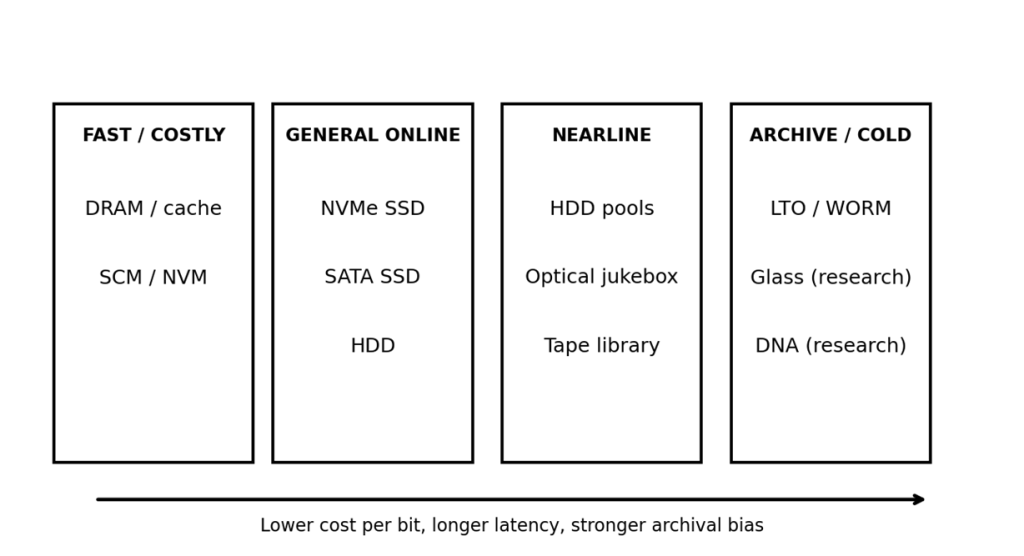
Figure 6. Storage remains a hierarchy. No single medium wins every workload.
Hard disks: more heat, more bits
HAMR is now commercial rather than speculative, and manufacturers continue to target higher platter densities. The foreseeable hard-disk future is therefore evolutionary: improved media, heads, servo systems, coding and mechanical packaging rather than the immediate disappearance of spinning disks.
Flash: vertical scaling and more states per cell
3D NAND grows capacity by stacking cell layers and by encoding more voltage states per cell. The engineering struggle is no longer merely lithographic shrink: layer count, channel etching, cell interference, error correction, endurance and packaging all matter. Enterprise designs increasingly optimise density for AI data lakes and read-heavy workloads rather than pretending every SSD should have the same endurance profile.
Storage-class and spintronic memories
MRAM, phase-change memory (PCM), resistive RAM (ReRAM) and related technologies blur the boundary between memory and storage by combining non-volatility with much lower latency than disks or flash. IBM’s racetrack-memory research stores magnetic domains in nanowires and moves the domains rather than a physical disk, aiming at high density, endurance and low energy. It remains research rather than an SSD replacement on shop shelves. [31–32]
Glass for deep archive
Microsoft’s Project Silica uses ultrafast lasers to encode data as microscopic structures within glass. In February 2026 Microsoft Research reported further work using borosilicate glass and techniques aimed at 10,000-year preservation. The attraction is a passive, durable archival medium; the challenge is writing speed, reader infrastructure and moving from impressive experiments to an economically complete ecosystem. [33]
In terms of long-term comprehensibility, lessons can be learned from the Voyager Golden Disc covers which contain what are intended to be language-independent and culturally-independent instructions for recovering the data contained upon the discs.
DNA data storage
DNA offers extraordinary theoretical density and long-lived molecular storage. Practical systems encode digital data into nucleotide sequences, synthesise DNA, preserve it, then sequence and decode it. The DNA Data Storage Alliance’s 2025 technology review focuses on the metrics and remaining barriers to commercial readiness. For now, synthesis cost, throughput, random access and standardisation keep DNA firmly in the archive-of-the-future category rather than next year’s laptop. [34]
Quantum storage: important, but not a replacement for your NAS
Quantum memories store quantum states for quantum networking and computation. They are fascinating and technologically important, but qubits are not a practical bulk substitute for ordinary archival bits: quantum states are fragile, specialised and governed by entirely different requirements. Future ‘storage’ will therefore remain plural. The best medium for a hot database, an immutable audit archive and a century-scale cultural record is unlikely to be the same thing.
Master taxonomy and comparison tables
| Medium | Physics | Access | Mutability | Representative capacity | Era | 2026 status |
| Punched card | Mechanical holes | Deck / batch | RW by replacement | ~80 chars/card | 1930s–1970s | Extinct operationally; highly readable physically |
| Paper tape | Mechanical holes | Sequential | Write once-ish | Varies | 1940s–1980s | Legacy / specialist (still some active use cases) |
| Core / plated wire | Magnetic state | Random | Rewritable / fixed variants | Words to KB-scale | 1950s–1970s | Historic / space legacy |
| Compact Cassette | Magnetic tape | Sequential | Rewritable | Tens–hundreds KB typical micro use | 1970s–1980s | Retro |
| Sinclair Microdrive | Endless magnetic tape | Loop sequential | Rewritable | ~85 KB+ | 1983–late 1980s | Retro / collector |
| Floppy | Flexible magnetic disk | Random | Rewritable | ~80 KB to 2.88 MB+ | 1970s–2000s | Legacy |
| Zip / removable rigid disk | Magnetic disk | Random | Rewritable | 100–750 MB (Zip) | 1990s–2000s | Legacy |
| WORM optical | Optical | Random-ish | Write once | MB to multi-GB+ | 1980s–2000s | Archive legacy |
| MO | Magneto-optical | Random | Rewritable | Hundreds MB to multi-GB | 1980s–2000s | Niche legacy |
| CD/DVD/BD | Optical | Random | ROM/R/RW variants | 0.65 GB to 100+ GB depending format | 1980s–present | Distribution / archive / legacy |
| Digital tape / LTO | Magnetic tape | Sequential | RW/WORM | Up to 40 TB native LTO-10 | 1950s–present | Major enterprise archive |
| HDD | Rigid magnetic disk | Random | Rewritable | Up to 36 TB current cited model | 1956–present | Mass online storage |
| NAND SSD | Electronic charge | Random | Rewritable | Up to 245.76 TB cited enterprise SSD | 1990s–present | Dominant performance storage |
| Glass (research) | Laser-written structure | Archive access | Write-once concept | Research-scale TB plates | Research | Potential deep archive |
| DNA (research) | Molecular sequence | Batch/random-access research | Typically write-once workflows | Extremely high theoretical density | Research | Potential deep archive |
Choosing a medium by requirement
| Requirement | Usually favours | Watch for |
| Lowest latency / high IOPS | NVMe SSD | Endurance, cost per TB, thermal limits |
| Bulk online capacity | HDD / dense SSD depending workload | Power, failure domains, rebuild time |
| Offline cyber-resilient archive | LTO / WORM | Migration cadence, reader generation |
| Cheap removable interchange | USB flash / SD / network transfer | Counterfeit media, controller quality, no inherent archival guarantee |
| Long-term cultural preservation | Multiple copies + migration + open formats | No single magic medium; preserve metadata and readers/emulators |
| Immutable records | Physical or cryptographically enforced WORM architecture | Distinguish policy from physical enforcement |
Conclusions: Nothing Remembers Forever
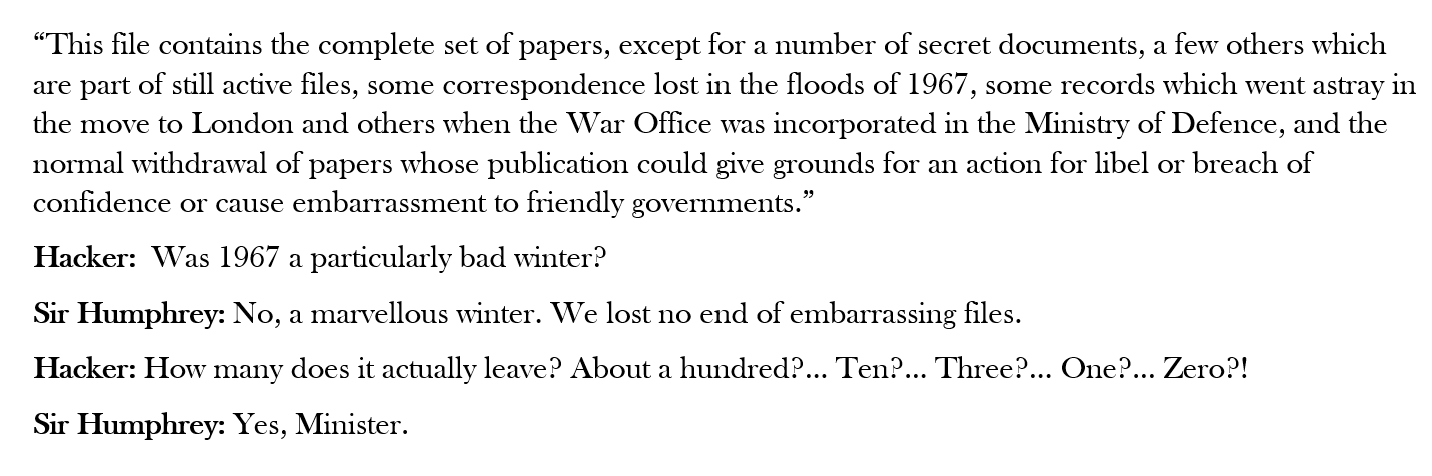
Storage history is a graveyard of technologies once advertised as permanent. Punched cards, paper tape, magnetic drums, cassettes, Microdrives, floppies, optical discs, tapes and hard drives have all had their moment of apparent inevitability. The recurring lesson is simple: the medium is temporary; the information is what matters.
Capacity has grown absurdly quickly, from bytes and kilobytes to terabytes and beyond, while the physical devices have generally become smaller, faster and less visible. Yet the old problems remain stubbornly familiar: media decay, obsolete interfaces, unreadable formats, lost documentation and the occasional perfectly intact disc for which nobody can find a working drive. Or an EBCDIC to ASCII conversion table.
The future will bring denser flash, larger magnetic storage, new optical techniques, molecular storage and probably several technologies currently confined to laboratories and optimistic press releases. Some will transform computing. Others will become excellent exhibits.
The safest prediction is therefore not that any particular medium will last forever, but that successful preservation requires copying, checking and migrating data before its storage technology becomes archaeology. Digital Rot is real; avoiding it involves processes and people not just technology.
And perhaps that is the real history of storage: humanity has become extraordinarily good at remembering enormous quantities of information, while remaining remarkably inventive about finding new ways to lose it.
| A final preservation rule If the data matters, the medium is not the archive. The archive is the media, multiple copies, integrity checks, documentation, format knowledge, working or emulated readers, migration plans and somebody still being paid to care. |

Glossary
Areal density: Bits stored per unit surface area.
CAV / CLV: Constant angular velocity / constant linear velocity, common rotational strategies.
ECC: Error-correcting code used to detect and repair bit errors.
HAMR: Heat-assisted magnetic recording.
IOPS: Input/output operations per second.
LTFS: Linear Tape File System, presenting supported tape content through a file-system-like interface.
MO: Magneto-optical.
NAND: Flash-memory architecture optimised for dense non-volatile storage.
NVMe: Non-Volatile Memory Express, a protocol designed for PCIe-attached non-volatile storage.
WORM: Write Once, Read Many.
Write amplification: Physical flash writes generated per unit of logical host data written.
References and further reading
Web sources were checked 13 August 2026. Product capacities describe cited current products or specifications, not a guarantee that every model is generally available in every market.
[1] Computer History Museum, “Punched Cards & Paper Tape”. https://www.computerhistory.org/revolution/memory-storage/8/326
[2] IBM, “Floppy disk storage”. https://www.ibm.com/history/floppy-disk
[3] Computer History Museum, “Memory & Storage: Timeline of Computer History”. https://www.computerhistory.org/timeline/memory-storage/
[4] Computer History Museum / storage timeline entries for Iomega Zip and RAMAC. https://www.computerhistory.org/timeline/memory-storage/
[5] NASA Science, Voyager Frequently Asked Questions. https://science.nasa.gov/mission/voyager/frequently-asked-questions/
[6] NASA Technical Reports Server, Reynolds & Tweed, “Plated wire memory subsystem”, NASA-CR-130093 (1972). https://ntrs.nasa.gov/citations/19720025544
[7] NIST, “Prefixes for binary multiples”. https://www.physics.nist.gov/cuu/Units/binary.html
[8] Seagate, “Why does my hard drive report less capacity than indicated on the drive’s label?”. https://www.seagate.com/support/kb/why-does-my-hard-drive-report-less-capacity-than-indicated-on-the-drives-label-172191en/
[9] Intel, Moore’s Law press kit / historical overview. https://newsroom.intel.com/press-kit/moores-law
[10] Microsoft Learn, EmulationType enumeration, including 2.88 MB floppy emulation. https://learn.microsoft.com/en-us/windows/win32/api/imapi2fs/ne-imapi2fs-emulationtype
[11] MIT OpenCourseWare, “El Torito Bootable CD-ROM Format Specification”. https://ocw.mit.edu/courses/6-828-operating-system-engineering-fall-2012/external-resources/el-torito-bootable-cd-rom-format-specification_0cf3a06d-5c60-4f69-b2be-75ec3e04dc3e/
[12] Domesday86, “Introduction to the BBC Domesday project”. https://www.domesday86.com/?page_id=2140
[13] Ariadne, “Domesday Redux: The Rescue of the BBC Domesday Project Videodiscs” (2003). https://www.ariadne.ac.uk/issue/36/tna/
[14] UK Parliament, Digital preservation briefing, Domesday example. https://www.parliament.uk/mps-lords-and-offices/offices/bicameral/post1/work-programme/physical-sciences/digital-preservation/
[15] Ecma International, ECMA-184, 130 mm rewritable magneto-optical disk cartridge. https://ecma-international.org/publications-and-standards/standards/ecma-184/
[16] Ecma International, ECMA-280, 130 mm WORM optical disk cartridge, 5.2 GB. https://ecma-international.org/publications-and-standards/standards/ecma-280/
[17] LTO Program, LTO-10 technology. https://www.lto.org/lto-10/
[18] LTO Program, generation compatibility. https://www.lto.org/lto-generation-compatibility/
[19] Seagate, Exos X / Mozaic 36 TB product information. https://www.seagate.com/support/internal-hard-drives/enterprise-hard-drives/x-mozaic/
[20] Kioxia, LC9 Series E3.L 245.76 TB enterprise NVMe SSD. https://europe.kioxia.com/en-europe/business/ssd/enterprise-ssd/lc9-e3l.html
[21] Kioxia, 9.8 PB in a 2U Dell server using forty 245.76 TB LC9 SSDs (2026). https://americas.kioxia.com/en-us/business/news/2026/ssd-20260514-2.html
[22] Solidigm, D5-P5336 122.88 TB SSD. https://www.solidigm.com/products/data-center/d5/p5336.html
[23] Computer History Museum, storage timeline entries for bubble memory and Seagate ST-506. https://www.computerhistory.org/timeline/memory-storage/
[24] BYTE Audio Cassette Standards Symposium / Kansas City Standard historical transcription. https://network47.org/kansas-city-standard-kansas-city-standard-md/
[25] ZX Microdrive historical summary; capacity cross-checked against contemporary manual references. https://en.wikipedia.org/wiki/ZX_Microdrive
[26] IBM PC documentation: system security option “Diskette Write Protect” treats diskettes as write-protected; physical media tabs remain a separate mechanism. https://manualsdump.com/en/manuals/ibm-8128model-8185model-8189model-8195model-8186model-8187model-8191model-8188model-8197model-8193model/120531/27
[27] Ecma International, ECMA-322, 130 mm magneto-optical disk cartridge. https://ecma-international.org/publications-and-standards/standards/ecma-322/
[28] ISO/IEC 18093:1999, 130 mm WORM optical disk cartridge, 5.2 GB. https://www.iso.org/standard/31688.html
[29] IBM, “Optical storage”. https://www.ibm.com/history/optical-storage
[30] Computer History Museum, “Tape unit developed for data storage” (1951/1952). https://www.computerhistory.org/storageengine/tape-unit-developed-for-data-storage/
[31] IBM, “Magnetic spin and the future of data storage” (racetrack memory). https://www.ibm.com/history/racetrack-memory
[32] IBM Research, “Magnetic Racetrack Memory: From Physics to the Cusp of Applications within a Decade”, Proceedings of the IEEE (2020). https://research.ibm.com/publications/magnetic-racetrack-memory-from-physics-to-the-cusp-of-applications-within-a-decade
[33] Microsoft Research, Project Silica news and 2026 glass-storage advance. https://www.microsoft.com/en-us/research/project/project-silica/news-and-awards/
[34] DNA Data Storage Alliance, publications including “DNA Data Storage Technology Review 2025”. https://dnastoragealliance.org/publications/
[35] Library of Congress, Designing Storage Architectures for Digital Collections 2025 meeting materials. https://www.digitalpreservation.gov/meetings/storage25.html
[36] 1973: “Winchester” pioneers key HDD technology
https://www.computerhistory.org/storageengine/winchester-pioneers-key-hdd-technology/

